A7 Plus – OPERATOR'S MANUAL
• To adjust brake activation sensitivity, touch the relevant icon buttons
or .
value setting range: 1 to 5.
• To adjust display brightness, touch the relevant icon buttons or
.
value setting range: 1 to 10.
• L9 SIDE DELIVERY models only: touch the corresponding icon button
to activate or deactivate automatic dentist’s board movement when the
"Reset position" programme of the dental chair is recalled.
• To confirm selected settings, simply quit this sub-menu by touching
icon button .
5.1.1.2.10. DATA AND TIME ADJUSTMENT
This setting is the same for all operators.
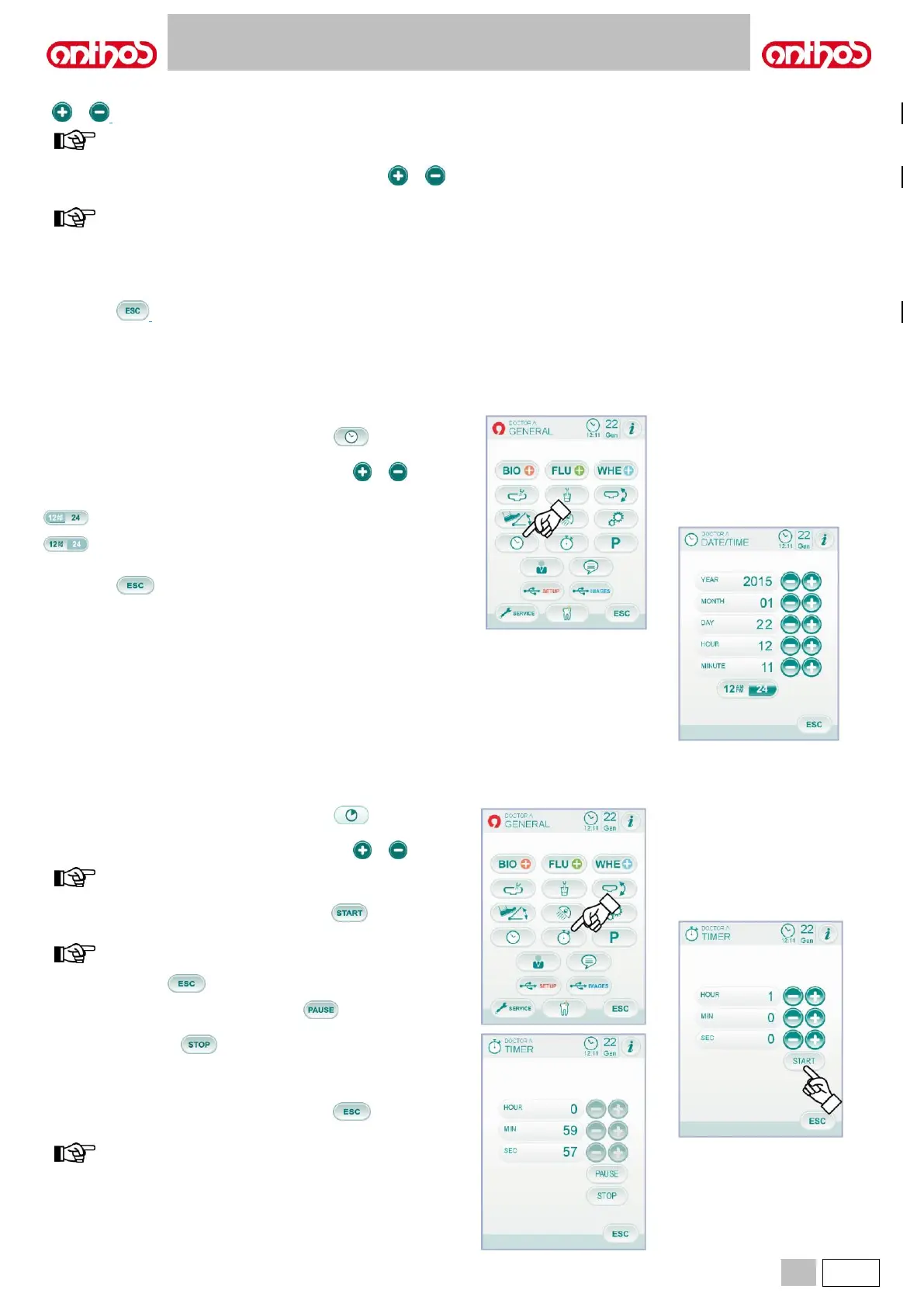
From the MAIN SETTINGS menu, touch icon button to access the
TIME AND DATE SETTING sub-menu.
• To edit displayed data, touch the relevant icon buttons or .
• To select time displaying mode, simply press the relevant icon button:
• To confirm selected settings, simply quit this sub-menu by touching
icon button .
From the MAIN SETTINGS menu, touch icon button to access the
STOPWATCH sub-menu.
• To edit displayed data, touch the relevant icon buttons or .
time setting range: 00:00:00 to 10:59:59.
• Once time has been set, touch icon button to start the
countdown.
now you can quit this menu by touching
icon button without stopping the countdown.
• To suspend the countdown touch icon button .
• To interrupt the countdown and take stopwatch back to the last set
time, touch icon button .
• Once the set time has elapsed, the dental unit will issue an intermittent
signal and the STOPWATCH menu will appear again on the TOUCH
DISPLAY.
To stop the intermittent signal, touch icon button or any other
button on the console.
the last set time is stored.



 To Next Page