A7 Plus – OPERATOR'S MANUAL
5.1.3. DENTAL CHAIR POSITION PROGRAMMING
This setting is specific for each single operator.
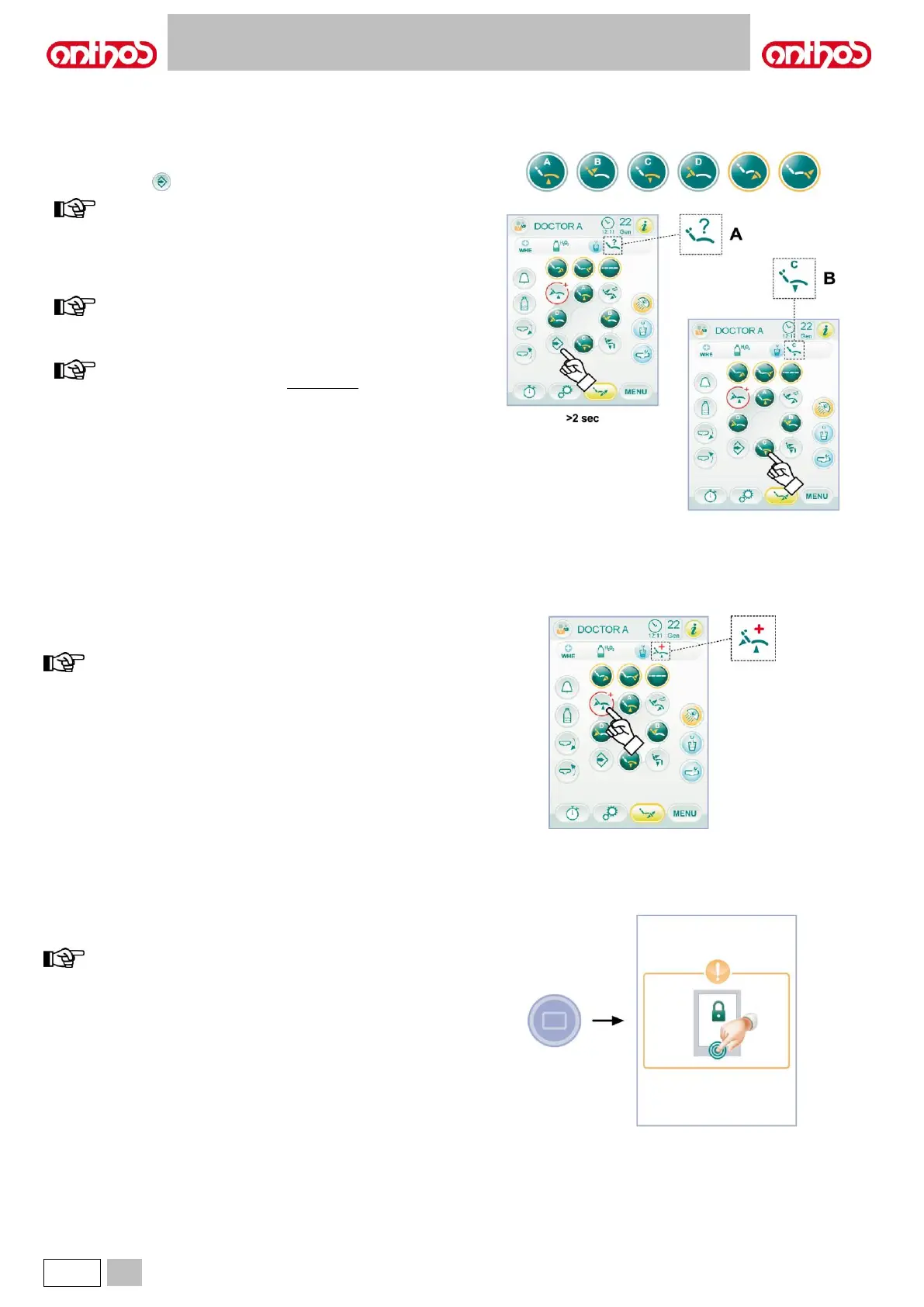
From main screen, carry out the following operations:
• Bring the dental chair into the desired position using manual movement
icon buttons.
• Press icon button for at least 2 seconds to activate saving mode.
save mode activation is signalled by a short acoustic signal
(BEEP) and by the corresponding icon ( A ) on the TOUCH
DISPLAY.
• Press icon buttons ( A ) or ( B ) or ( C ) or ( D ) to associate position to
button (ex. C).
the appearance of icon ( B ) relating to the selected
programme (ex. C) on the TOUCH DISPLAY will confirm that
it has been saved.
to recall a programmed position, shortly press the icon button
where this position had been previously saved.
This button can be used in the event of an emergency to bring the
patient into the Trendelenburg position.
the Trendelenburg position is already set and cannot be
changed.
5.1.5. TOUCH-SCREEN LOCK BUTTON
Press this button to enable/disable the TOUCH DISPLAY screen in order
to easily carry out console cleaning operations.
the locked screen mode is signalled by a clear message on the
TOUCH DISPLAY.



 To Next Page