A7 Plus – OPERATOR'S MANUAL
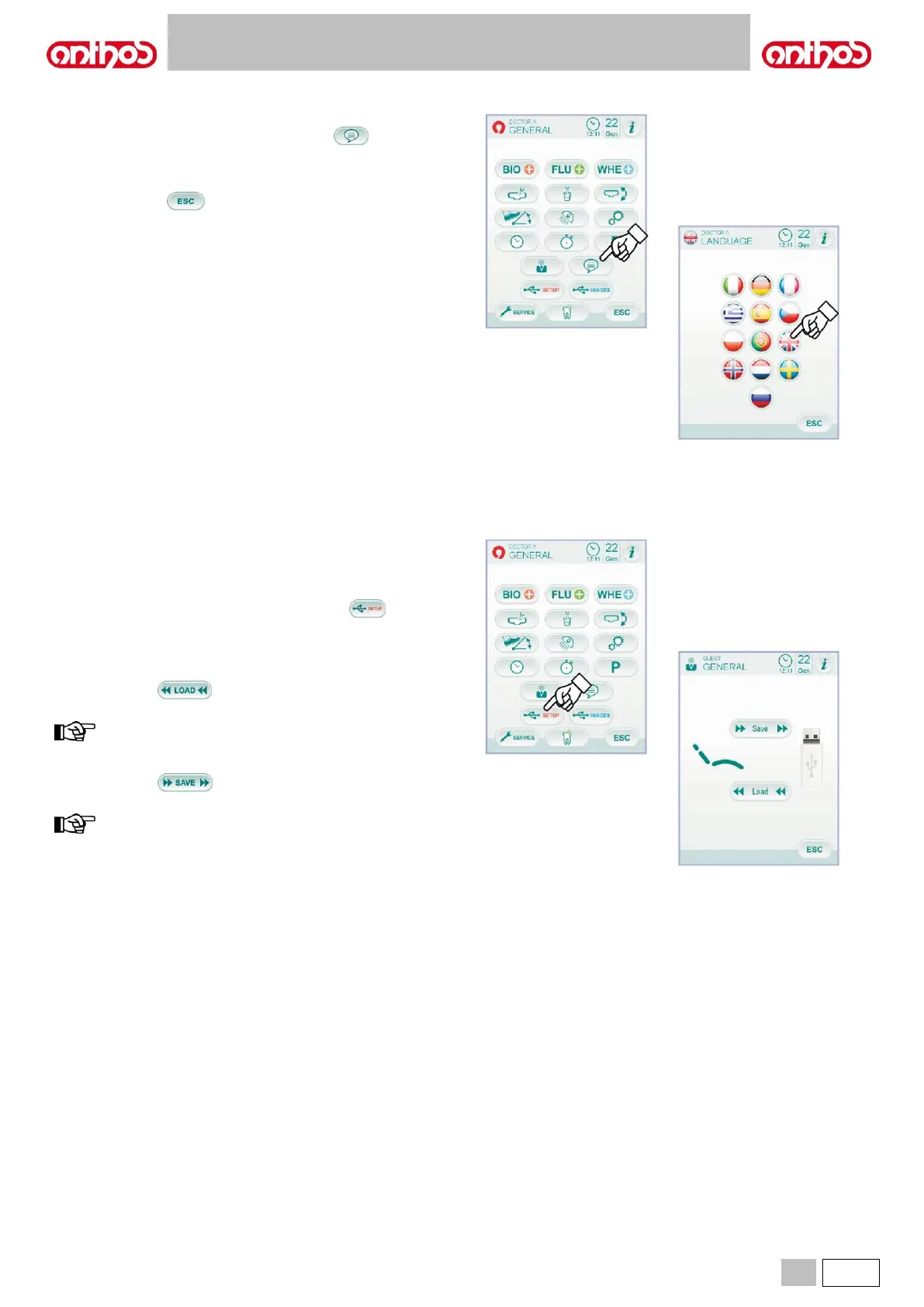
5.1.1.2.14. LANGUAGE SELECTION
This setting is the same for all operators.
From the MAIN SETTINGS menu, touch icon button to access the
LANGUAGE SELECTION sub-menu.
• To edit language, touch the icon button of the corresponding flag.
• To confirm the selected language, simply quit this sub-menu by
touching icon button .
The USB Setup screen allows managing the following activities:
• saving the current user profile on a USB flash drive,
• downloading a user profile for the "guest" operator from a USB flash
drive.
From the MAIN SETTINGS menu, touch icon button to access
the USB SETUP sub-menu.
Proceed as follows:
• Insert a USB flash drive inside the special port on the dentist's board
console (see paragraph 5.).
• Touch icon button to download a "guest" user profile from a
USB flash drive.
the "guest" profile will be automatically uploaded in the fourth
operator position by overwriting the existing profile, if any.
• Touch icon button to save the current user profile in a USB
flash drive.
the settings of all instruments on dentist's board, stopwatch,
light and foot control will be saved.



 To Next Page