A7 Plus – OPERATOR'S MANUAL
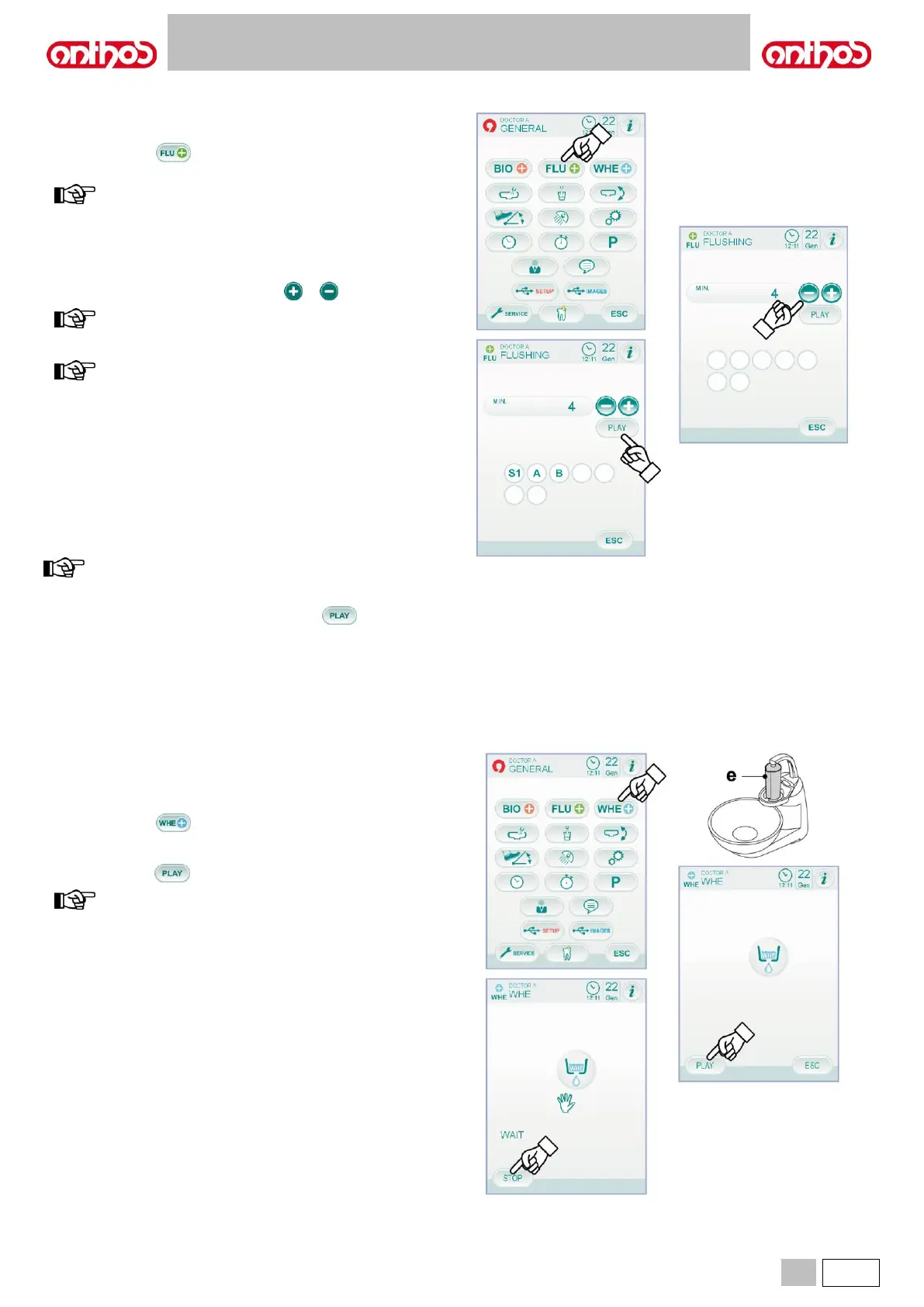
5.1.1.2.2. SETTING THE FLUSCHING CYCLE
This setting is the same for all operators.
From MAIN SETTINGS menu, carry out the following operations:
• Touch icon button to access the "FLUSHING cycle setting" sub-
menu.
this sub-menu cannot be accessed if
distilled water tank is in reserve (see paragraph 7.2.). A
message on the console display together with an acoustic
signal (BEEP) will warn about the impossibility to access the
sub-menu.
• Set flushing time by touching icon buttons or .
time setting ranges from a min. of 1 minute to a max. of 5
minutes, with intervals of 1 minute.
when working on distilled water tank, it is recommended not
to set a time above 2 minutes.
• Extract the instruments to be treated (the relevant icon will be
displayed):
S1: syringe on dentist's board.
A: instrument in position A
B: instrument in position B
C: instrument in position C
D: instrument in position D
S1: syringe on assistant's board.
F: instrument on assistant's board.
the FLUSHING cycle will not start if at least one instrument has
not been selected.
• To start the FLUSHING cycle, touch icon button (see paragraph
7.6.).
5.1.1.2.3. W.H.E. SYSTEM TANK EMPTYING
This function allows emptying the W.H.E. system water circuit (see
paragraph 7.3.) in case dental unit must stay off for several days or if the
water present inside system must be drained.
From MAIN SETTINGS menu, carry out the following operations:
• Touch icon button to access the "W.H.E. system tank emptying"
sub-menu.
• Insert the special supplied cup ( e ) under the spout.
• Touch icon button to start the emptying cycle.
emptying cycle will not start if the SANASPRAY system is
active or if the W.H.E. system is in error conditions.
• Once emptying cycle is over, dental unit can be turned off or the
system can be reset in case work has to be resumed.



 To Next Page