A7 Plus – OPERATOR'S MANUAL
5.1.1.2.8. OPERATING LIGHT SETTING
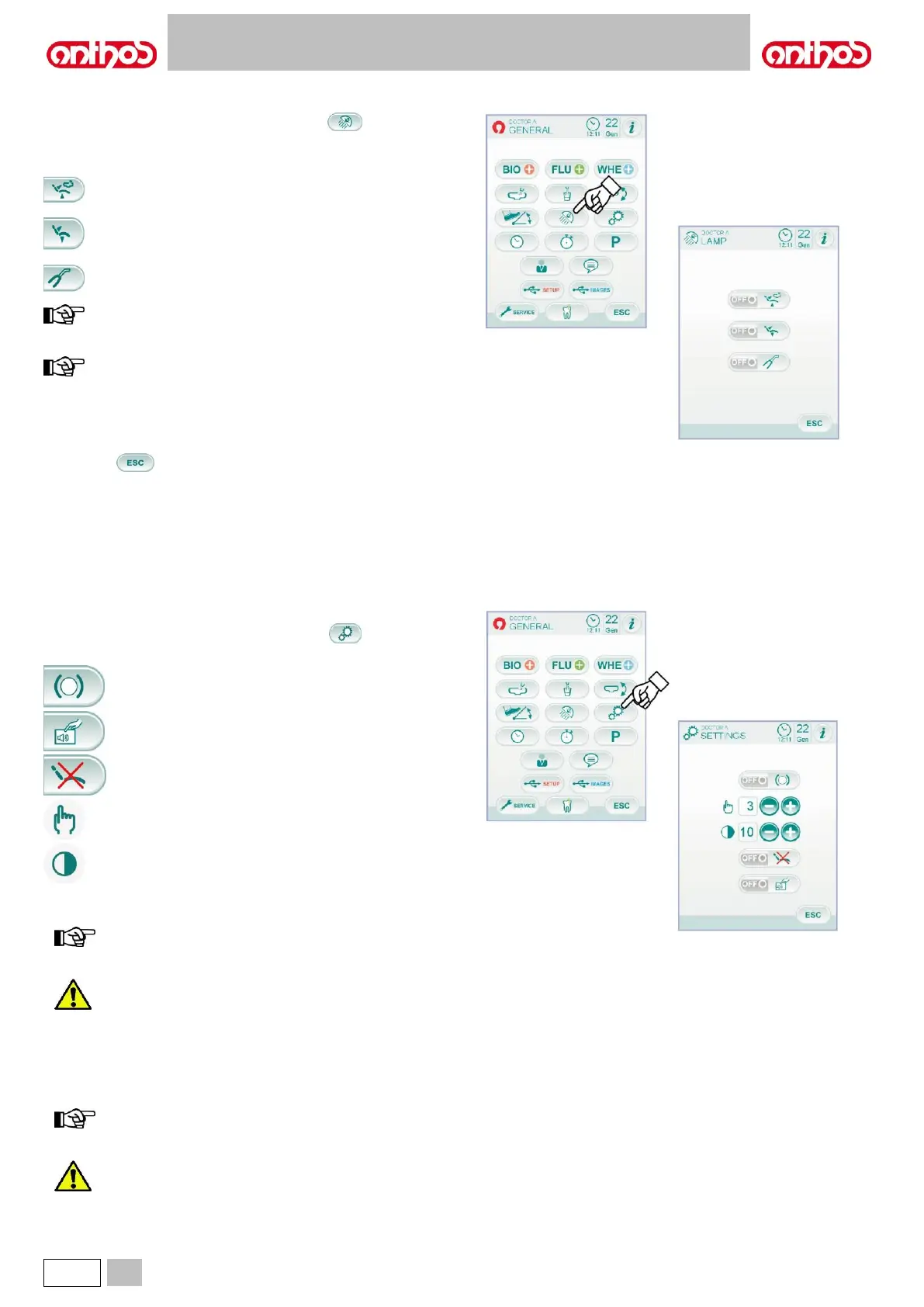
From MAIN SETTINGS menu, touch icon button to access the
OPERATING LIGHT SETTING sub-menu including the following icon
buttons:
Light turning off controller with dental chair rinsing position call.
Light turning off controller with dental chair reset position call.
Light brightness reduction controller with curing light instrument
extraction (with VENUS PLUS -L light, only).
with turning off controller enabled, simply recall any dental chair
movement to turn operating light on again.
with brightness reduction controller enabled, simply put curing
light instrument back in place to re-activate the set brightness
level.
• To select/deselect a controller, touch the corresponding icon button.
• To confirm selected settings, simply quit this sub-menu by touching
icon button .
5.1.1.2.9. OTHER SETTINGS
These settings apply to all operators.
From MAIN SETTINGS menu, touch icon button to access the
OTHER SETTINGS sub-menu including the following icon buttons:
Pantograph arm brake release activation/deactivation (A7
Plus CONTINENTAL model only).
Display touch acoustic signal activation/deactivation.
Dental chair movement activation/deactivation.
Brake sensitivity adjustment
(A7 Plus CONTINENTAL model only)..
Display brightness adjustment.
• To enable or disable pantograph arm brake release, touch the relevant
icon button.
brake unlockable status is signalled by the relevant icon on
the TOUCH DISPLAY (see paragraph 5.1.).
For enhanced safety at work, this operation shall be
compulsorily carried out if an external electric surgical
scalpel is used.
• To enable or disable an acoustic signal whenever the TOUCH
DISPLAY is touched.
• To enable or disable dental chair movements, touch the relevant icon
button.
dental chair locked status is signalled by the relevant icon on
the TOUCH DISPLAY (see paragraph 5.1.).
For enhanced safety at work, this operation shall be
compulsorily carried out if an external electric surgical
scalpel is used.



 To Next Page