A7 Plus – OPERATOR'S MANUAL
Performing the disinfection cycle.
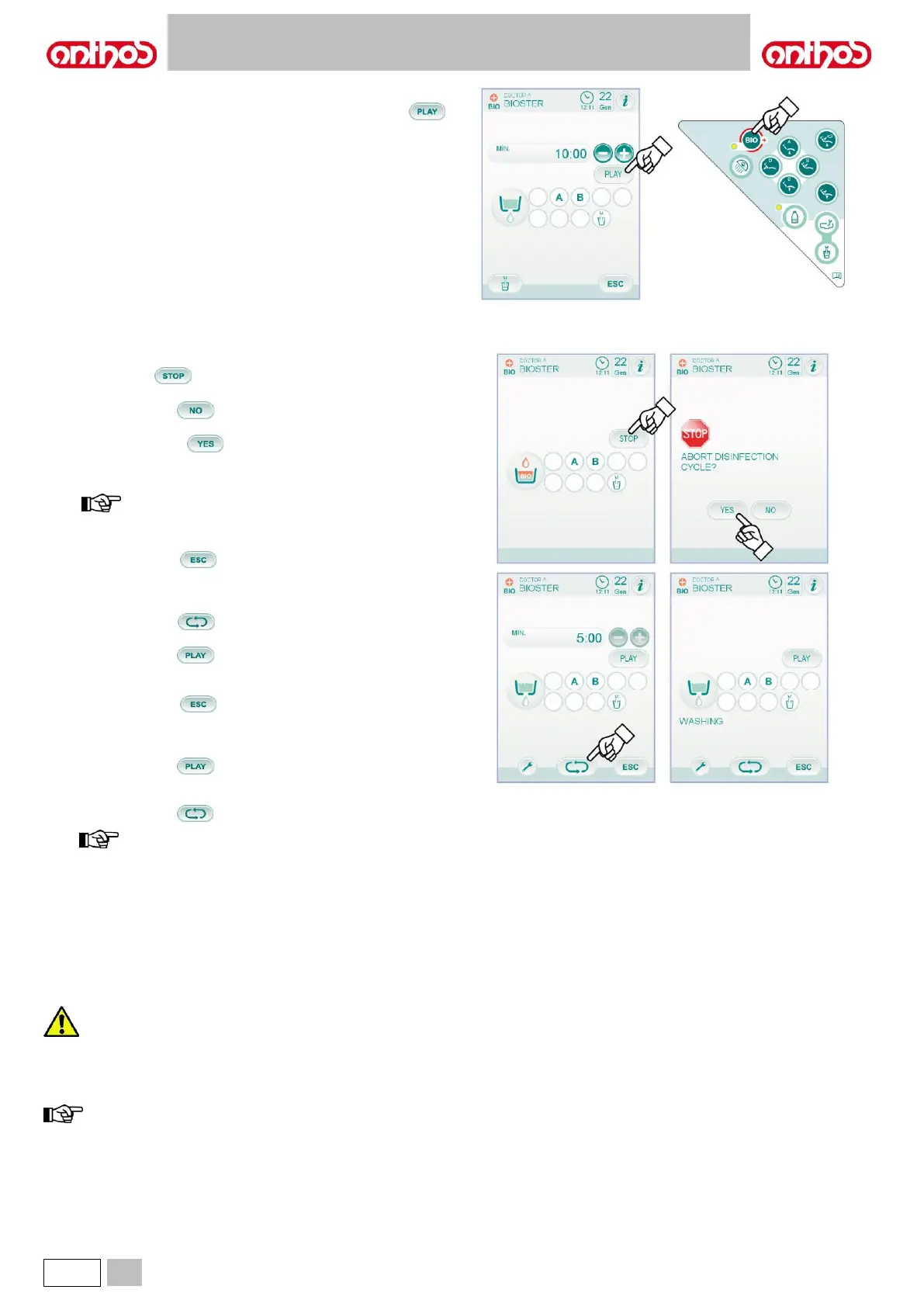
• Start the automatic disinfection cycle by touching icon button
(see paragraph 5.1.1.2.1.) on the TOUCH DISPLAY or by pressing the
BIO button on the assistant's board.
• Now the system automatically performs the following operations:
- emptying water ducts of instruments with air,
- introduction of disinfectant fluid and starting of the counting of the
previously-set residence time,
- once time has elapsed, start of a new duct emptying phase with
air,
- ducts flushing with mains water or with distilled water (only if
distilled water supply system is installed and active).
• At the end of the disinfection cycle ("Cycle end: put instruments back in
place" will appear on the TOUCH DISPLAY), simply put extracted
instruments back in place to go back to standard working conditions.
Disinfection cycle interruption.
• Touch icon button to interrupt the disinfection cycle at any time.
• A confirmation message will appear on the console display:
- touch icon button if you do not want to stop disinfection and
cycle menu will appear back on the display.
- touch icon button to interrupt the disinfection cycle; an
intermediate menu showing set time and extracted instruments will
appear on the display.
now the dental unit is in lockout mode.
• Now the following options are available:
- touch icon button to go back to time setting starting menu
where you can restart the disinfection cycle from the beginning by
editing, if necessary, the disinfectant residence time and/or adding
other instruments to be disinfected,
- touch icon button to access the "Instrument flushing" menu
to flush the ducts of the extracted instruments,
- touch icon button to resume disinfection cycle from where it
was interrupted.
• From "Instrument flushing" menu:
- touch icon button to go back to time setting starting menu
where you can restart the disinfection cycle from the beginning by
editing, if necessary, the disinfectant residence time and/or adding
other instruments to be disinfected,
- touch icon button to enable the emptying and flushing cycle
of extracted instrument ducts with mains water or distilled water (if
the S.H.S. system is installed),
- touch icon button to go back to the previous menu.
at the end of the flushing cycle, "Cycle end: put
instruments back in place" will appear on the display;
simply put extracted instruments back in place to go
back to standard working conditions.
PEROXY Ag+ storage.
For proper PEROXY Ag+ storage, follow the manufacturer’s instructions
given on the package.
It is important to keep the package tightly closed and stored in a cool
place at a temperature not exceeding 25°C.
Never leave PEROXY Ag+ or oxygenated water in the tank
(a) for more than one month.
If you are going to be absent from the surgery for long
periods of time (holidays), completely empty the tank (a)
before leaving.
to empty tank, use a suction tube.



 To Next Page