Patient monitor User’s manual
Chapter 1-17
EMS can connect with the host monitor as the multi-function measuring
module of the host monitor. At the time, among the buttons of EMS, the
screen switching button is still enabled, the rest functional buttons are
equal to the corresponding buttons on the host monitor. The host
monitor executes EMS functions of menu display and alarm as well.
EMS can also be used as a stand-alone monitor for a patient. At the time,
all functions of button operation, menu display and alarm are enabled.
The details refer to Chapter 16 EMS.
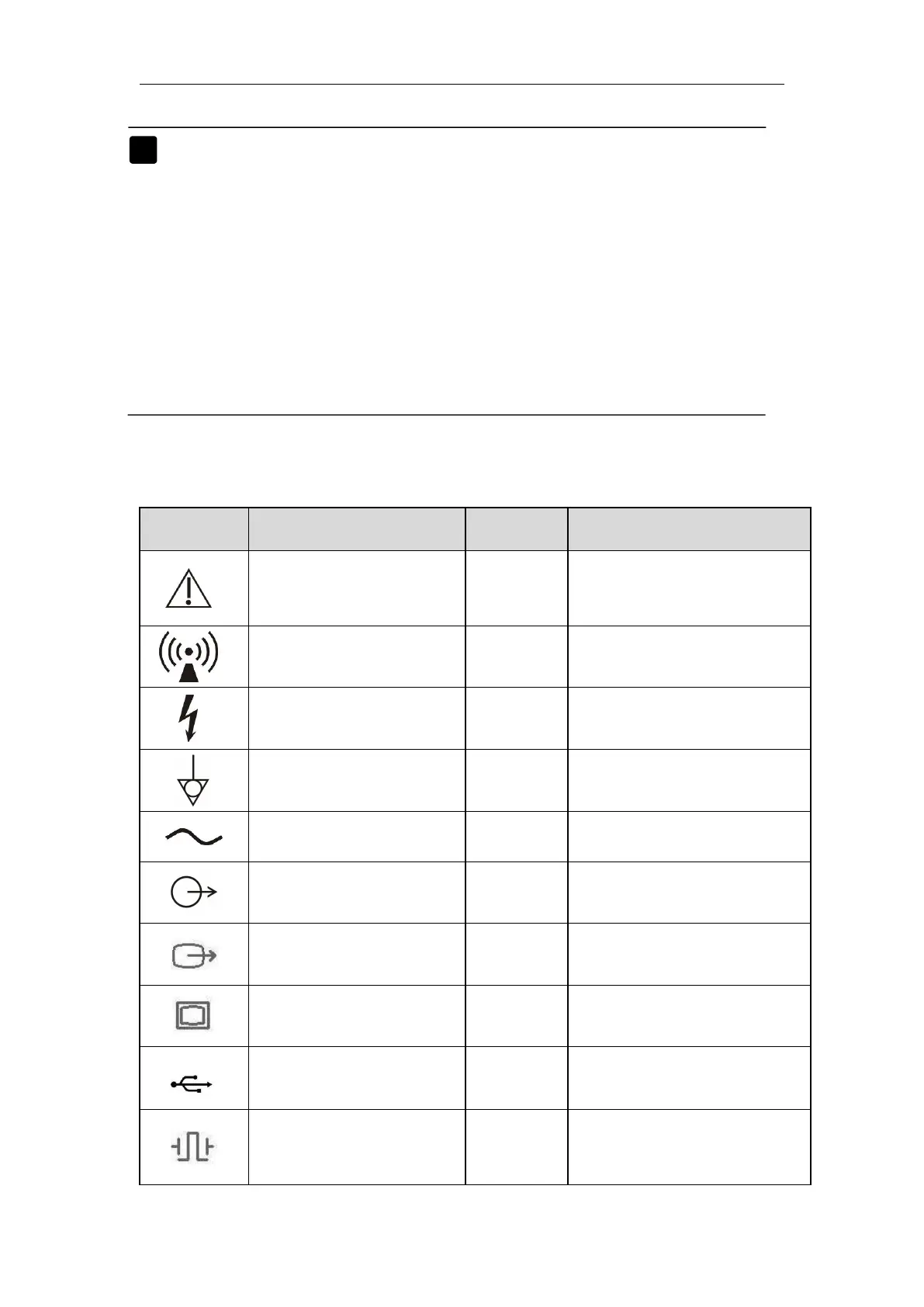
Attention: Consult
accompanying documents
(this manual).
Short for
“ “Electrocardiogram”
Short for “Pulse Oxygen
Saturation”
Short for “Invasive Blood
Pressure”
Short for “Non-invasive
Blood Pressure”
Auxiliary output
connector
Short for “Carbon dioxide”
Short for “Anesthetic gas”
Short for “Impedance
cardiography”
Short for “Cardio Output”
Defibrillator
synchronization output
connector
Short for “Cerebral State
Monitoring”


 To Next Page