9
SQL/DISP KNOB
Rotate this knob to adjust the desired squelch level. Rotate clockwise until background noise goes off.
The squelch level will be displayed on the screen according to the rotation of the squelch knob.
When the knob is pressed, current squelch level will be displayed for 2 seconds.
Push this knob for two seconds to view the squelch select menu, which will appear on the lower left
of the display. The default setting is [AUTO]. Rotate the dial knob to select [AUTO], [LSQ], [NSQ].
(Note: LSQ: Level squelch, NSQ: Noise squelch)
To confirm selection, press the SQL knob.
PHONE JACK
Use a headphone with a 3.5mm plug. When a headphone is connected, the internal speaker will be
disabled.
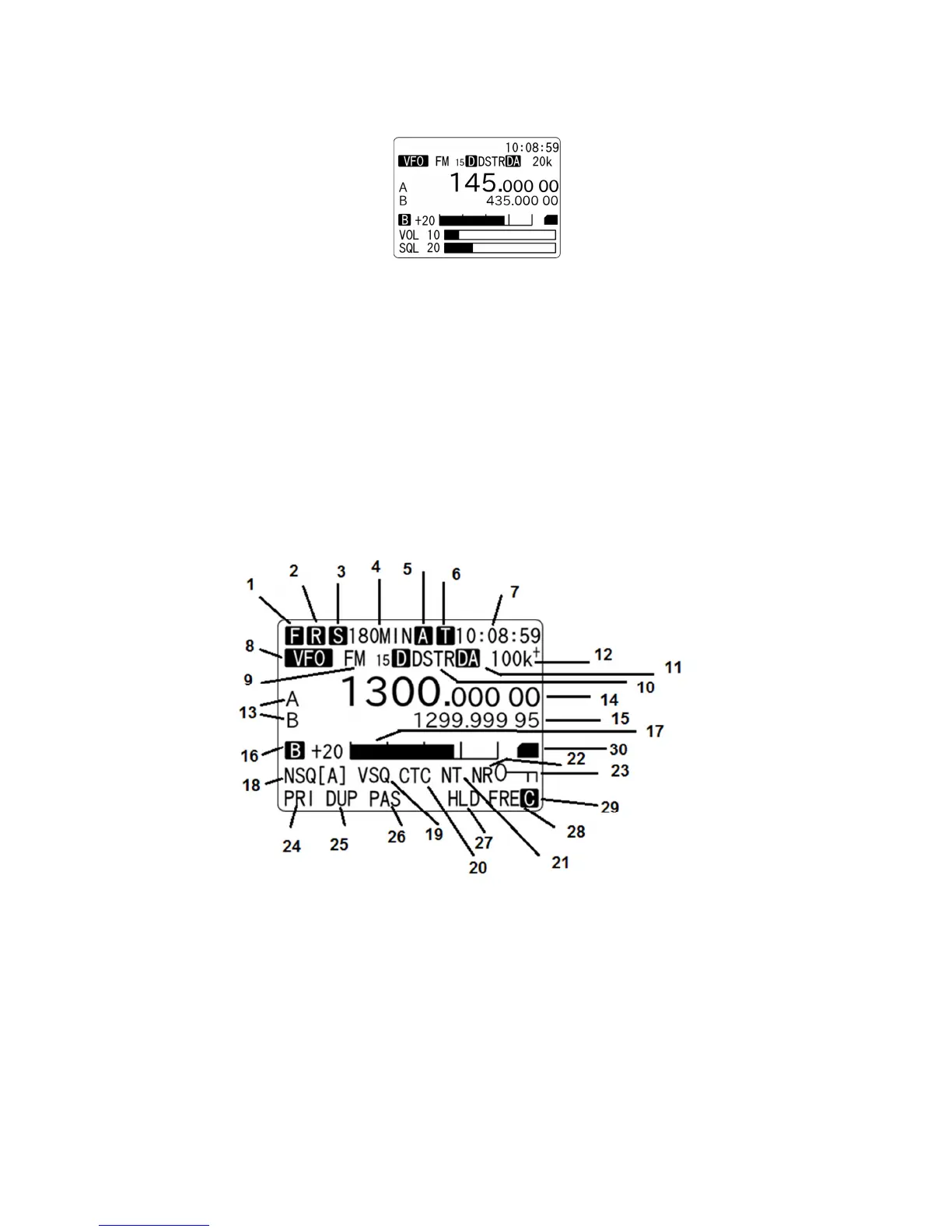
LCD
1 (F) Function switch
2 (R), (P) (R) Recording (P) Playback
3 (S) Sleep timer
4 ***MIN Sleep timer (in minutes)
5 (A) Alarm function. Will blink while activated
6 (T) Recording timer. Will blink when recording timer is activated
(Note: The backlit LCD will go off while activated.)
7 HH:MM:SS Clock



 To Next Page