Model 8640B TM 9-4935-601-14-7&P
SETTING FREQUENCY AND AMPLITUDE
Frequency
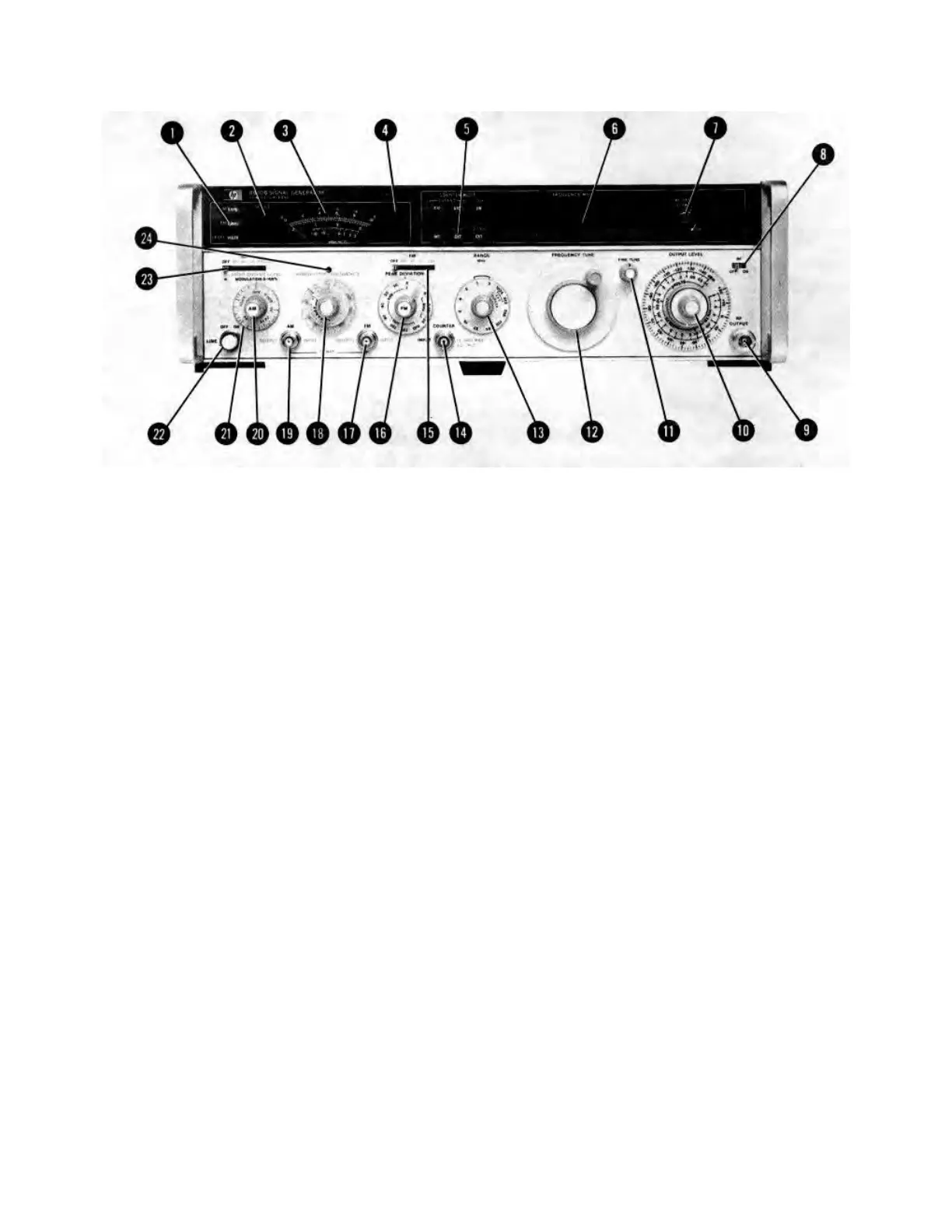
a. Set COUNTER MODE (5) to INT and TIME BASE VERNIER (7) to CAL.
b. Set RANGE (13) to span the desired frequency.
c. Use FREQUENCY TUNE (12) and FINE TUNE (11) to set the Signal Generator to the desired frequency.
d. Normally, the decimal point on the FREQUENCY display (6) is automatically set by the RANGE control (13). For
more resolution, set COUNTER MODE EXPAND (5) to X10 or X100.
e. To phase lock the generator's output, set COUNTER MODE LOCK (5) to ON; use TIME BASE VERNIER (7) as
the fine frequency tune. On some frequency bands it will be necessary to use the COUNTER MODE EXPAND
controls to tune between adjacent counts.
Figure 3-5. Setting the Frequency and Amplitude Controls (1 of 3)
3-12
Artisan Technology Group - Quality Instrumentation ... Guaranteed | (888) 88-SOURCE | www.artisantg.com


 To Next Page