Model 8640B TM 9-4935-601-14-7&P
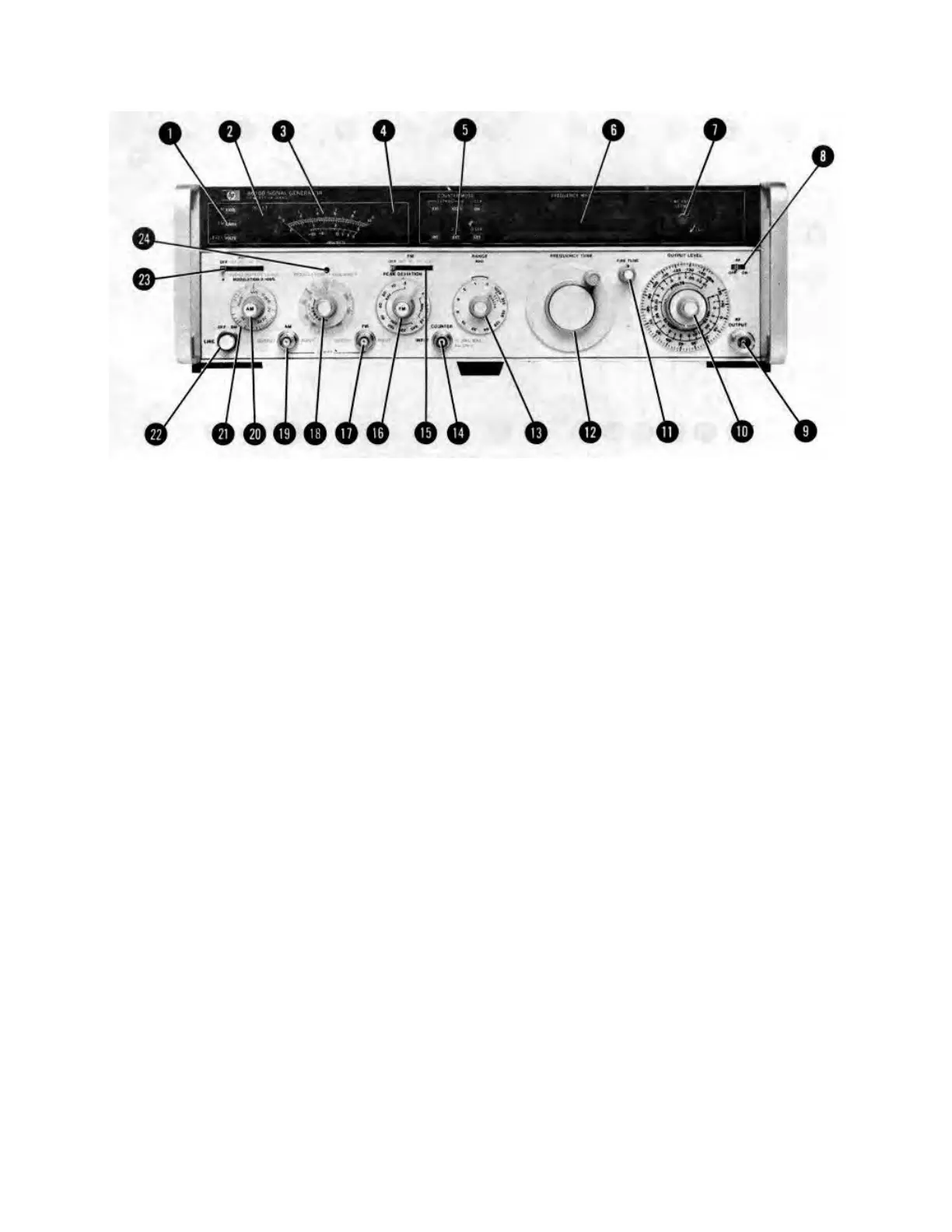
SETTING MODULATION
Amplitude Modulation
a. Set Meter Function (1) to AM.
b. To use the internal modulation oscillator, set AM (23) to INT. Set MODULATION FREQUENCY (18) to the
desired frequency, and set percent of modulation with the MODULATION vernier (20); modulation is indicated by
the meter (3) (e.g., a meter reading of 5.4 indicates that the AM is 54%).
NOTE
The REDUCE PEAK POWER annunciator (4) lights whenever the Signal Generator's output
amplifier is being overdriven. When it lights, reduce MODULATION vernier or OUTPUT LEVEL
vernier.
c. With AM (23) set to INT, the internal modulation oscillator signal is present at the AM OUTPUT jack (19) (600
ohm source impedance). Its level is set by AUDIO OUTPUT LEVEL (21)
Figure 3-6. Setting the Modulation Controls (1 of 4)
3-15
Artisan Technology Group - Quality Instrumentation ... Guaranteed | (888) 88-SOURCE | www.artisantg.com


 To Next Page