TD 92372GB
2007-06-18/ Ver. E
Installation and Operation Manual
IP-DECT Base Station & IP-DECT Gateway
32
7.1 General
This section describes how to do the following configurations and settings.
• Change User Name and Password
• Name the equipment
• Licence (SW 2.06 and earlier)
• Configure automatic firmware update
• Configure the NTP settings
• Configure Logging
• Configure the HTTP settings
Figure 34.
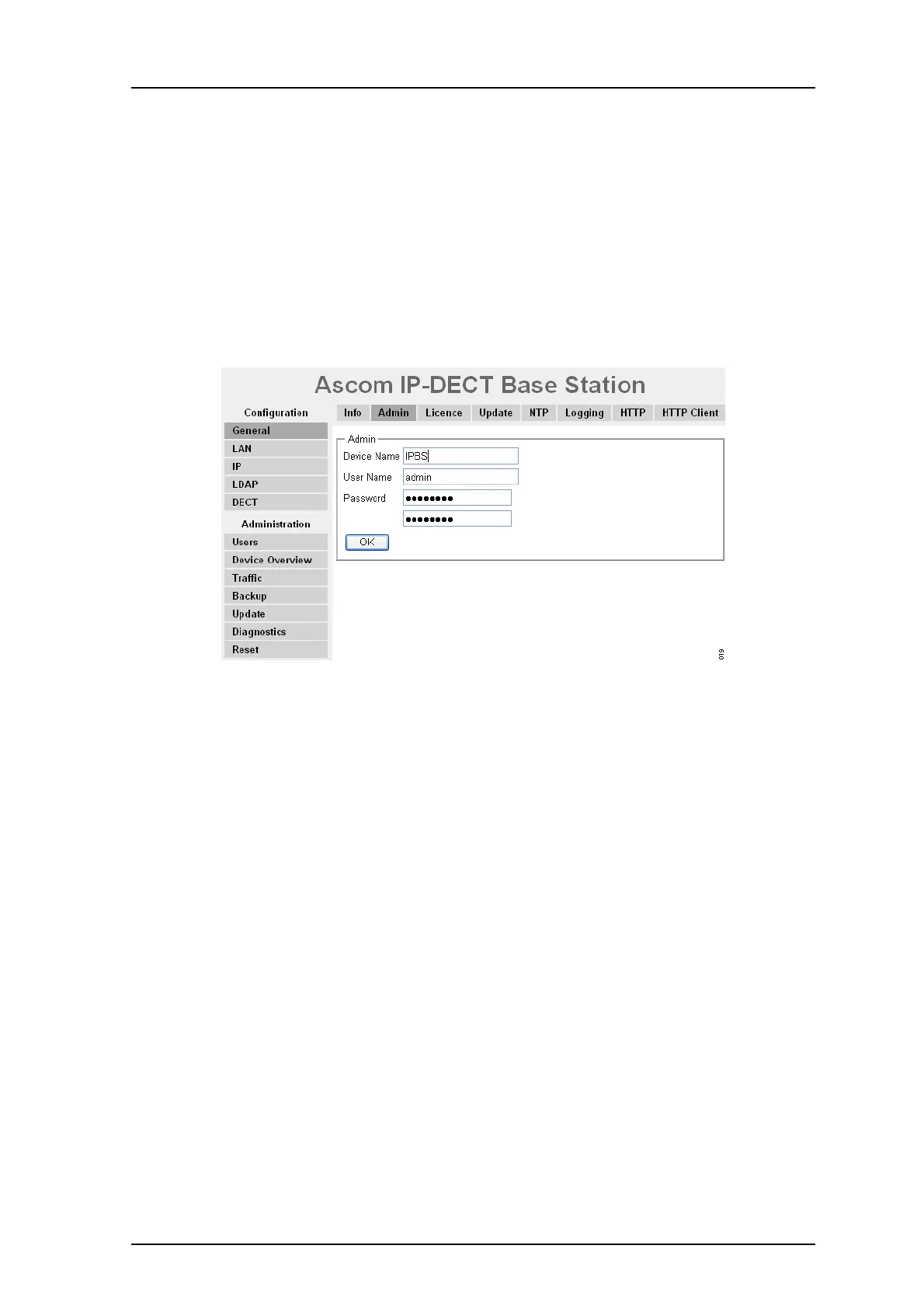
Figure 20. Assigning a name, username, and password.
7.1.1 Change User Name and Password
The user name and password us used to access the IPBS/IPBL through the web GUI.
1 Select General > Admin.
2 Write a user name in the User Name text field.
3 Enter a new password in the Password text field. Repeat the password in the
second text field.
4 Click "OK".
7.1.2 Name the IPBS/IPBL
Each IPBS/IPBL can be assigned a name. It is recommended to assign a descriptive name
for example IPBS/IPBL location.
1 Select General > Admin.
2 Enter a name in the Device Name text field.
3 Click "OK".
7.1.3 Licence
This section only applies to the IPBS with SW 2.06 and earlier.



 To Next Page