TD 92372GB
2007-06-18/ Ver. E
Installation and Operation Manual
IP-DECT Base Station & IP-DECT Gateway
36
Figure 37.
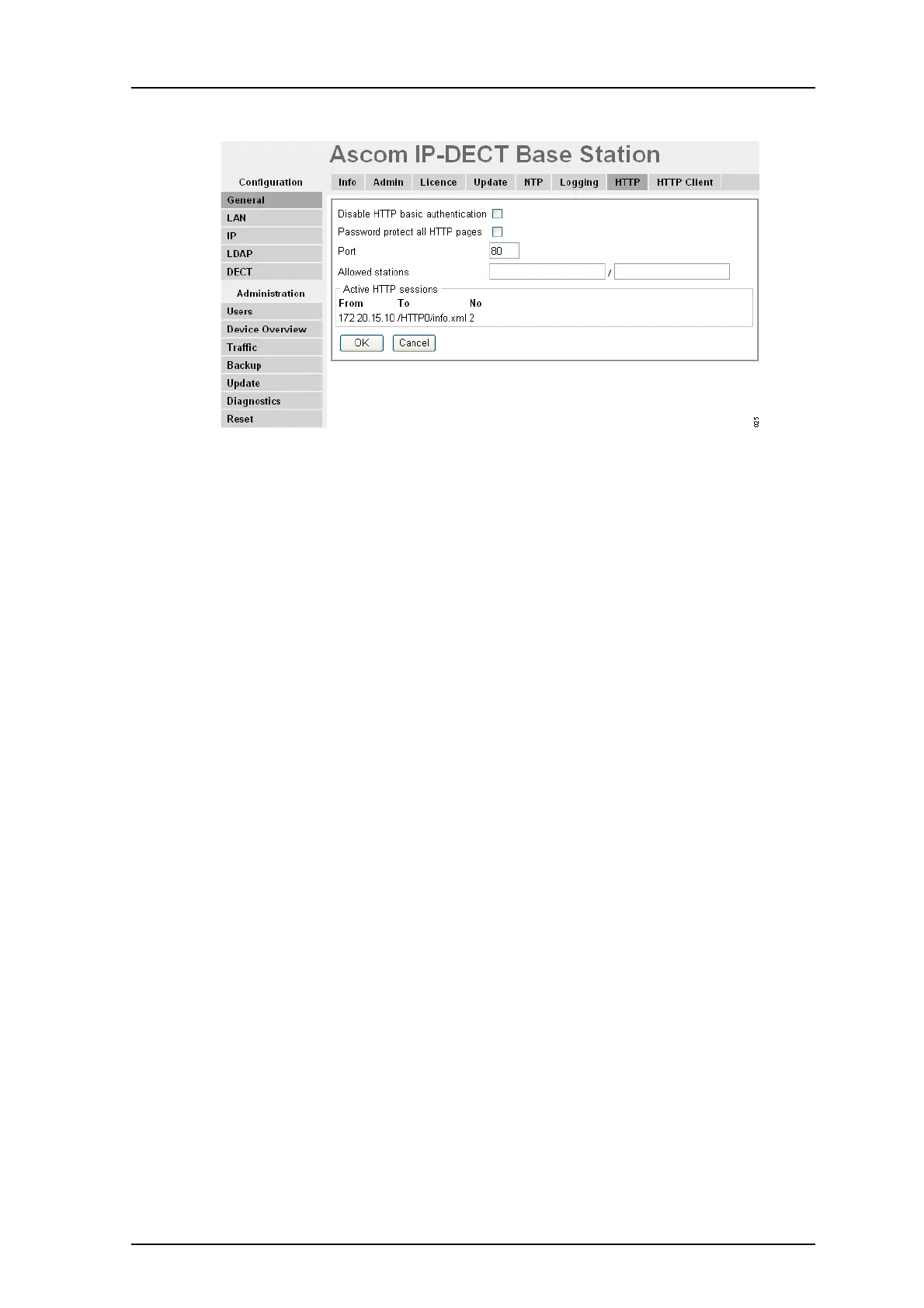
Figure 22. Configure the HTTP settings
1 Select General > HTTP
• Mark the Disable HTTP basic authentication check box to require all
administrative and programmatic clients to support HTTP digest authentication.
• Mark the Password protect all HTTP pages check box to password protect all
HTTP pages.
• Enter "Port number" in the Port text field. The IPBS/IPBL is by default
administered over the network via the TCP port 80 (http). If port 80 is not to be
used another port can be set up for access.
• Enter "Network Base Adresss" / "Network Base Mask" in the Allowed stations
text fields to only allow access only from matching network, for
example:172.16.0.0/255.255.0.0
•In the Active HTTP sessions field all ongoing HTTP traffic is displayed.
Figure 38.
2 Click "OK".
7.1.8 Configure the HTTP Client settings
A list of URL that require authentication can be specified.
1 Select General > HTTP Client.
2 Enter the “URL” in the URL text field.
3 Enter "User" and "Password" in the User and Password text fields.
4 Click “OK”.
A new row will be shown and more URLs can be added.



 To Next Page