Traffic Mode and the Traffic Page
Envision EX5000 -48- 600-00151-001 Rev 01
l Datalink Weather—Not displayed.
Up to 5 non-bearing intruders (traffic threats reported by the traffic
sensor without valid bearing) are listed below the airplane symbol.
Acknowledging the TA message from the Traffic mode removes it
from the message bar, allowing other messages to be displayed. The
TA message is automatically removed when the threat is reduced or
the intruder is no longer present.
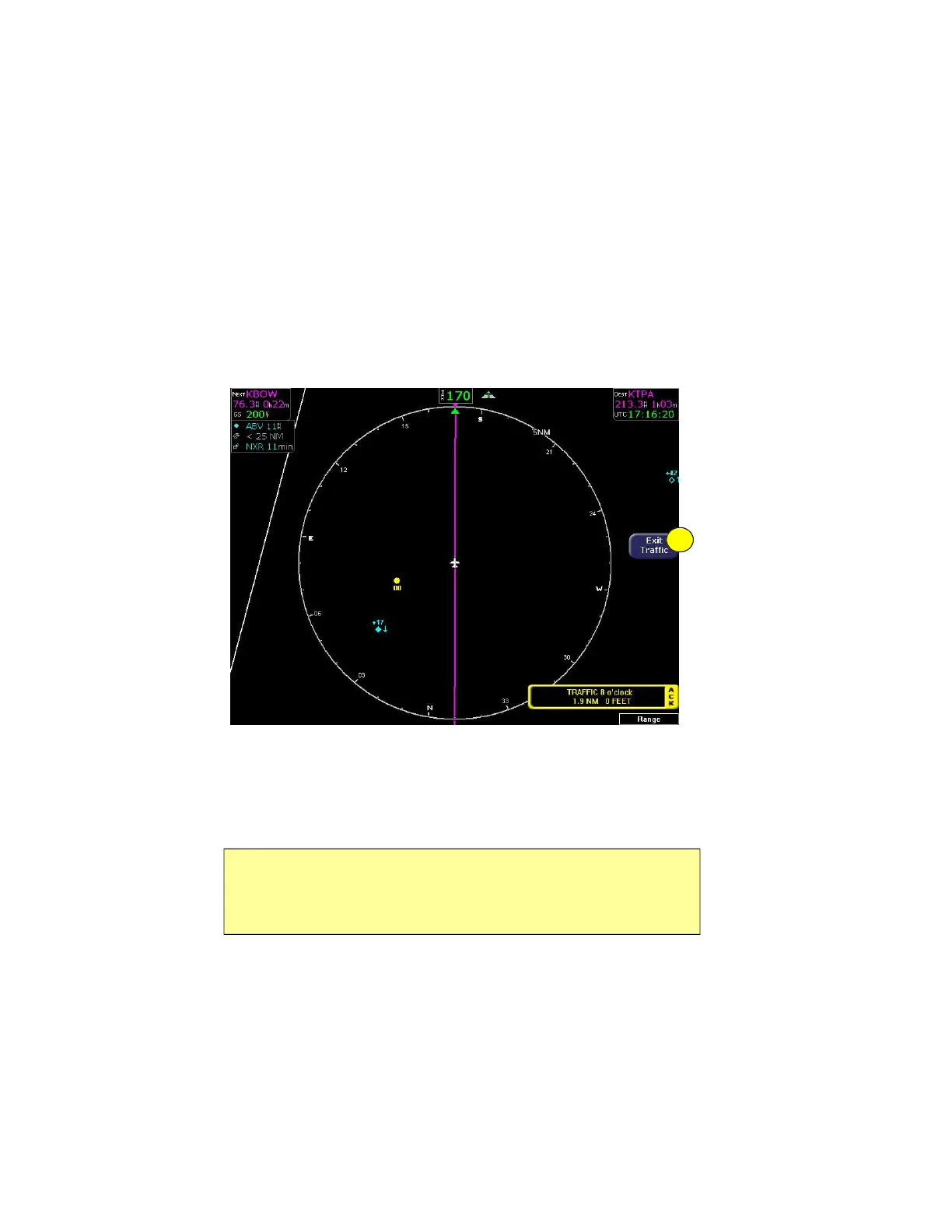
Figure 4.1 Map Page—Traffic Mode
1) Exit Traffic—Restores the Map page to the previous settings. If
the Map page is restored prior to acknowledging a TA, the
message will remain displayed and acknowledging it will once
again bring up the dedicated Traffic page.
The available Traffic button modes are listed below. For more
information on specific traffic sensor modes, consult the user
documentation for your traffic sensor.
Note: Traffic limitations and operational ranges depend on the installed
traffic sensor. For TAS or TCAD sensors, see the corresponding sensor
Pilot Guide. For TIS sensors, see Section 1-3-5 of the Aeronautical
Information Manual.
1



 To Next Page