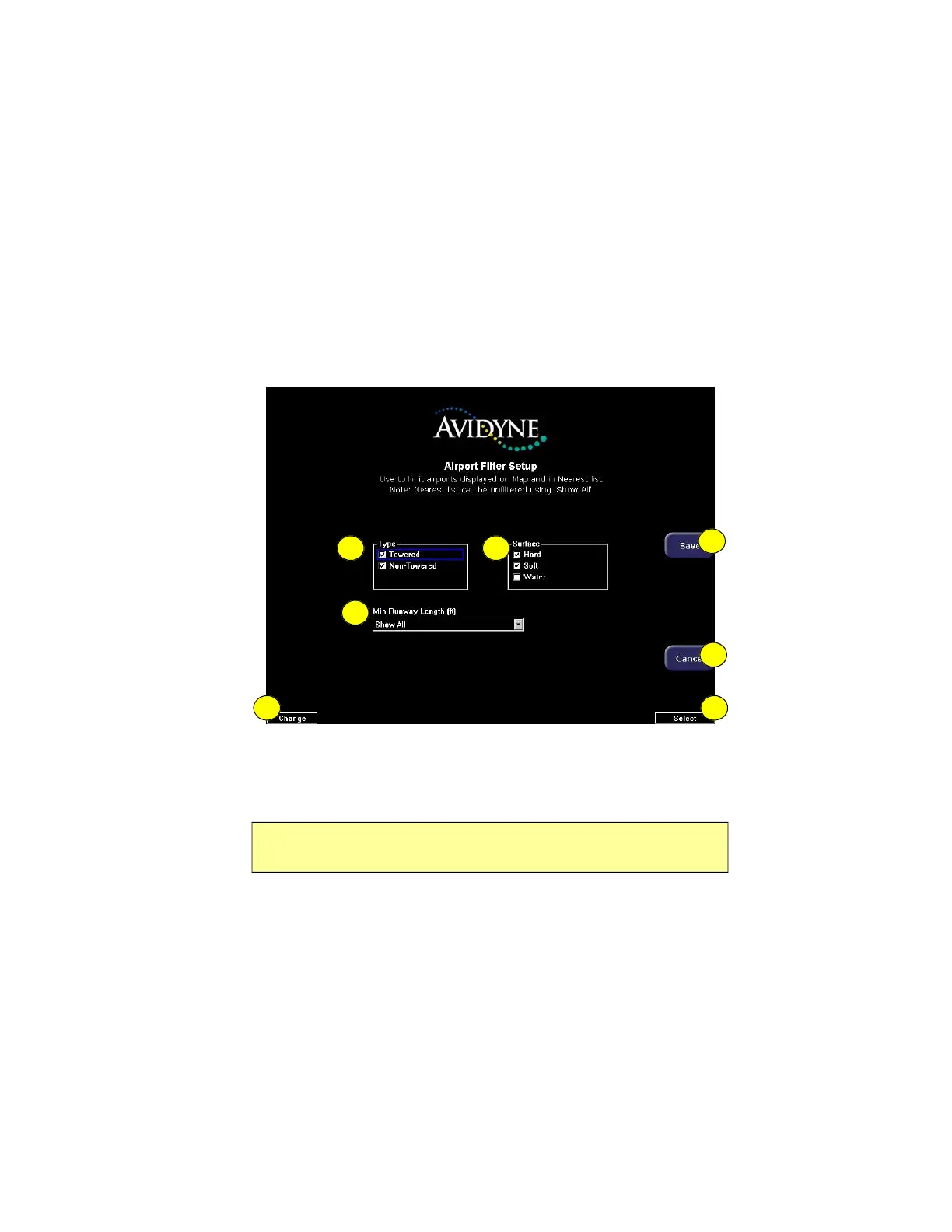
Airport Filter Setup Page
600-00151-001 Rev 01 -69- Envision EX5000
7.1 Airport Filter Setup Page
The Airport Filter Setup page allows you to set criteria for nearest
airport searches of the database. You can select towered and/or non-
towered airports, the type of surfaces you prefer to land on, and the
minimum runway length based on your particular aircraft or type of
flying. The values selected on this page also dictate the types of
airports that get displayed on the map.
Figure 7.2 Airport Filter Setup Page
1) Airport Type—Select Towered, Non-Towered, or both.
2) Surface—Select between hard, soft, and/or water surfaces.
3) Minimum Runway Length—select the minimum runway length
from 2000ft.—7000ft. or show all lengths.
4) Save—Saves settings and returns to the Aux Main page.
5) Cancel—Cancels any changes and returns to the Aux Main
page.
Note: To display airports with both hard surface and water runways check
the hard surface box.
1
76
3
2
4
5



 To Next Page