CMax Selection Page
600-00151-001 Rev 01 -39- Envision EX5000
3.7 CMax Selection Page
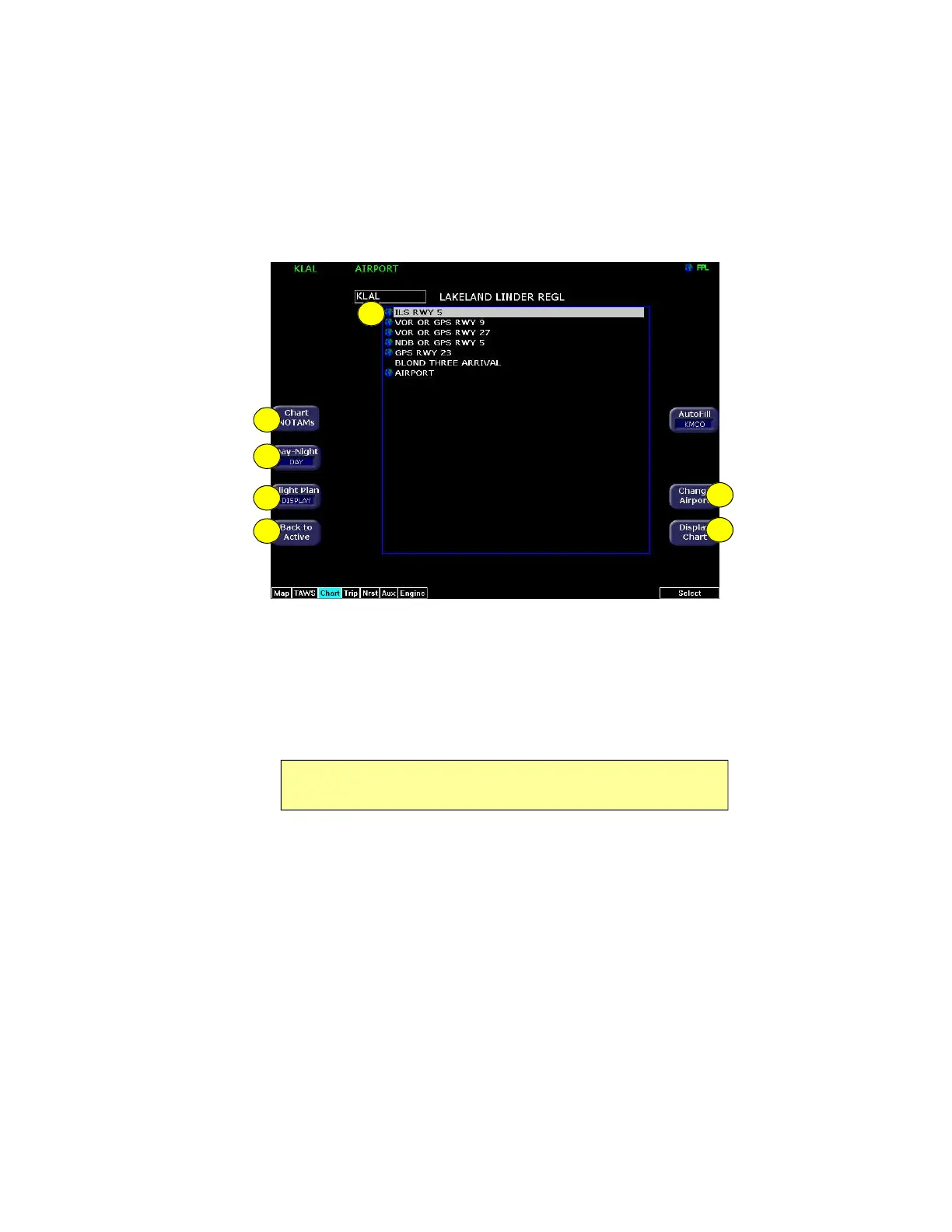
Figure 3.7 CMax Selection Page
1) Chart Selection list—A list of all charts available for the
identified airport. Although the majority of charts listed are indeed
instrument approach procedure charts and are generally referred
to in this documentation as procedures, the list also includes
other types of charts such as airspace diagrams, taxi diagrams,
special instructions, and other miscellaneous charts.
2) Chart NOTAMs—The Chart NOTAMs button only displays if
chart NOTAMs exist for the currently-selected airport. Press
Chart NOTAMS to bring up a window that lists any associated
chart NOTAMs for the airport currently entered in the Airport
Entry Field. See Section 3.8.1, "Chart NOTAMs Page" on page
43 for more information.
Note: The EX5000 shows only those charts covered by your Chart data
subscription. The Charts are listed in the Jeppesen chart index order.
1
7
5
4
6
3
2


 To Next Page