Envision EX5000 -53- 600-00151-001 Rev 01
5Trip Page
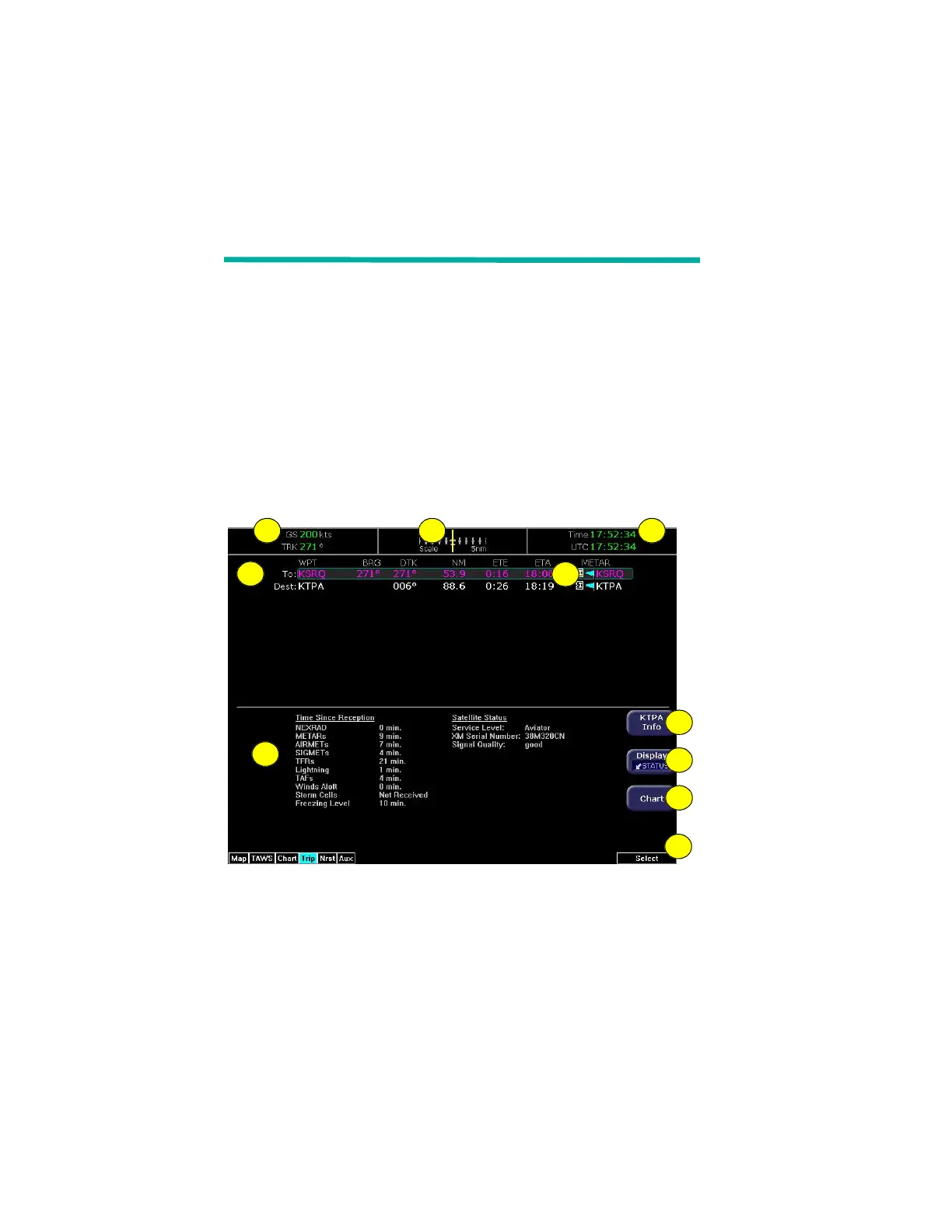
The Trip page is continuously updated during flight. The distance and
the time values are updated with each new positive fix from the GPS.
The route legs advance with each waypoint message. Turn the Page
knob to bring up the Trip page, which shows the remaining legs in the
current flight plan and other data being received by the EX5000 from
the GPS.
If the entire flight plan does not fit on the screen, an ellipsis (...)
displays in the next to last line. The destination line is always
displayed. All flight plans are from the GPS. A “No Flightplan
Available” message displays if there is no flight plan entered or if the
GPS has failed.
Figure 5.1 Trip Page Information
1) Current ground speed and track—As reported by your GPS
Navigator.
2) Course Deviation Indicator (CDI)—Shows lateral distance
(Crosstrack deviation) from desired course, providing continuous
navigation reference when viewing the Trip page.
4
10
5
321
9
8
7
6



 To Next Page