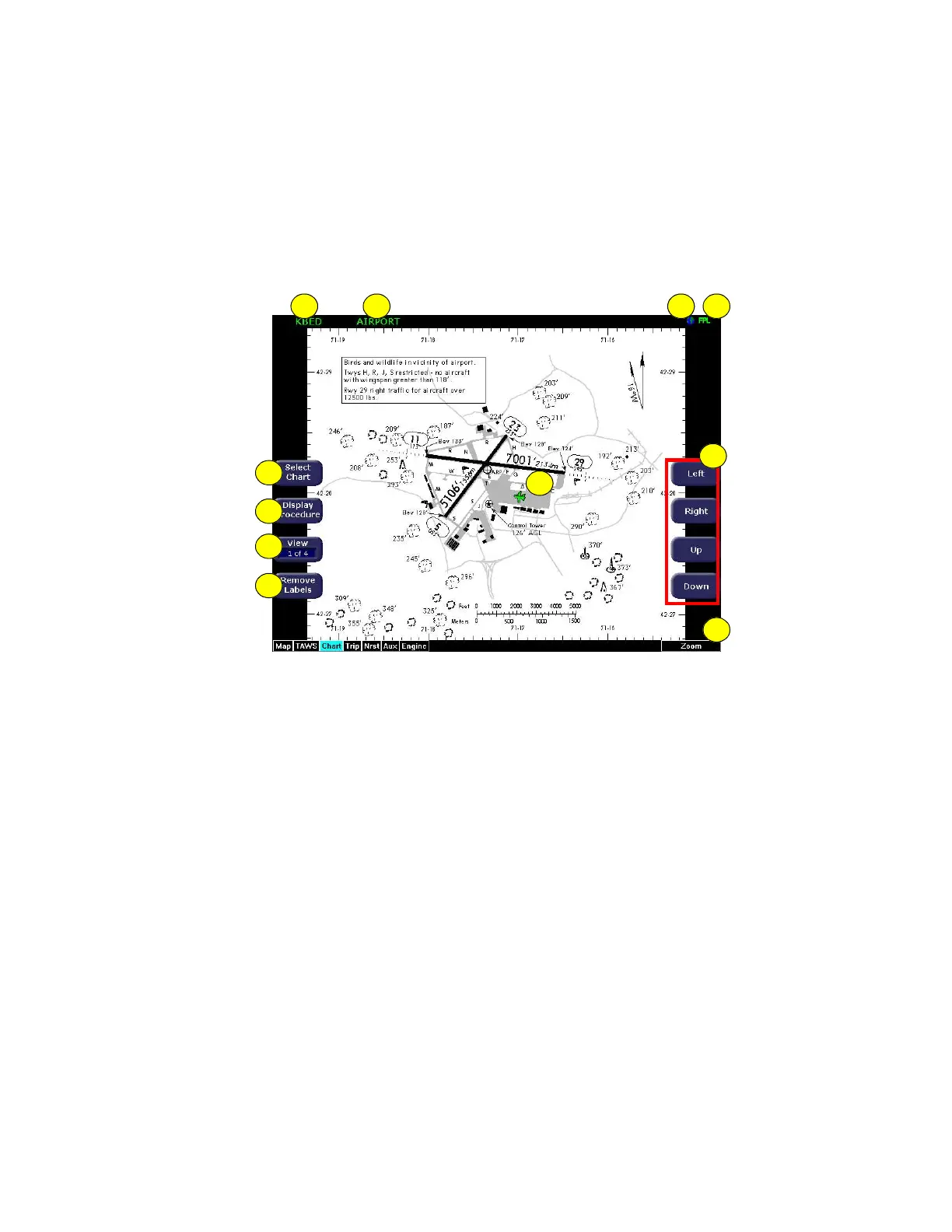
CMax Chart Page
600-00151-001 Rev 01 -29- Envision EX5000
The Chart page shows the airport diagram of the current airport, with
ownship symbol for current aircraft position, if the airport diagram is
geo-referenced.
Figure 3.2 CMax Chart Page (Airport)
1) Airport Identifier—The airport identifier for the current airport
displays in green.
2) Chart Name—The name of the current chart being displayed,
also in green.
3) Geo-referenced Symbol—When the displayed chart is geo-
referenced, a small globe displays. If the chart is not geo-
referenced, the globe symbol is crossed out.
4) Flight Plan Symbol—an FPL symbol indicates the option to
display the current flight plan is turned on. If the display of flight
plan is turned off, the FPL symbol is crossed out. Note that if a
chart is not geo-referenced or no flight plan is received from the
GPS, the flight plan cannot be displayed even if the option is
selected.
1 2 4
11
6
7
5
3
9
10
8



 To Next Page