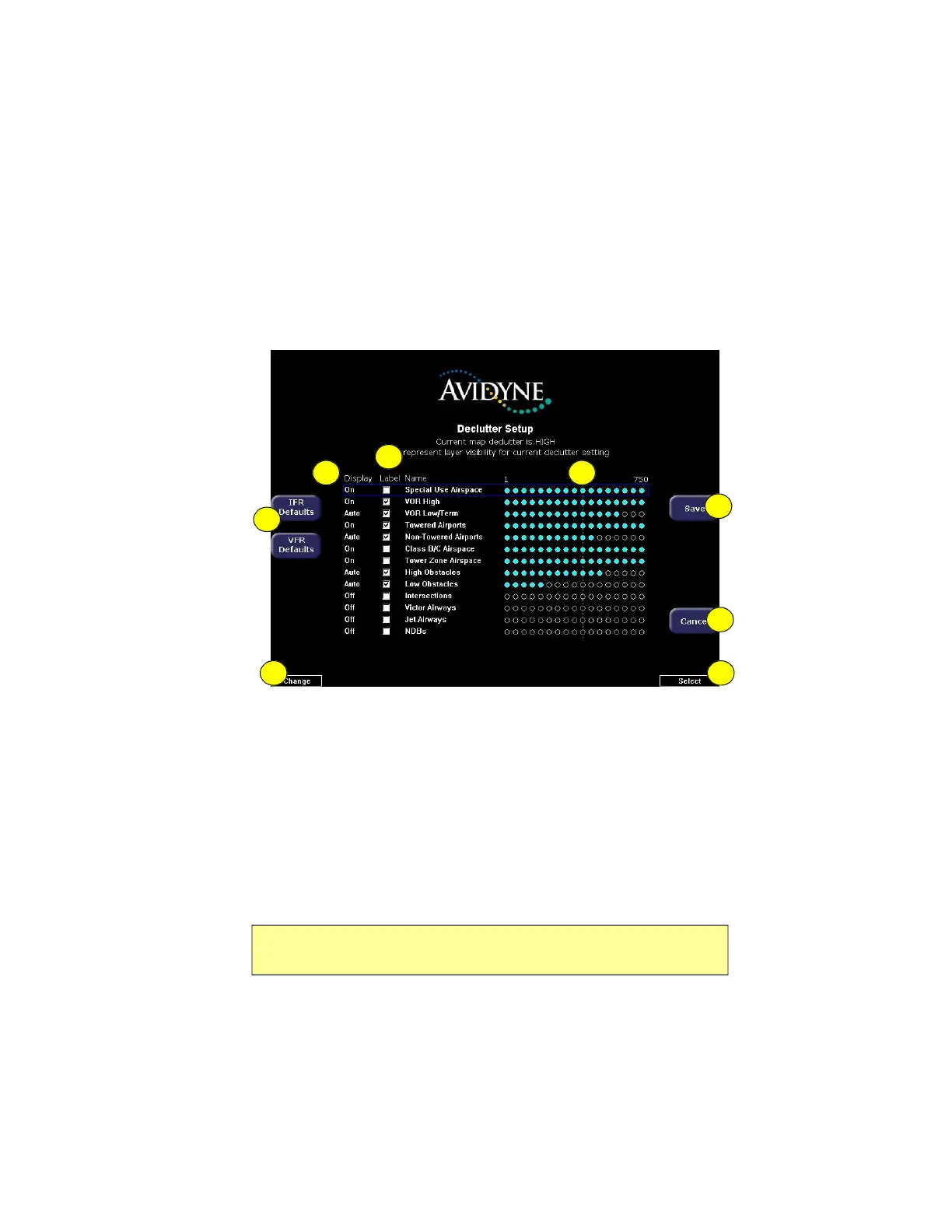
Declutter Setup Page
600-00151-001 Rev 01 -71- Envision EX5000
7.2 Declutter Setup Page
The Declutter Setup page is used to define the navigation symbols
and other default display settings for the Declutter button. Individual
items can be selected for display or a pre-defined group of items can
be selected by choosing VFR or IFR defaults.
Figure 7.3 Declutter Setup Page
1) IFR & VFR Defaults—Sets the declutter settings to predefined
factory settings based on typical usage.
2) Display—Each item has three possible display settings:
n On—The item displays all the time.
n Auto—The item displays automatically and declutters
automatically based on pixel density of the display at a given
range.
n Off—The item is never displayed.
Note: The EX5000 may limit the number of symbols displayed based on the
total symbol density.
87
5
6
1
2
3
4



 To Next Page