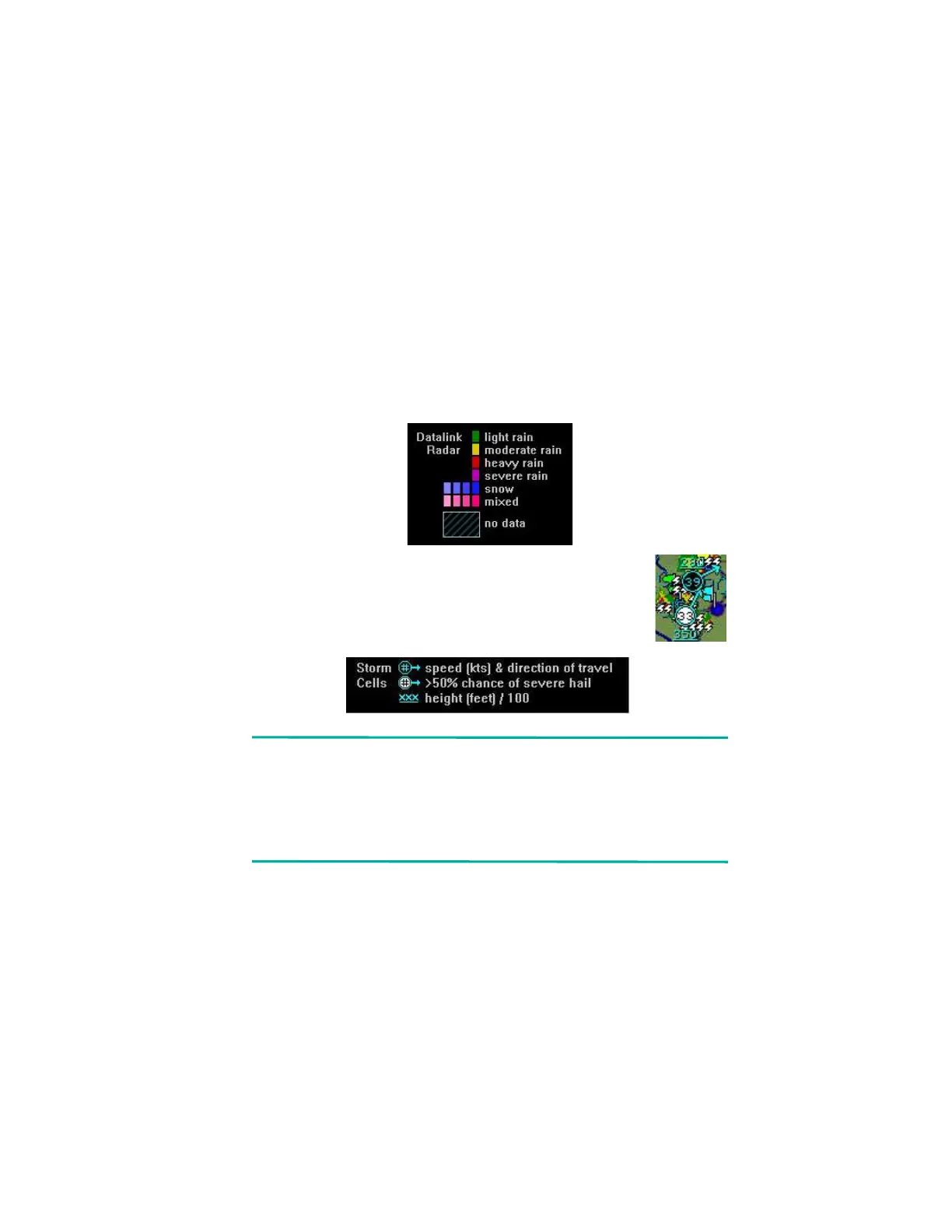
Symbols Displayed using Datalink
600-00151-001 Rev 01 -83- Envision EX5000
labeled as to their type. For more details, see Table 9.7 Airspace
and Airways Lines on page 101.
l Datalink Radar Images—The XM Datalink Radar images are
delivered with a resolution of approximately 1 NM. The EX5000
smoothes the edges of the Datalink Radar images, so that the
images are not distracting at smaller zoom ranges. The Datalink
Radar colors conform to aviation standards: green, yellow, red,
and magenta depict varying intensities of rainfall, and shades of
blue for snow and pink for mixed precipitation. A handy legend for
the Datalink Radar colors is found on the Trip page:
l Storm Cells—If storm cells are present, the EX5000
displays the cells along with the cell’s groundspeed,
in knots, and direction of travel. If there is a greater
than 50% chance of hail, the cell is displayed with a
white background. It also shows echo tops..
Note:At longer range settings, individual lightning strikes and
storm cells are combined into single strikes or single
storm cells, depending on their proximity. This avoids
clutter and improves readability. And vice versa, lower
map range settings will display more strikes and storm
cells.
l TFR—Temporary Flight Restrictions (TFRs) are reported over the
Broadcast Datalink. TFRs are shown with solid red lines on the
Map page. Note that at a full Map Declutter setting (all navigation
data and airspace removed), TFRs will also be removed from the
display.



 To Next Page