REPAIR/REPLACEMENT PROCEDURES
BUS MONITOR MODULE REPLACEMENT
I-E96-506B1 7 - 3
BUS MONITOR MODULE REPLACEMENT
NOTE:
The bus monitor module can be removed under power.
Replace with another bus monitor module as soon as possible.
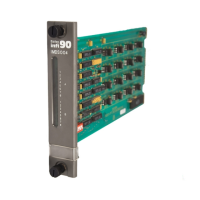
To replace the bus monitor module:
1. Turn the 2 thumbscrews on the module faceplate 1/2-turn
in either direction to release the module. Slide the module out.
2. Set switch S1 and jumpers J1 through J8 on the replace-
ment to match the settings of the BMM module just removed.
3. Grasp the replacement module by the faceplate.
4. Align the top and bottom edges of the circuit board with the
guides in the panel.
5. Hold the module by the faceplate and slide it into the slot;
push until the rear edges are firmly seated in the backplane
connectors.
6. Turn the 2 thumbscrews on the module faceplate 1/2-turn
to lock the module in place.
FAN ASSEMBLY
Fuse Replacement
1. Disconnect power from the fan assembly by unplugging it
from J4 on the IEPEP01 or IEPEP02 power entry panel or J1 on
the IEPEP03 power entry panel.
2. Remove the fuse by turning the fuse holder cap counter-
clockwise until it releases.
3. Use the fuse holder cap to pull the fuse from its holder.
4. Put an identically rated replacement fuse in the fuse holder
cap.
5. Touching only the fuse holder cap, insert the fuse into the
fuse holder and turn the fuse holder cap clockwise until
secure.
6. Connect the fan assembly to power by connecting it to J4
on IEPEP01 and IEPEP02 power entry panels or J1 on
IEPEP03 power entry panels.
Fan Assembly Replacement
1. Unplug the fan assembly.
Artisan Technology Group - Quality Instrumentation ... Guaranteed | (888) 88-SOURCE | www.artisantg.com


 To Next Page