468 9424200994 Rev N
Protection, Current,
Instantaneous Overcurrent (50-1)
Enables 50-1 function for
IA mode
Protection, Current,
Instantaneous Overcurrent (50-1)
Selects forward direction
for 50-1
Protection, Current,
Instantaneous Overcurrent (50-2)
Enables 50-2 function for
3I0 mode
Protection, Current,
Instantaneous Overcurrent (50-2)
Selects forward direction
for 50-2
Protection, Current,
Instantaneous Overcurrent (50-3)
Enables 50-3 function for
I2 mode
Protection, Current,
Instantaneous Overcurrent (50-3)
Selects forward direction
for 50-3
Target Configuration, Targets
Enables phase A
directional target for 50-1
Target Configuration, Targets
Enables residual
directional target for 50-2
Target Configuration, Targets
Enables Neg SEQ
directional target for 50-3
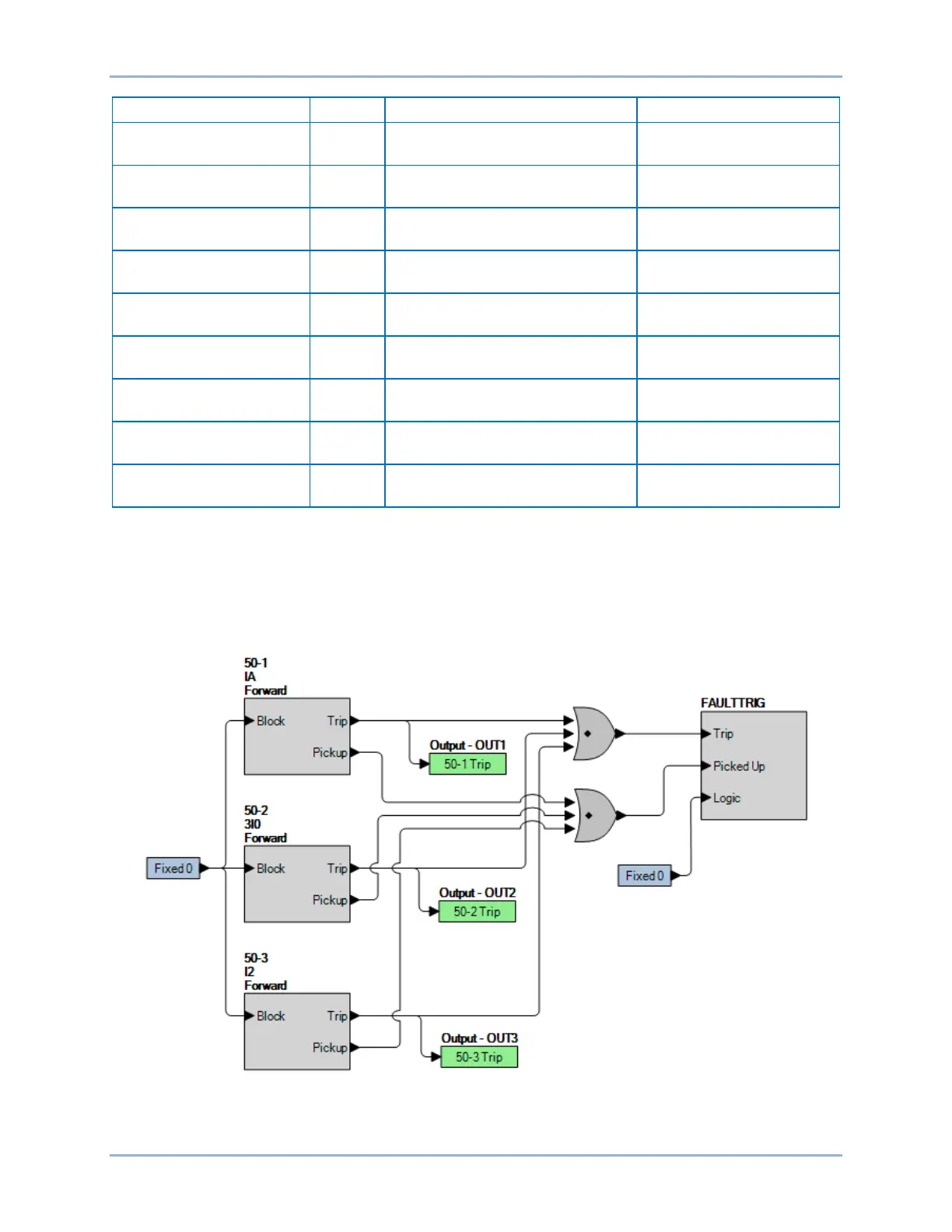
Step 2: Use BESTCOMSPlus to configure the BESTlogicPlus programmable logic shown in Figure 306.
• Blocking is disabled.
• OUT1 closes for 50-1 Trip.
• OUT2 closes for 50-2 Trip
• OUT3 closes for 30-3 Trip.
• Fault recording is enabled for 50-1, 50-2, and 50-3.
Figure 306. BESTlogicPlus Settings
Step 3: Using Table 213 as a guide, send the settings to the BE1-11g. Prior to each directional test,
reset the BE1-11g targets from the previous test. Max Torque Angle setting, for positive and
Directional Overcurrent (67) Test BE1-11g


 To Next Page