EasyManua.ls Logo

Boyo AVN700A - Page 124

Boyo AVN700A
136 pages
Print Icon
To Next Page IconTo Next Page
To Previous Page IconTo Previous Page
Loading...
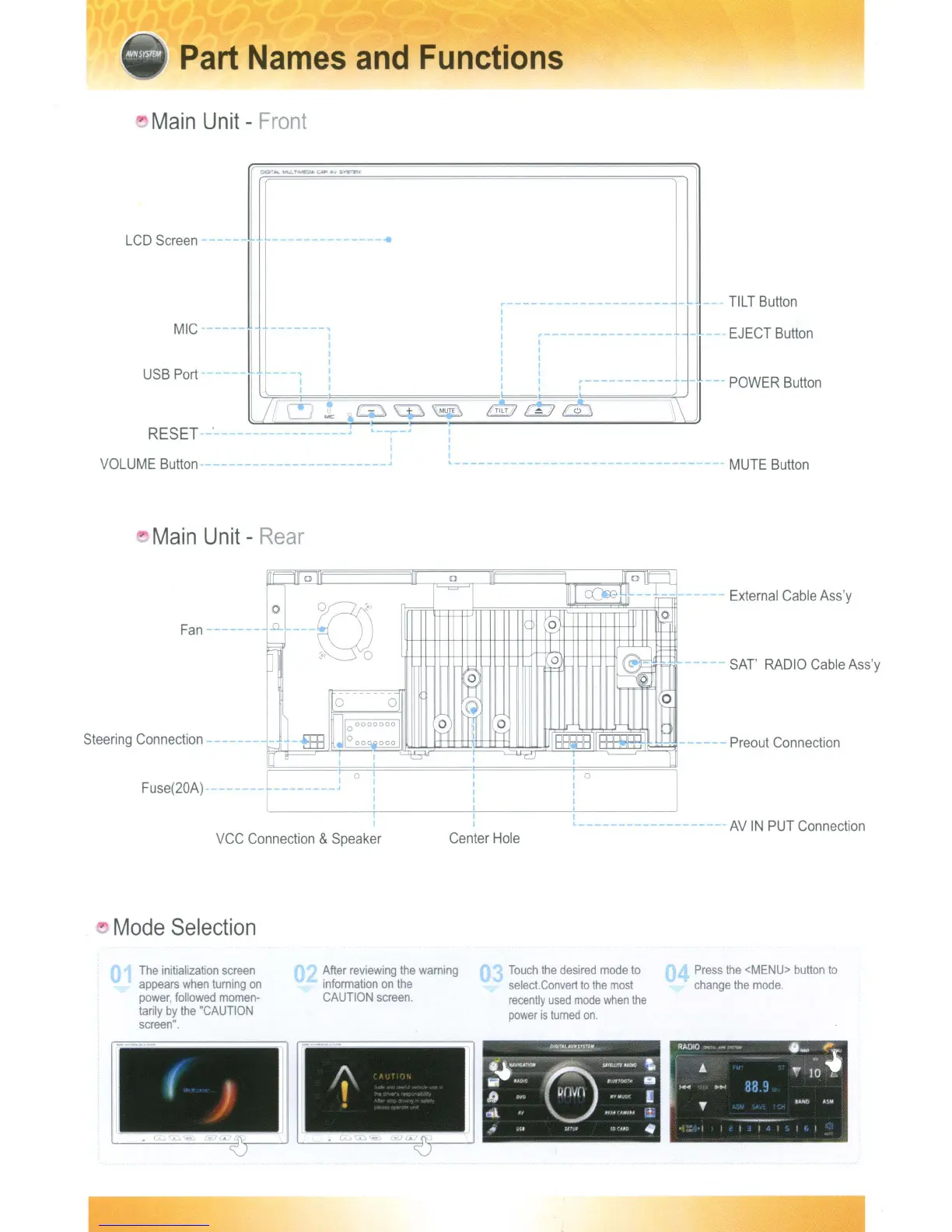
Part
Names
and
Functions
Main
Unit
-
Front
LCD
Screen
------
--
-----------
..
MIC
-
USB
Port
RESET
~--------------------
I
I
III
L,
-:
i ,
c--~--------j
Jl~
~lJ(CL..!_r;:::::;_=~:>==-:.....;;.~~::
...
G\=~
-=,
=,
=f=\
='\MU=t;...E=\~:_/Jk7~T1~T_(_~~_j_@_'~~==-==-~==:\\:~
TILT
Button
EJECT
Button
-
POWER
Button
VOLUME
Button
- J
"
Main
Unit
-
Rear
MUTE
Button
Fan
----
-
Steering
Connection
Fuse(20A)
a
0
1111
au::
;:::J...
1'---=-'1
IIII
<::()ffiH
.-=--
0
-~
~
II
II
0
.0...
-
y
,l-
-'--U
]
~,
0
0
-.
~
1"'-
...:;
a
~ ~
~
0
0 0
~-HB
J17°000000
0
mr
0
-
o oOQ.Qooo
trl
H
BE!m
-
J
It
0
I ,
I
L
_______
l
0
I
I
I
0
0
I
I
I
0
I
I
I
I
I
I
I
,
-
External
Cable
Ass'y
- -
SAT'
RADIO
Cable
Ass'y
Preout
Connection
VCC
Connection
&
Speaker
Mode
Selection
Center
Hole
,-------------------
AV
IN
PUT
Connection
The
initialization
screen
appears
when
turning
on
power,
followed
momen-
tarily
by
the
"CAUTION
screen".
After
reviewing
the
warning
information
on
the
CAUTION
screen.
Touch
the
desired
mode
to
select.
Convert
to
the
most
recently
used
mode
when
the
power
is
turned
on.
Press
the
<MENU>
button
to
change
the
mode.
Part
Names
and
Functions
Main
Unit
-
Front
LCD
Screen
------
--
-----------
..
MIC
-
USB
Port
RESET
~--------------------
I
I
III
L,
-:
i ,
c--~--------j
Jl~
~lJ(CL..!_r;:::::;_=~:>==-:.....;;.~~::
...
G\=~
-=,
=,
=f=\
='\MU=t;...E=\~:_/Jk7~T1~T_(_~~_j_@_'~~==-==-~==:\\:~
TILT
Button
EJECT
Button
-
POWER
Button
VOLUME
Button
- J
"
Main
Unit
-
Rear
MUTE
Button
Fan
----
-
Steering
Connection
Fuse(20A)
a
0
1111
aU::
;:::J...
1'---=-'1
IIII
<::()ffiH
.-=--
0
-~
~
II
II
0
.0...
-
y
,l-
-'--U
]
~,
0
0
-.
~
1"'-
...:;
a
~ ~
~
0
0 0
~-HB
J17°000000
0
mr
0
-
o oOQ.Qooo
trl
H
BE!m
-
J
It
0
I ,
I
L
_______
l
0
I
I
I
0
0
I
I
I
0
I
I
I
I
I
I
I
,
-
External
Cable
Ass'y
- -
SAT'
RADIO
Cable
Ass'y
Preout
Connection
VCC
Connection
&
Speaker
Mode
Selection
Center
Hole
,-------------------
AV
IN
PUT
Connection
The
initialization
screen
appears
when
turning
on
power,
followed
momen-
tarily
by
the
"CAUTION
screen".
After
reviewing
the
warning
information
on
the
CAUTION
screen.
Touch
the
desired
mode
to
select.
Convert
to
the
most
recently
used
mode
when
the
power
is
turned
on.
Press
the
<MENU>
button
to
change
the
mode.

Table of Contents