EasyManua.ls Logo

Boyo AVN700A - Page 125

Boyo AVN700A
136 pages
Print Icon
To Next Page IconTo Next Page
To Previous Page IconTo Previous Page
Loading...
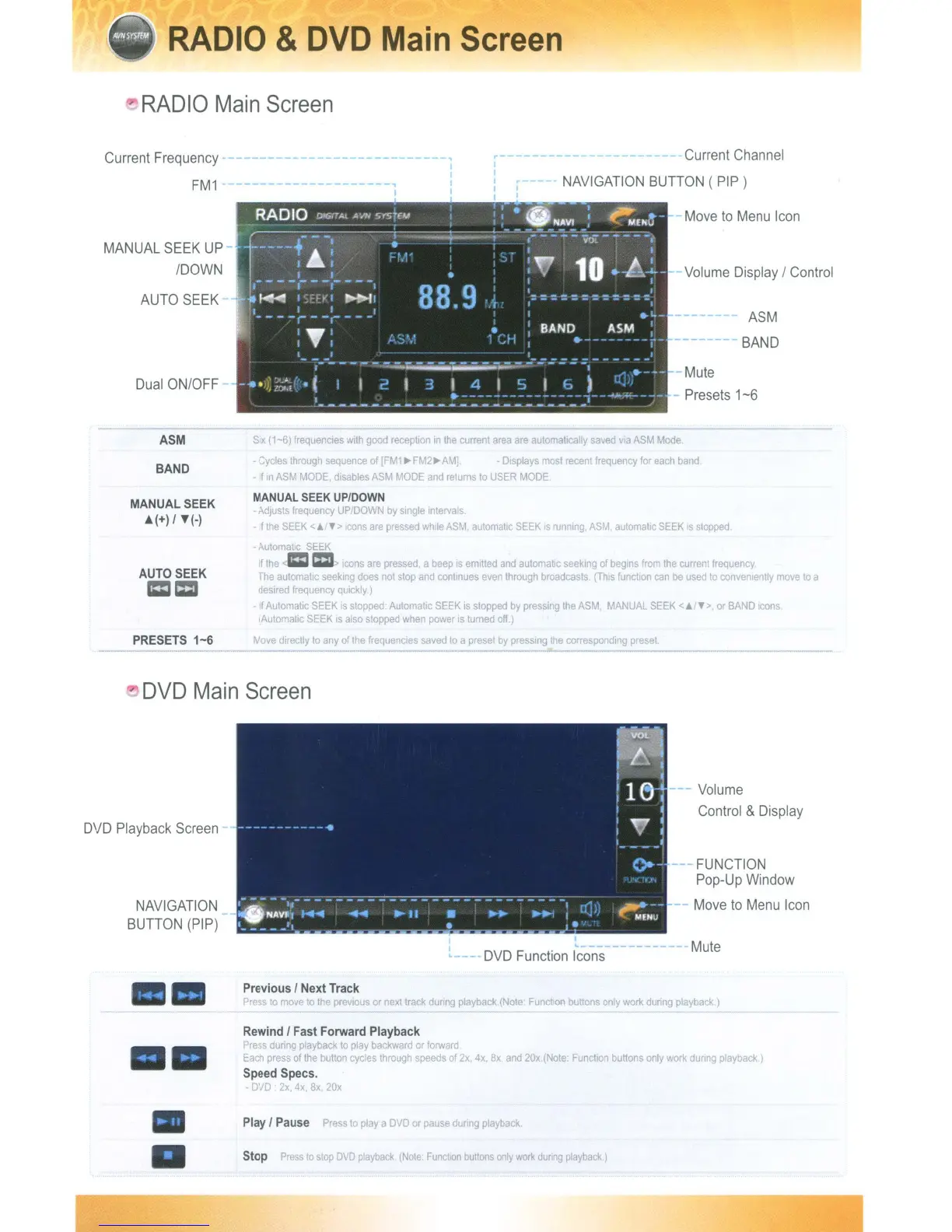
RADIO
&
DVD
Main
Screen
"
RADIO
Main
Screen
Current
Frequency
FM1
MANUAL
SEEK
UP-
/DOWN
AUTO
SEEK
Dual
ON/OFF
-------------------,
I
r-----
I
I
I
r--
I I
I I
Current
Channel
NAVIGATION
BUTTON
( PIP)
-
Move
to
Menu
Icon
Volume
Display
/
Control
ASM
BAND
-Mute
Presets
1-6
ASM
BAND
MANUAL SEEK
A(+) /
'f(-)
AUTO SEEK
==
PRESETS
1-6
SIX
(1-6)
frequencies
with
good
reception
in
the
current
area
are
automatically
saved
via
ASM
Mode
-
Cycles
through
sequence
of
[FM1.-FM2.-AMJ -
Displays
most
recent
frequency
for
each
band
-
If
In
ASM
MODE
disabtes
ASM
MODE
and
returns
to
USER
MODE
MANUAL
SEEK
UP/DOWN
Adjusts
frequency
UP/DOWN
by
single
Intervals.
-
If
ti,e
SEEK
<;.,,,>
cons
are
pressed
whlleASM.
automahc
SEEK
IS
running,
ASM
automatic
SEEK
IS
stopped
- Automatc
SEEK
tf
the
c:::D>
It:ens
are
pressed
a
beep
IS
emitted
and
automatic
seeking
of
begins
from
the
current
frequency
The
automahc
seeking
does
not
stop
and
continues
even
through
broadcasts
(ThiS
funchon
can
be
used
to
conveOiently
move
to
a
deSired
frequency
quickly)
- If
Automahc
SEEK
is
stopped
Automatic
SEEK
is
stopped
by
pressing
the
ASM
MANUAL
SEEK
<
'"
">,
or
BAND
Icons
(Automatic
SEEK
IS
also
stopped
when
power
IS
turned
off.)
Move
directly
10
any
of
the
frequencies
saved
to
a
preset
by
pressing
the
corresponding
preset
..
"
DVD
Main
Screen
DVD
Playback
Screen
NAVIGATION
BUTTON
(PIP)
I
I
,,---
. -
DVD
Function
Icons
---
Volume
Control
&
Display
FUNCTION
Pop-Up
Window
Move
to
Menu
Icon
Mute
Previous / Next Track
Press
10
move
to
the
prevIous
or
next
track
dUring
playback
(Note
Function
buttons
only
work
during
playback.)
Rewind / Fast Forward Playback
Press
during
playback
to
play
backward
or
forward
Each
press
of
the
button
cycles
through
speeds
of
2x,
4x,
8x,
and
20x.(Note.
Funchon
buttons
only
work
dunng
playback.)
Speed Specs.
DVD
2x.
4x,
8x
20x
Play / Pause
Press
to
playa
DVD
or
pause
during
playback.
Stop
Press
to
stop
DVD
playback.
(Note:
Funcllon
buttons
only
work
dUring
playback)
RADIO
&
DVD
Main
Screen
"
RADIO
Main
Screen
Current
Frequency
FM1
MANUAL
SEEK
UP-
/DOWN
AUTO
SEEK
Dual
ON/OFF
-------------------,
I
r-----
I
I
I
r--
I I
I I
Current
Channel
NAVIGATION
BUTTON
( PIP)
-
Move
to
Menu
Icon
Volume
Display
/
Control
ASM
BAND
-Mute
Presets
1-6
ASM
BAND
MANUAL SEEK
A(+) /
'f(-)
AUTO SEEK
==
PRESETS
1-6
SIX
(1-6)
frequencies
with
good
reception
in
the
current
area
are
automatically
saved
via
ASM
Mode
-
Cycles
through
sequence
of
[FM1.-FM2.-AMJ -
Displays
most
recent
frequency
for
each
band
-
If
In
ASM
MODE
disabtes
ASM
MODE
and
returns
to
USER
MODE
MANUAL
SEEK
UP/DOWN
Adjusts
frequency
UP/DOWN
by
single
Intervals.
-
If
ti,e
SEEK
<;.,,,>
cons
are
pressed
whlleASM.
automahc
SEEK
IS
running,
ASM
automatic
SEEK
IS
stopped
- Automatc
SEEK
tf
the
c:::D>
It:ens
are
pressed
a
beep
IS
emitted
and
automatic
seeking
of
begins
from
the
current
frequency
The
automahc
seeking
does
not
stop
and
continues
even
through
broadcasts
(ThiS
funchon
can
be
used
to
conveOiently
move
to
a
deSired
frequency
quickly)
- If
Automahc
SEEK
is
stopped
Automatic
SEEK
is
stopped
by
pressing
the
ASM
MANUAL
SEEK
<
'"
">,
or
BAND
Icons
(Automatic
SEEK
IS
also
stopped
when
power
IS
turned
off.)
Move
directly
10
any
of
the
frequencies
saved
to
a
preset
by
pressing
the
corresponding
preset
..
"
DVD
Main
Screen
DVD
Playback
Screen
NAVIGATION
BUTTON
(PIP)
I
I
,,---
. -
DVD
Function
Icons
---
Volume
Control
&
Display
FUNCTION
Pop-Up
Window
Move
to
Menu
Icon
Mute
Previous / Next Track
Press
10
move
to
the
prevIous
or
next
track
dUring
playback
(Note
Function
buttons
only
work
during
playback.)
Rewind / Fast Forward Playback
Press
during
playback
to
play
backward
or
forward
Each
press
of
the
button
cycles
through
speeds
of
2x,
4x,
8x,
and
20x.(Note.
Funchon
buttons
only
work
dunng
playback.)
Speed Specs.
DVD
2x.
4x,
8x
20x
Play / Pause
Press
to
playa
DVD
or
pause
during
playback.
Stop
Press
to
stop
DVD
playback.
(Note:
Funcllon
buttons
only
work
dUring
playback)

Table of Contents