32
EN
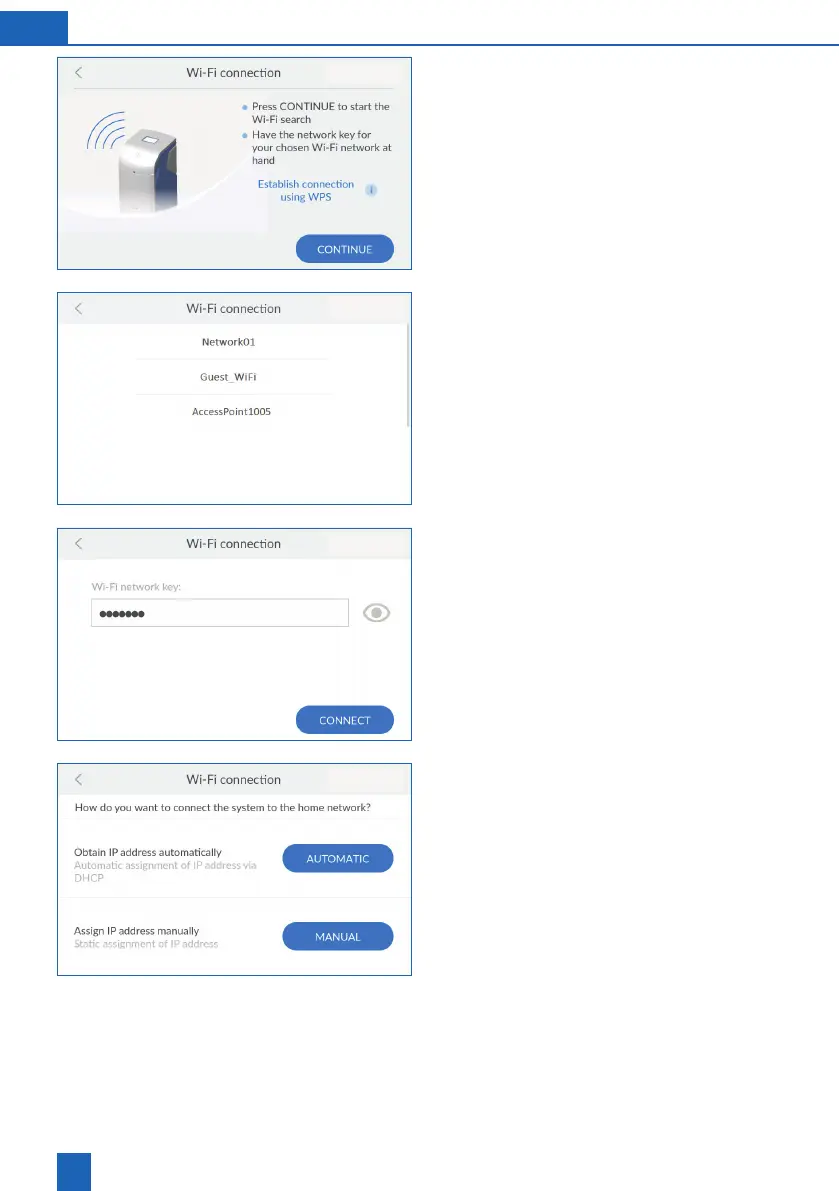
Starting the Wi-Fi search
Press
CONTINUE
to search for available Wi-Fi
networks.
If your Wi-Fi router supports WPS, you can use it to
establish the connection automatically.
Selecting Wi-Fi
Press the desired Wi-Fi network to select it.
Entering the security key
-
rity key (e.g. WPA2 key) of the selected Wi-Fi
network.
To check the entry afterwards, press the eye
Obtaining the network connections
automatically
The network settings can be obtained automatically
via DHCP.
Press
AUTOMATIC
to use your network settings.
If you do not want to obtain your network settings
via DHCP, you can also assign them manually. To
do so, you must know your network settings.
Press
MANUAL
if you want to assign the network
settings yourself.



 To Next Page