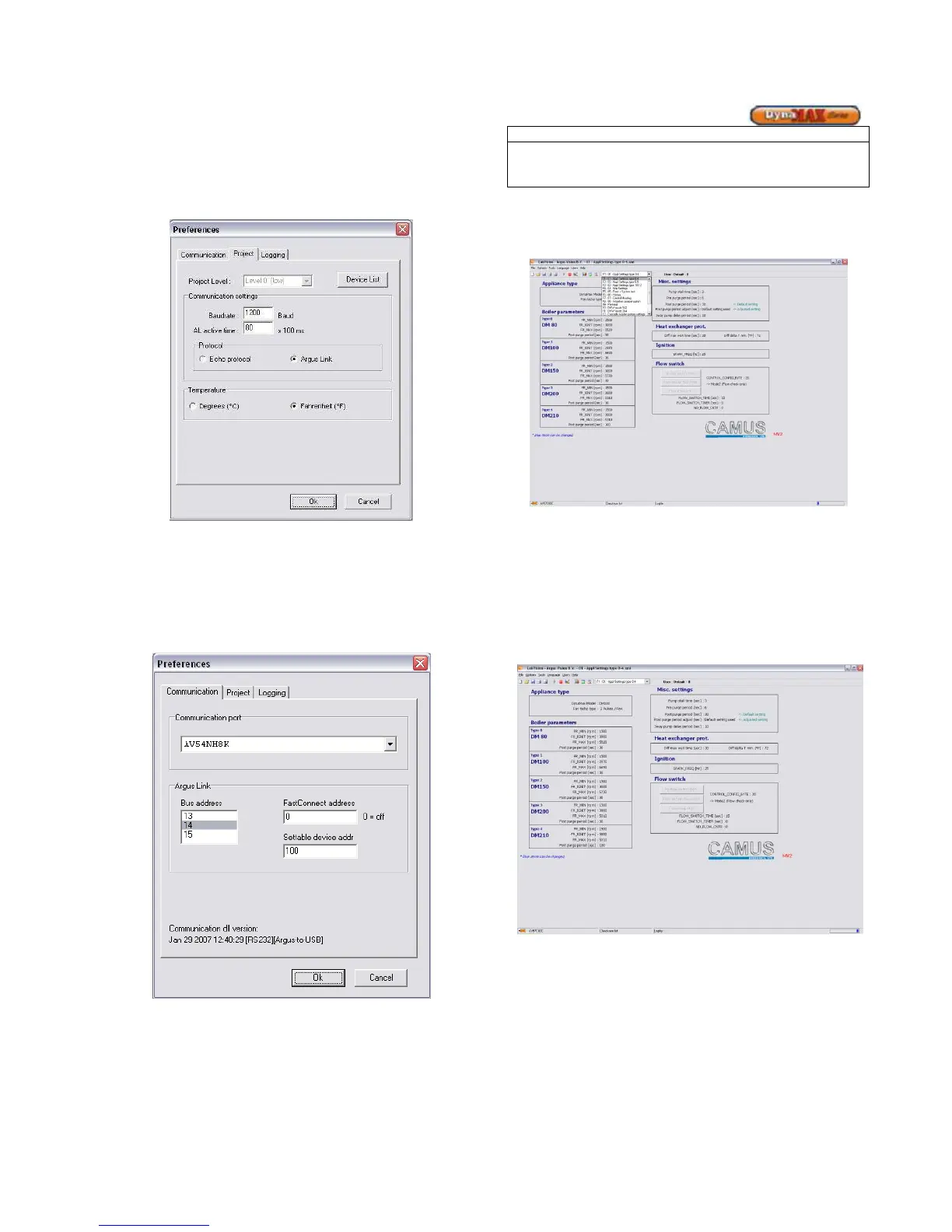
• Go to Options > Communication > Preferences
• A Preferences screen will pop up
• Under the Project Tab in the Protocol box select the
Argus Link connection
Figure 29: Selecting Argus Link Protocol
• Click on the Communication Tab
• In the Communication Port pull down menu
select the address of Argus Link USB port.
• Click [OK]
• Use the pull down menu to jump to the desired
mode of operation.
Figure 30 : Selecting Communication Port
The three blue status bars located at the bottom-right of the
screen will move left-to-right and back again. This confirms
that a successful connection has been established between
LabVision and the DynaMax boiler.
USB connector address is shown in the bottom-left.
Do not make any other parameter or setting changes other
than those stated in the manual as they will have a
detrimental effect to the DynaMax.
8.4 ADJUSTING FAN SPEEDS
Use the pull down menu to access DynaMax settings:
Figure 31: Pull Down Menu
To adjust ignition fan speeds. Use the pull down menu or the
function keys on the keyboard, select Settings. This will bring
up the Settings screen.
Parameters shown in blue text can be adjusted. To change a
blue coloured parameter, place the cursor on top of a
parameter and double-click. This will bring up a window to
enter the desired values of operation.
Figure 32: Settings Screen
• The Appliance name is listed under Appliance Type
• Fan speeds are listed which corresponds to the
appliance address, listed below:






 To Next Page