9.8 BOILER CONTROL
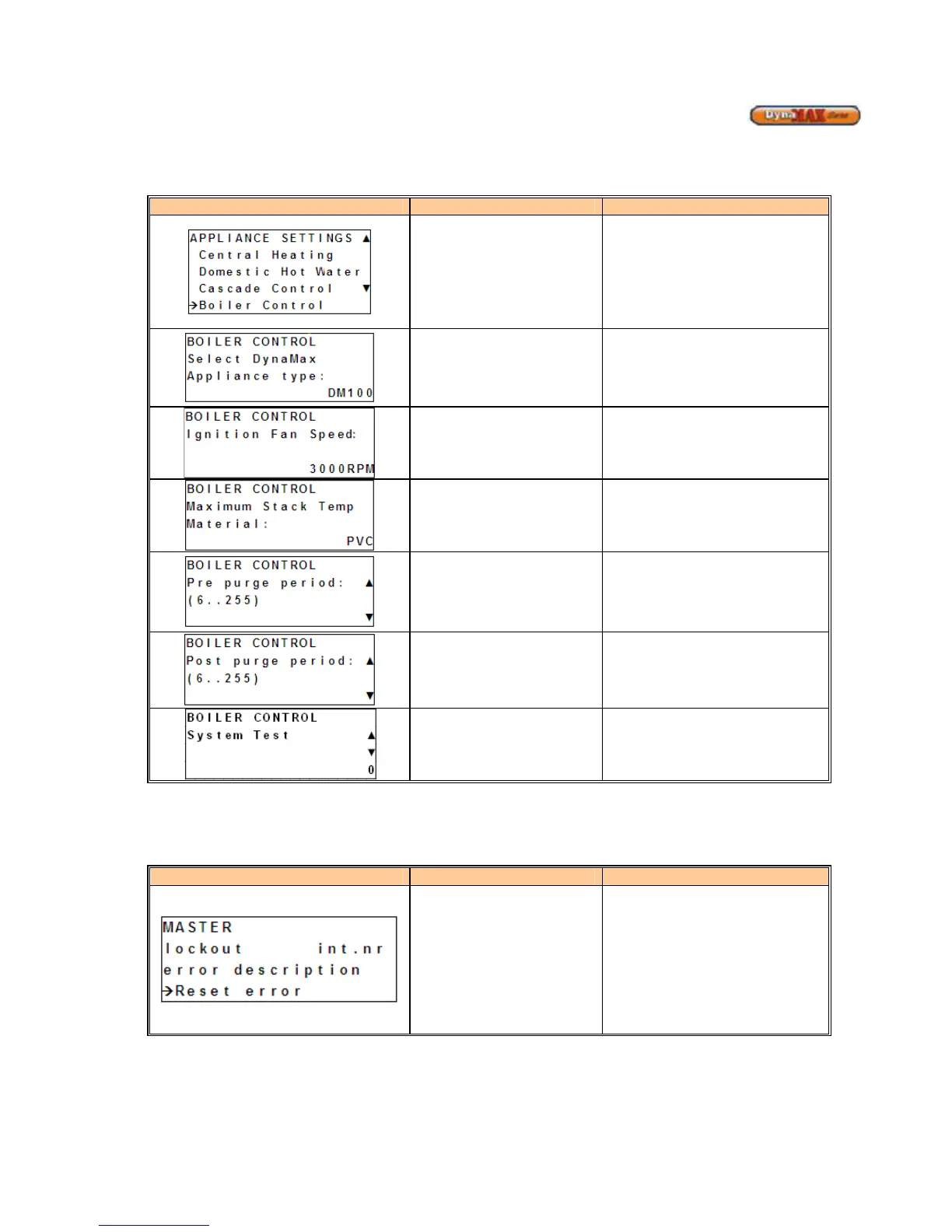
1) Use [PREVIOUS]/[NEXT] button to select ‘Boiler Control’.
2) Press ENTER
Display Display Readout Description
Boiler Control
Enters Boiler Control branch of
display
Appliance Type Selection
Select the appliance model
parameters associated with each
model
Ignition Fan Speed
Adjust the ignition fan speed.
(Default: 3000 RPM)
Stack Material
Select the vent material which is
being used on the appliance.
Pre Purge Period
Sets the pre purge time for before
ignition occurs (Default: 10 seconds)
Post Purge Period
Sets the post purge time after a call
for heat ends (Default: 30 secs for
wall hung units, 100 secs for floor
mount units)
System Test
Manual override of fan speeds for a
time of 10 minutes. Fan speeds can
vary from Off, Minimum Power,
Ignition Power or Maximum Power
9.9 ERROR SCREEN
1) Use [PREVIOUS]/[NEXT] to select ‘Errors’
2) Press [ENTER].
Display Display Readout Description
Error Screen
This will display ‘Blocking’
or ‘Lockout’ depending on the error
Int.nr: This will display the error
code in the form of an internal
number (Lockout code, Table 5.4.1)
or (Blocking error, Table 5.4.2)
Error Description: The error
description block shall display the
error in text.






 To Next Page