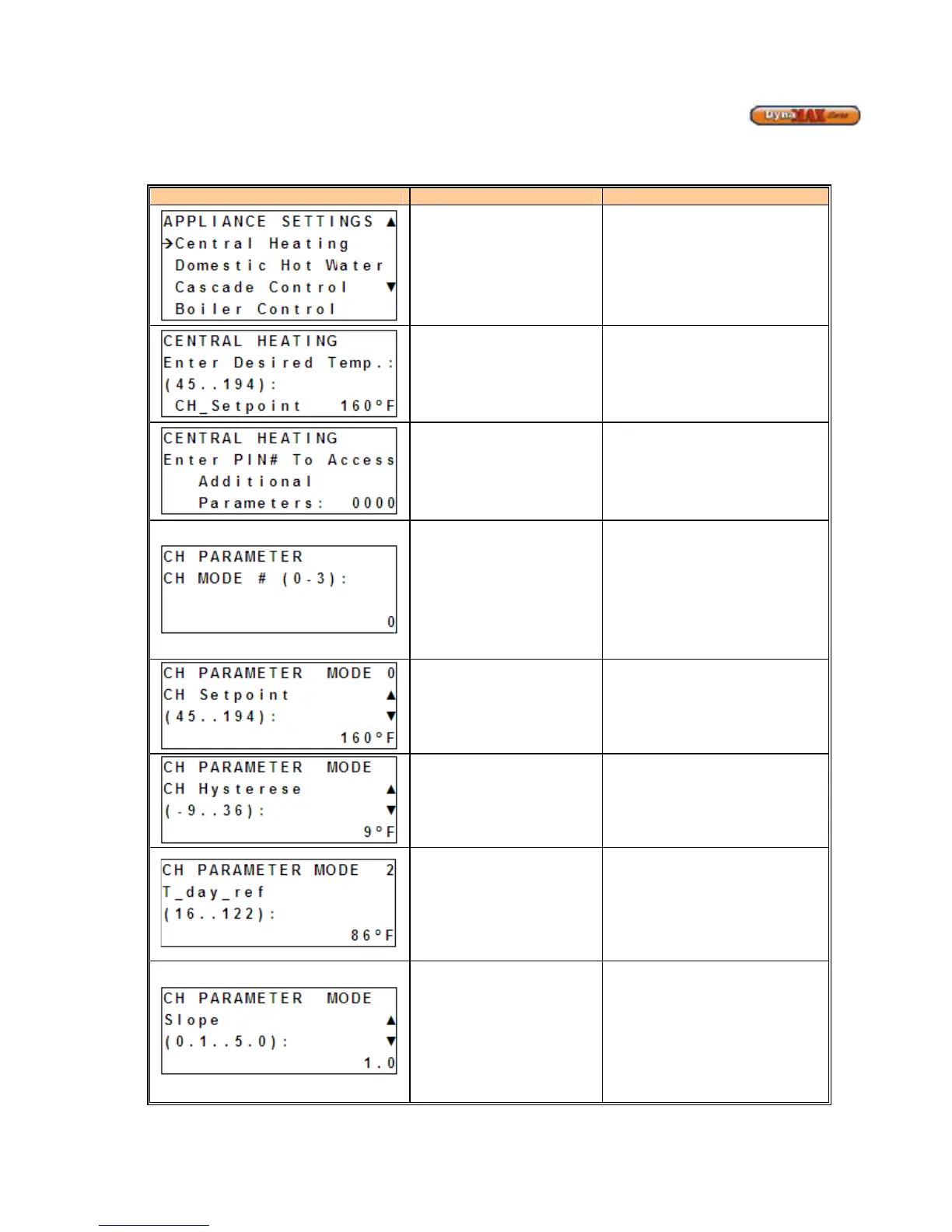
9.5 CENTRAL HEATING DISPLAY
1) Use [PREVIOUS]/[NEXT] button to select ‘Appliance Settings’.
2) Press ENTER
Display Display Readout Description
Central Heating
Enters Central Heating branch of
display
Setpoint
Allows adjustment of Setpoint. The
Setpoint is controlled to the boiler
outlet sensor. (Default: 160
o
F)
PIN# Access
1) Use [
to enter
INSTALLER ACCESS display
2) Use [UP/DOWN] to enter
desired PIN #. 0225
3) Press [ENTER] to confirm.
CH Mode of Operation
Mode 0: Central Heating Without
Outdoor Reset
Mode 1: Central Heating with
Outdoor Reset and Thermostat
Control
Mode 2: Central Heating with
Outdoor Reset
Mode 3: Central Heating with
Constant Temperature Loop
CH_Setpoint
(Mode 0, 3)
Allows adjustment of Setpoint. The
Setpoint is controlled to the boiler
outlet sensor. (Default: 160
o
F)
CH_Hysterese
(Mode 0, 1, 2, 3)
To provide modulation rate above
and below CH_setpoint. For
example, if the value is 10
o
F and the
setpoint is 160
o
F, the boiler will begin
to modulate at 155
o
F and shut off at
165
o
F. (Default: 9
O
F)
T_day_ref
(Mode 1, 2)
To determine the outdoor reset
temperature. The control uses the
following algorithm to adjust the
CH_setpoint: CH_Setpoint =
T_day_ref + [(70-T_Outdoor) *
Slope]. (Default: 86
o
F)
Slope
(Mode 1, 2)
To determine the outdoor reset
temperature. See T_day_ref to
understand how Slope affects
CH_Setpoint. (Default: 1.0)






 To Next Page