10.1 SETTING THE CORRECT COMBUSTION
1) Switch the main power off to the boiler by placing the
toggle switch in the ‘OFF’ position
2) Switch the main power on to the boiler and adjust set
point so that boiler begins ignition sequence.
3) Observe the boiler as it goes through its startup cycle
and operates at high fire. This cycle is detailed on Table
41 in section 12.14 Ignition Cycle.
4) Insert the combustion measurement probe into the stack
when high fire operation is observed. Check to see that
fan is running at maximum fan speed using the Control
Panel.
5) The combustion values should reside in the range listed
in Table 38. If combustion values are not within this
range refer to Section 10.2 Gas Valve Adjustment
Procedure to correct this issue.
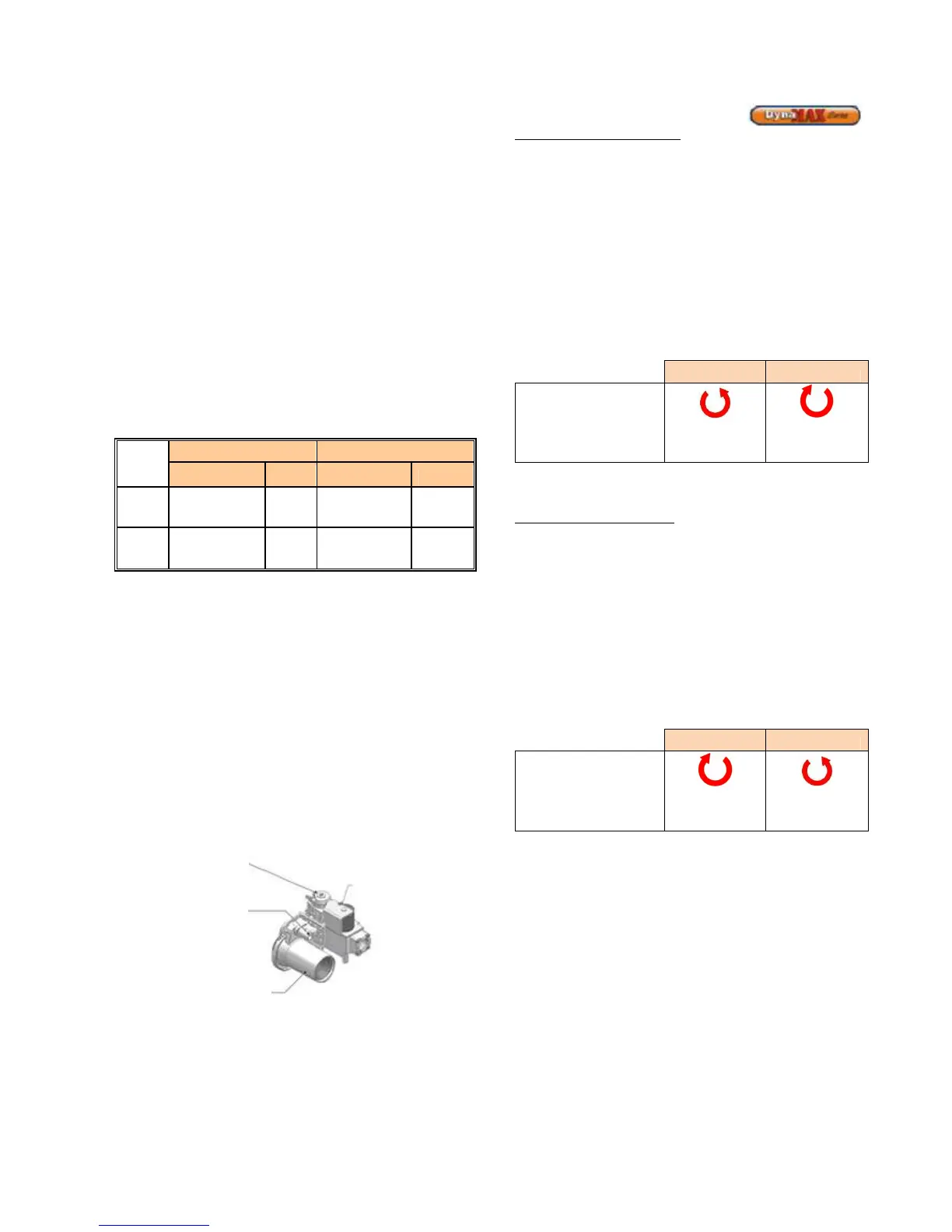
Table 31: Combustion Values
Natural Gas Propane
CO
CO
Max.
Fire
8.5% - 9.0%
<100
9.5% -
10.0%
<100
PPM PPM
Min.
Fire
8.0% - 8.5%
<100
9.0% - 9.5%
<100
PPM PPM
6) When the combustion values are satisfied record these
values as Camus requires these for warranty purposes.
7) Remove the combustion measurement device and
switch the main power off to the boiler by placing the
toggle switch in the ‘OFF’ position.
8) Replace the flue temperature sensor back to its proper
location.
10.2 GAS VALVE ADJUSTMENT PROCEDURE
If adjustment of the gas valve is required use the following
procedure.
In order to perform adjustments to the gas valve the
DynaMax must be firing before proceeding.
DM 080 – 250, 260
Figure 56: Venturi & Gas Valve Assembly
To adjust the high-fire setting
Use the DynaMax Control Panel
Press the [MENU] button > select Appliance Settings and
press [ENTER] > select Boiler Control and press [ENTER] >
Enter the correct Installer passcode.
Select ‘Maximum power’ for high power. The DynaMax
should respond immediately and fire at maximum fan speed.
Locate the input adjustment screw on the side of the venturi.
Turn the screw 1/8 turn in either way for each adjustment to
keep track of the adjustments. After adjusting the screw wait
a moment for the combustion levels to stabilize before
attempting to make any further adjustments. Continue this
procedure until combustion levels are satisfied.
Increase CO2 Decrease CO2
High Fire
Adjustment
Counter-
Clock Wise
Clockwise
On the DynaMax Control Panel select ‘off’ to return to
normal operation.
To adjust the low fire setting
Use the DynaMax Control Panel
Press the [MENU] button > select Appliance Settings and
press [ENTER] > select Boiler Control and press [ENTER] >
Enter the correct Installer passcode.
Select ‘Minimum power’ for low power.
The DynaMax should respond immediately and fire at
minimum fan speed. When this is achieved locate the low
fire adjustment screw as illustrated in Figure 56. This screw
is covered with a cap, which can be removed using a Torx
40 screwdriver. When the correct combustion values are
achieved replace the screw cap back on to the gas valve.
Clockwise
Counter-
Clock Wise
On the DynaMax Control Panel select ‘off’ to return to
normal operation.
(use Torx 40 for adjustment,
clockwise increases CO
2
)
(use slotted screwdriver for
adjustment, counter-
clockwise increases CO
2
)






 To Next Page