9.1 INTRODUCTION TO THE DYNAMAX
CONTROL PANEL
For times when a notebook computer is not available, a
service technician will still be able to perform all the
functions described in LabVision, except for the logging
aspect.
The menu structure for the DynaMax Control Panel was
designed to be intuitive and easy to use for a first time user.
To maintain the DynaMax boiler at its correct settings three
levels of security is provided. User, Installer and Factory
with an increasing amount of parameters that can be
adjusted with each higher level of access. This is done to
provide an easy means of communication for the end user
and a more indepth approach for factory and installers
when installing and troubleshooting.
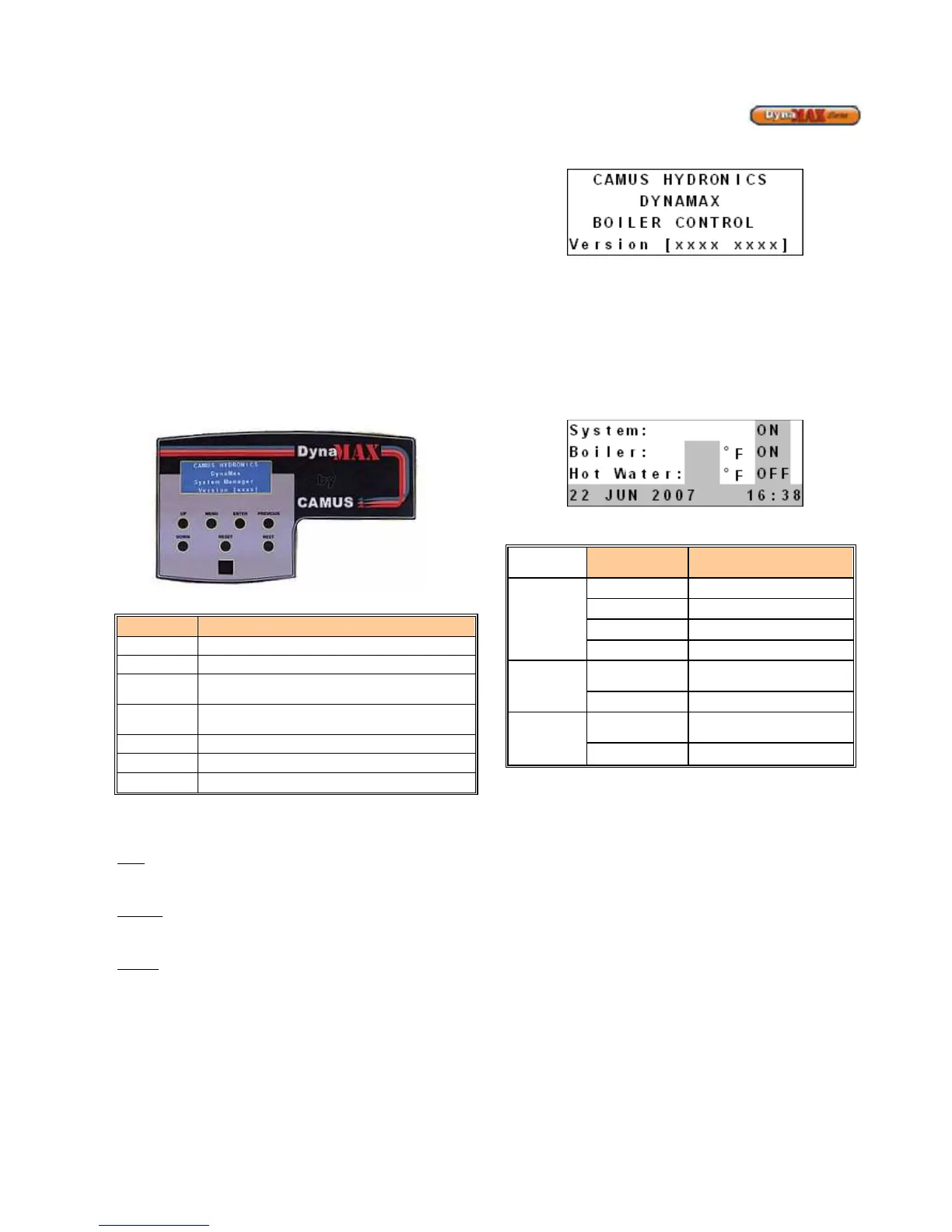
Figure 53: DynaMax Control Panel Layout
Table 29: DynaMax Control Panel Key Functions
KEY KEY DESCRIPTION
MENU
The MENU display is shown when pressed.
RESET
Only used during a lockout error situation
ENTER
Confirms selection of a parameter or
parameter value
PREVIOUS
Scroll backward through the parameter
structure
NEXT
Scroll forward through the parameter structure
UP
Increase a parameter value
DOWN
Decrease a parameter value
Levels of Access
Three access levels to simplify the use of the boiler.
User – Access to general boiler and display settings and
will allow adjustments to the central heating and domestic
hot water setpoint.
Installer –Access to all user parameters and allows for
changes to additional boiler parameters to allow for ease of
startup and serviceability.
Camus – Full access to DynaMax parameters and is only
open to Camus personnel.
Startup Display
Upon startup of the DynaMax boiler the DynaMax Control
Panel startup display is shown. This display is shown for 5
seconds upon startup. The Version # relates to the version
of software uploaded onto the boiler control. The latest
display version is [F371] coupled with ignition control
[1A5B].
Figure 54: DynaMax Home Screen
The display panel then defaults to the next screen which
provides System, Boiler and Hot Water temperature. For a
DynaMax heater that does not have domestic hot water
capability the status will display OFF.
A temperature readout of supply temperatures from the boiler
will be displayed. If the DynaMax is a water heater or a
combination unit it will also display the Hot Water
temperature.
Figure 55: Temperature and Status
Table 30: Temperature and Status Display Readout






 To Next Page