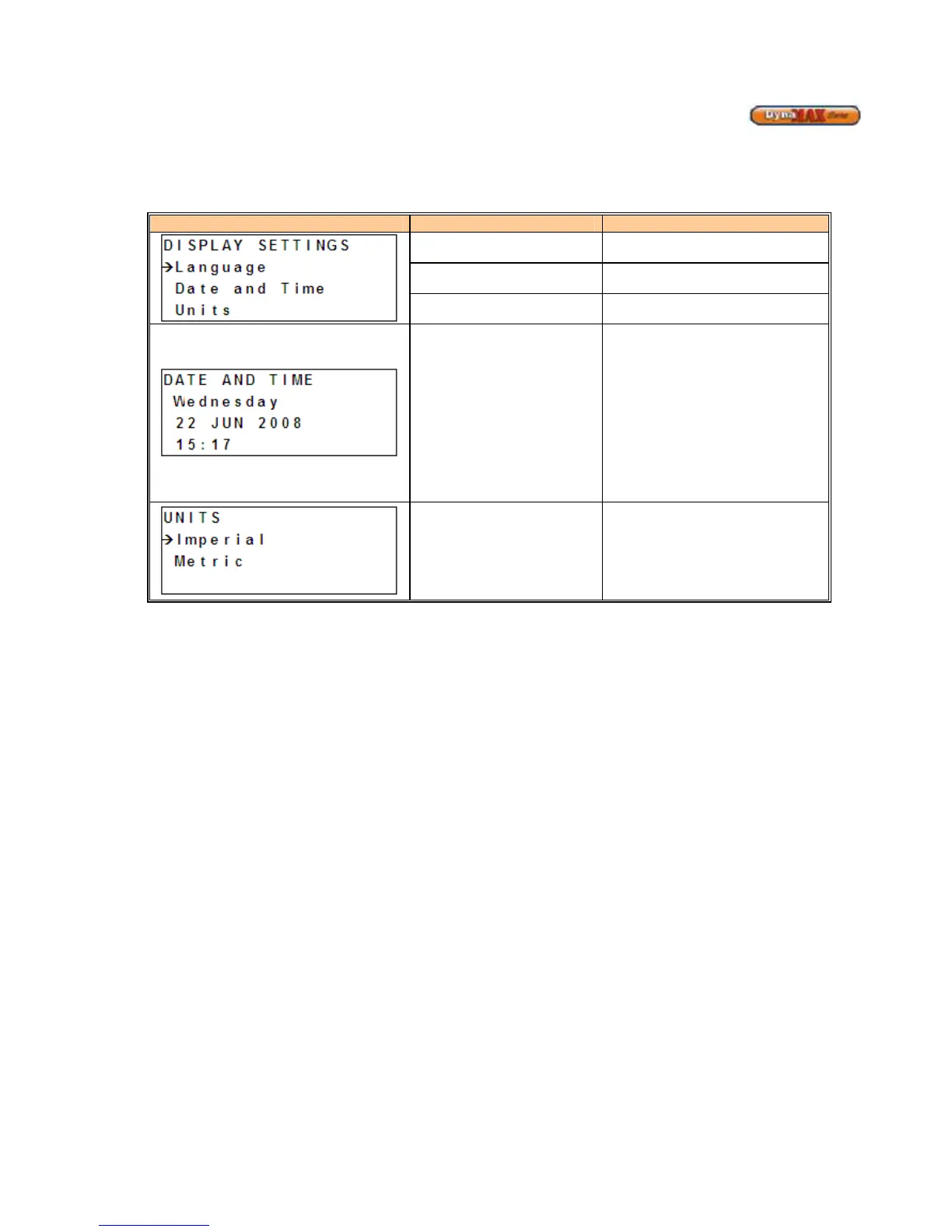
9.4 DISPLAY OPTIONS DISPLAY
From MENU display;
1) Use [PREVIOUS]/[NEXT] button to select ‘Display Options’.
2) Press ENTER
Display Display Readout Description
Language
Allows the control to be set to
English (default), French or Spanish
Date and Time
Allows the Date and Time to be
Units
Allows the control to be set to
Imperial (default) or Metric units
Date and Time
1) Use
to view DATE AND
TIME display
2) Use [UP]/[DOWN] and the
cursor arrow will point to either
the Day, Date or Time
3) Press [ENTER] to change a
parameter. The parameter will
begin to flash
4) Use [UP]/[DOWN] to change
parameter value.
5) Press [ENTER] to confirm.
Units
1) Use
to view UNITS
display
2) Use [UP]/[DOWN] to select the
desired unit of measurement
3) Press [ENTER] to confirm.






 To Next Page