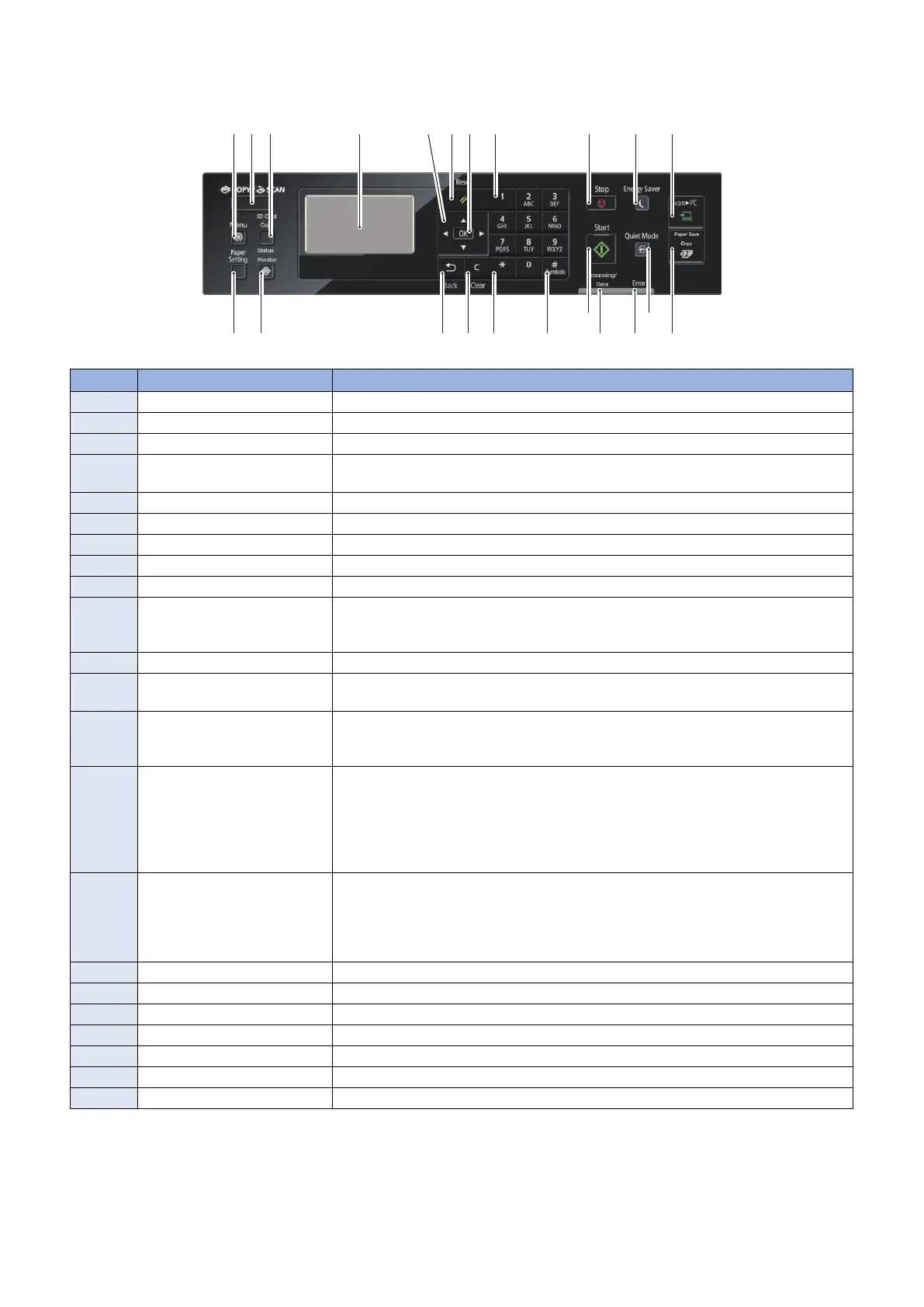
■ 5-line Control Panel Model
[20]
[2]
[19]
[1]
[8]
[3]
[18]
[22]
[17]
[21]
[9]
[16]
[6]
[10]
[5]
[13]
[7]
[11]
[12][15] [14]
[4]
No. Key / LED name Function
[1] [Menu] key Press to make various registrations and product settings.
[2] [Copy / Scan] key Press to switch Copy mode and Scan mode.
[3] [ID Card Copy] key Press to copy the front and back of a card onto the same side of a sheet of paper.
[4] Display Displays a message or operation status. Displays menu, selected item, texts, numbers
and other information when changing settings.
[5] Directional Keys Press to search setting items, increase / decrease input values, adjust setting values, etc.
[6] [Reset] key Press to reset the settings back to the standard mode settings.
[7] [OK] key Press to apply settings for functions and modes.
[8] Numeric keys Press to enter the number of copies, zoom values and text.
[9] [Stop] key Press to stop a job.
[10] [Energy Saver] key Press to manually enter/recover from energy saver mode.
• Off: In normal machine operation
• On (Green): In energy saving mode
[11] [Scan -> PC] key Press to store the scanned data to the registered PC.
[12] [Paper Save Copy] key Press to set 2 on 1 1-Sided > 2-Sided, 4 on 1 1-Sided > 2-Sided, 2 on 1 1-Sided > 1-sided,
4 on 1 1-Sided > 1-sided.
[13] [Quiet mode] key Press to switch On / Off of the quiet mode.
• Off: In normal machine operation
• On (Green): In quiet mode
[14] Error LED Indicates Error status
• Off: No Error
• On (Orange): When an error that cannot be recovered by the user (service call) occurs
• Blinking (Orange): When an error that can be recovered by the user (such as paper
jam, no paper, etc.) occurs
* On status overrides Blinking status when the both occur simultaneously.
[15] Processing/Data LED Indicates Job status
• Off: No Job
• On (Green): Job waiting
• Blinking (Green): Job being executed
* On status overrides Blinking status when the both occur simultaneously.
[16] [Start] key Press to start a job.
[17] [Symbols] key Press to enter symbols.
[18] [*] key Use to send the tone signal from the dial line.
[19] [Clear] key Press to clear numbers such as number of copies, or text.
[20] [Back] key Press to return to the screen one layer above.
[21] [Status Monitor] key Press to check the status of printing, copying and outputting the Report.
[22] [Paper Settings] key Press to make paper settings.
1. Product Overview
21










 To Next Page