Using the Printer on a Network
3-40
Setting Up the Printing Environment
3
3
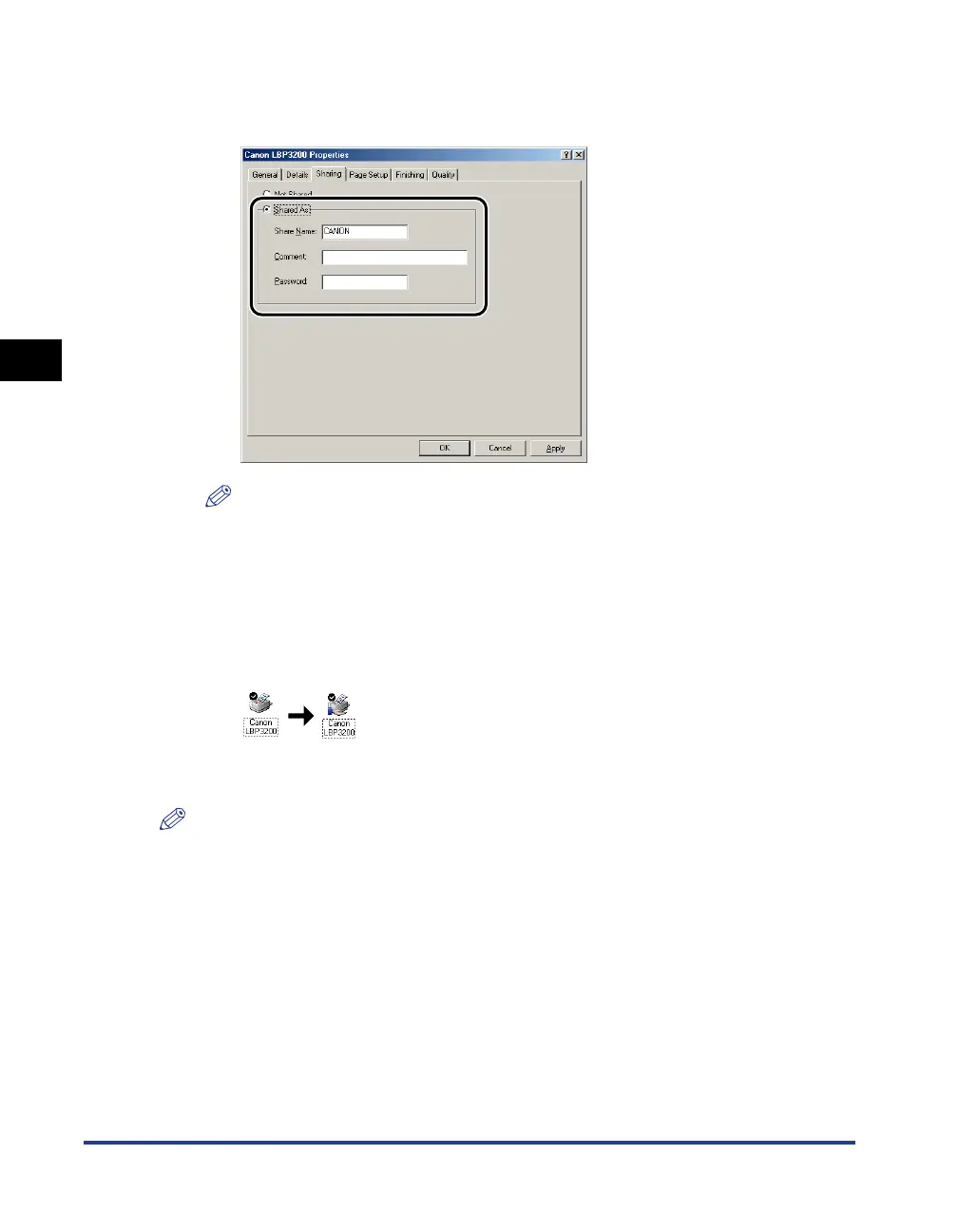
Select [Shared As]. Change [Share Name] if you want to, then
enter [Comment] and [Password] as needed.
NOTE
• If you have selected [User-level access control] in Step 7 of "Network Settings"
(see p. 3-38), click [Add] and select users that can use the printer.
• Do not enter blank or special characters in [Share Name].
4
Click [OK].
The printer icon changes to the printer sharing icon.
For Windows 2000/XP
NOTE
The screen shots used in this section are from Windows 2000.
■ Network Settings
1
For Windows 2000: Select the [Start] menu ➞ [Settings] ➞
[Network and Dial-up Connections].
For Windows XP: Select the [Start] menu ➞ [Control Panel] ➞
[Network and Internet Connections] ➞ [Network Connections].
For Windows 2000, the [Network and Dial-up Connections] dialog box will appear.
For Windows XP, the [Network Connections] dialog box will appear.




 To Next Page