Admin Viewer/VB Viewer
171
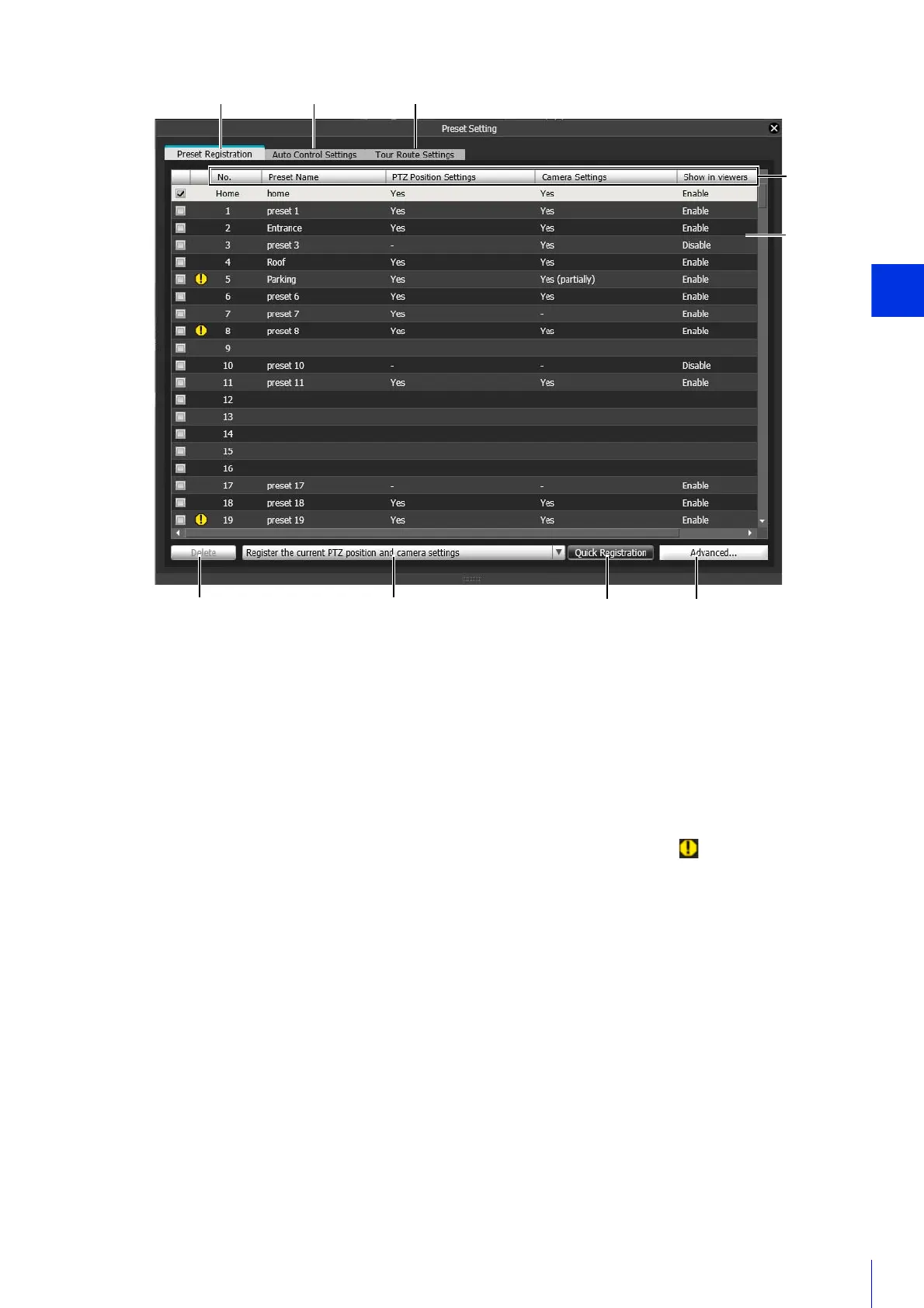
(1) [Preset Registration] Tab
Registers presets.
(2) [Auto Control Settings] Tab
Displays the Auto Control Settings panel (P. 177).
(3) [Tour Route Settings] Tab
Displays the Tour Route Settings screen (P. 179).
(4) Preset List Headers
The following items appear here. Click an item to sort the list.
[No.]
The number of the preset. If the position for the preset is outside the view restriction range, (warning icon) will
appear on the left.
[Preset Name]
Displays the registered preset name.
[PTZ Position Settings]
[Yes] appears if pan, tilt or zoom positions are registered in presets.
[Camera Settings]
[Yes] appears if camera settings (P. 174) are registered in presets, and [Yes (partially)] if only partial camera settings
are registered.
[Show in viewers]
Shows whether presets are set to be selectable in the Viewers.
[Enable] appears when using [Quick Registration] or for presets that were registered with [Show in viewers] selected in
the [Advanced Preset Settings] panel (P. 173).
(5) Preset List
Presets appear in a list. If you double-click a registered preset in the list, you can also check that preset in the video
display area.
(4)
(5)
(3)(2)
(6)
(7) (8) (9)
(1)



 To Next Page