Admin Tools
245
For [Downloaded] video, the video is played back on the computer. For video that has not completed download, video on the memory card
is played back.
Play Back JPEG Video
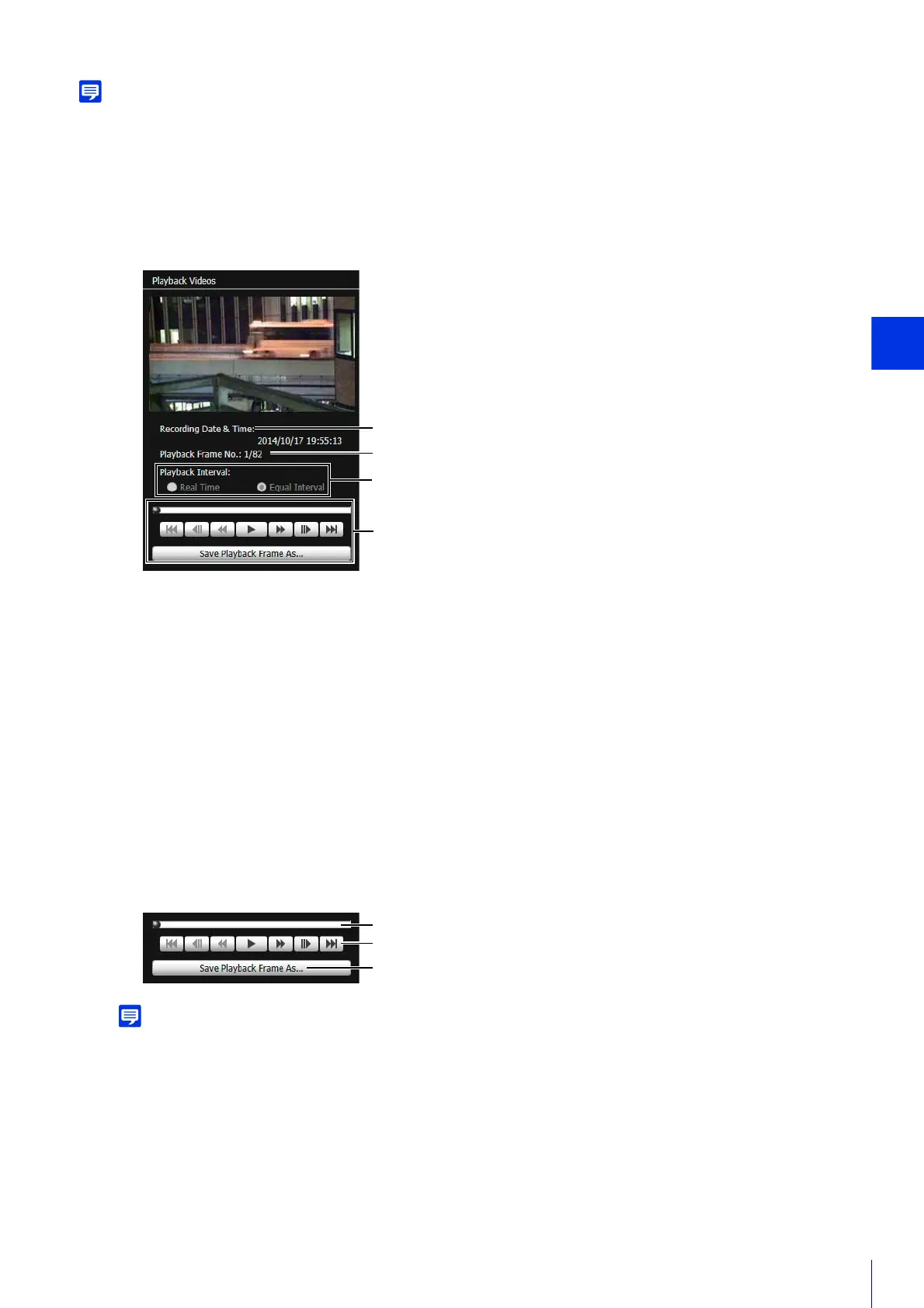
The first frame and information for the selected video will appear in [Playback Videos].
(1) [Recording Date & Time]
Displays the date and time of video frames that are being displayed.
(2) [Playback Frame No.]
Displays frame numbers and total number of video frames that are being displayed.
(3) [Playback Interval]
[Real Time]
JPEG video is played back in real time interval according to the recording time. The preceding JPEG video
appears in an empty frame. [Real Time] can be selected only for playback of downloaded videos.
[Equal Interval]
JPEG video is played back at a 1-second interval.
(4) Playback Controls
Controls used for playback.
[Not Downloaded] or [Partially Downloaded] videos may not be played back in the order they were recorded.
(1) Slider
Drag the slider to change playback position.
1
Select JPEG video in the video list for playback.
2
Use the playback controls for playback.



 To Next Page