50 Main features CG Drives & Automation, 01-5980-01r2
7.1.3Jog functions
The Jog (slow speed) function can be activated via the
control panel using the jog keys, via remote I/O control or
via serial communication.
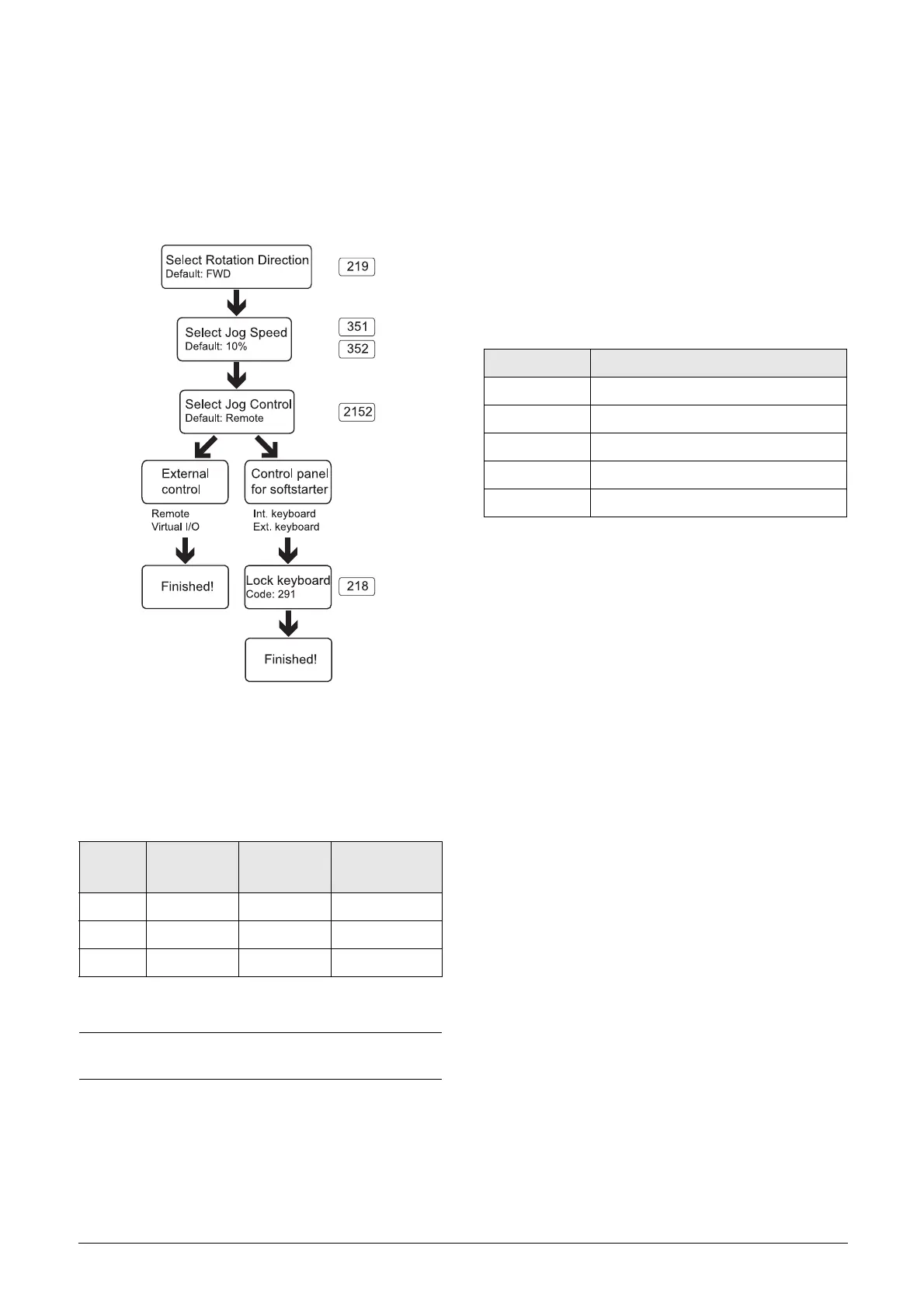
To select the method to activate the jog function, follow the
procedure described in Fig. 36.
Fig. 36 Jog decision tree
It is necessary that the rotation direction settings for all
parameters involved in the jog function correlate to each
other. See Table 20 below.
1) Value that can be changed in the respective menu.
It is possible to adjust the rate of acceleration from standstill
to the selected Jog speed level in menu “[353] Jog Ramp
Rate” to achieve smooth Jog start.
There are also a couple of examples on how to apply time
settings for jog by using logic functions, see page 63.
7.1.4Start/Stop signal priority
A jog command has lower priority than a normal start
command, meaning that if the softstarter is already running
the motor, the jog command is ignored. If the softstarter is
in jog mode, a normal start command will override this and
start the motor to full speed.
An “Enable” command (setting via Digin [520]) has the
highest priority and overrides both a normal start/stop
command and a jog command. If “Enable” is inactive it will
not be possible to execute a normal start or a jog start. The
total priority order is listed in Table 21 below.
7.1.5Setting motor data
For optimal performance set motor data according to the
motor’s rating plate. The menus for this are found in section
8.2.3, page 73; menu group [220]. The motor data is
handled as a parameter set (one of four: M1- M4). Motor
M1 is selected as default and the motor data entered will be
valid for motor M1. If different motors are used, the motor
data must be saved under different motor data sets, selected
in menu [212]. See also “Handling motor data in parameter
sets” on page 52.
7.1.6Process information
An external sensor, e.g. a 4-20mA pressure sensor can be
connected to the analogue input and be used as process
value for the TSA.
The process value can be configured to show a true SI value,
e.g in [bar].See menu group [320].
It is also possible to let this reference value, depending on
level, make an automatic start (or stop) of the TSA. For
more information see example page 107.
If needed, the SI units can be changed to US units in menu
[21C].
Please note that Motordata settings will be reset and thereby
needs to be adjusted after changing units.
Table 20 Jog settings depending on rotation direction
Menu
Forward
Jog
Reverse
Jog
Forward and
reverse jog
219 FWD REV FWD+REV
351 10%
1)
10%
1)
352 10%
1)
10%
1)
NOTE: To jog with the control panel jog keys, press and
hold.
Table 21 Signal priority for digital inputs
Priority Command
1Enable
2Stop
3 Run FWD and Run REV
4 Jog FWD and Jog REV
5 Spinbrake


 To Next Page
 Loading...