LPOD Outdoor Amplifier / Block Up Converter (BUC) Revision 9
Updating Firmware MN-LPOD
3–3
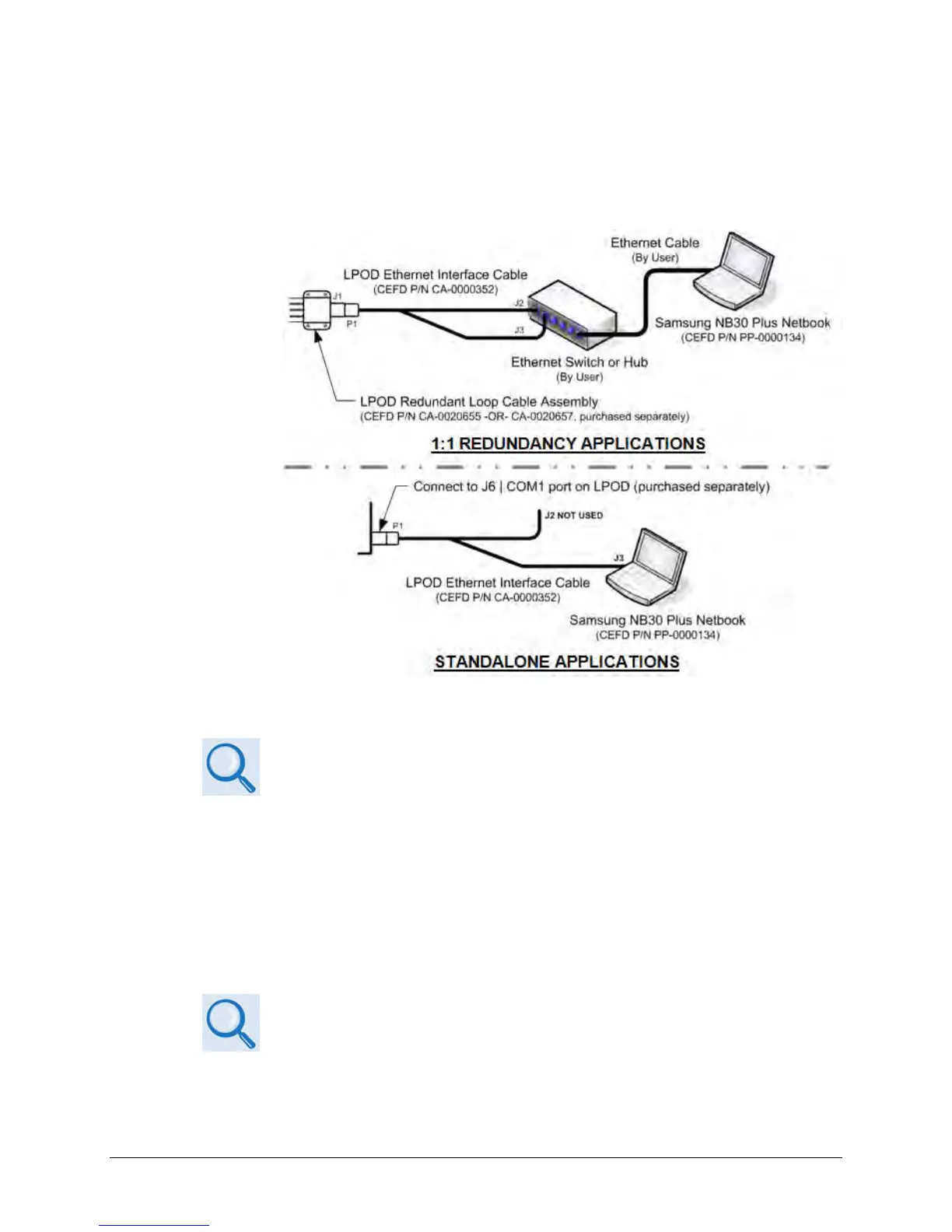
o Your Ethernet connection may use either the CAT5 Ethernet adapter cable
(CEFD P/N CA-0000352) to directly connect the PC Ethernet port to the LPOD, or
the optional LPODnet M&C Netbook Accessory Kit (CEFD Kit KT-0000203). The
following example depicts use of the LPODnet for 1:1 Redundant or Standalone
Ethernet connection:
B. On the PC – If not using the CLC-10, configure the terminal emulator program if applicable.
Refer to your terminal emulator program HELP feature or user guide for
operating and configuration instructions.
Configure the utility program serial port communication and terminal display operation:
• 38400 bps (Baud Rate) • 8 Data Bits • 1 Stop Bit
• Parity = NO
•
• Display New line Rx/Tx: CR
• Local Echo = ON
C. On the LPOD – Power up the unit. Your power connection varies depending on your
ordered unit.
See Sect. 2.2.3 Connector ‘J3 | POWER IN’ (AC Power Mains) or Sect. 2.2.4
Connector ‘J3 | POWER IN’ (DC Power Mains) in this manual for your specific
power connectors.



 To Next Page