LPOD Outdoor Amplifier / Block Up Converter Revision 9
Ethernet-based Remote Product Management MN-LPOD
4–8
4.5 Web Server (HTTP) Interface
A user-supplied web browser allows the full monitor and control (M&C) of the LPOD through its
Web Server Interface. This non-secure embedded web application is designed for, and works
best with, Microsoft’s Internet Explorer Version 5.5 or higher.
See the Remote Commands and Queries specifications tables found in Chapter 5. SERIAL-BASED
REMOTE PRODUCT MANAGEMENT for detailed descriptions of many of the functions depicted
throughout Sect. 4.5.4 Web Server Page Descriptions.
4.5.1 Enabling the Web Server Interface
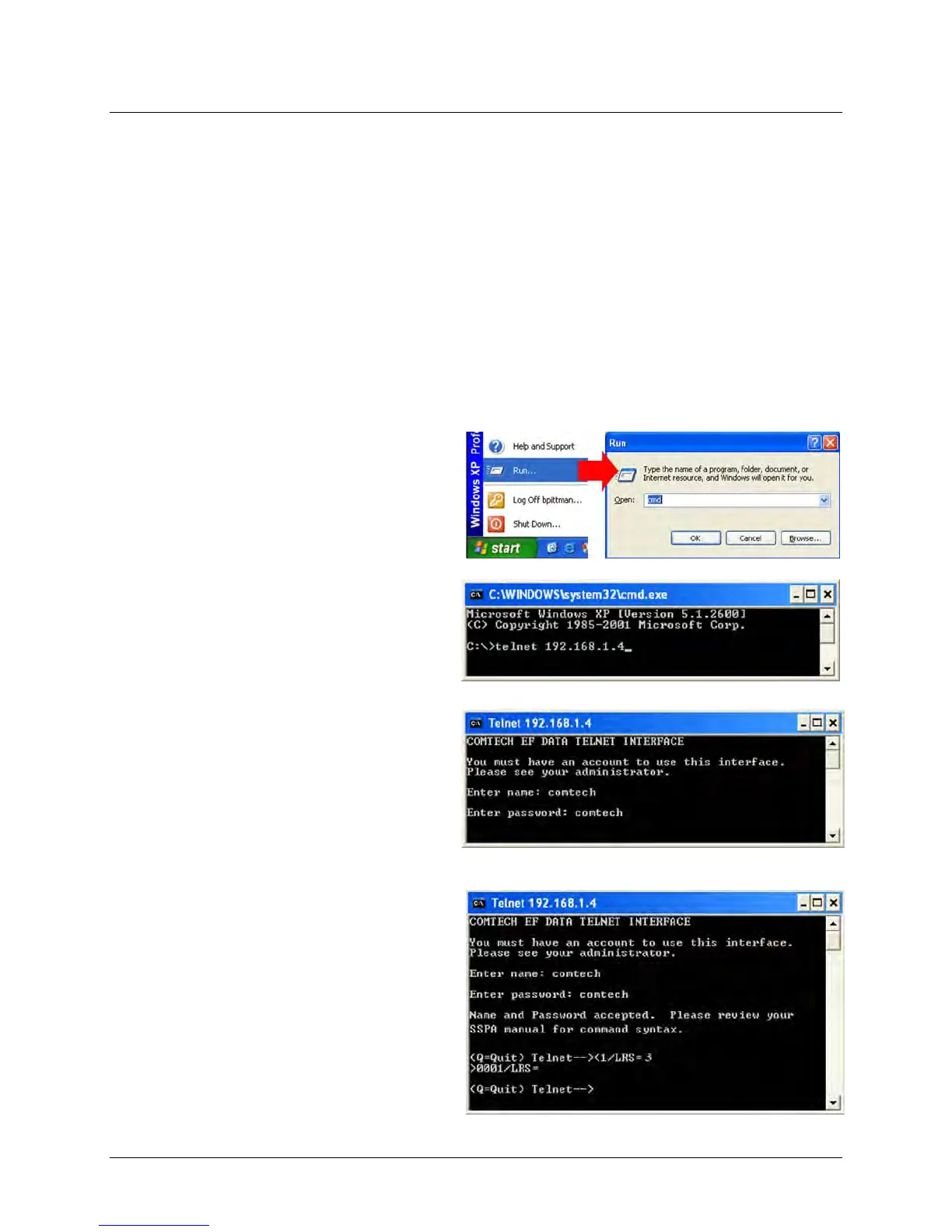
To enable the Web Server Interface in the LPOD using only a 100BaseTx remote interface (this
assumes that you are running a Microsoft Windows OS):
1. Select Start, then Run, then type
“cmd” to open the command
prompt window:
2. Start a Telnet session with the unit
at the default IP address of
192.168.1.4:
3. Enter the Telnet username and
password (the default for both
parameters is comtech):
4. Set the remote access parameter to
accept Ethernet remote control
using the LRS command.
LRS=3, the default remote
command, provides Serial +
Ethernet control, while remote
command LRS=2 provides Ethernet
control only.



 To Next Page