Function Timer On/Off
FanEnter/Cancel Mode
Function Timer On/Off
FanEnter/Cancel Mode
Function Timer On/Off
FanEnter/Cancel Mode
Function Timer On/Off
FanEnter/Cancel Mode
Function Timer On/Off
FanEnter/Cancel Mode
24 00 05
05
03 00
01
24
30
10. Unit make:
11. Braemar (SDHV series
inverter ducted, single
phase units only)
12. Gree (GFH inverter
ducted, single phase
units only)
Myzone Wiring
Connections to
Braemar and
Gree Units
Service Mode Parameters
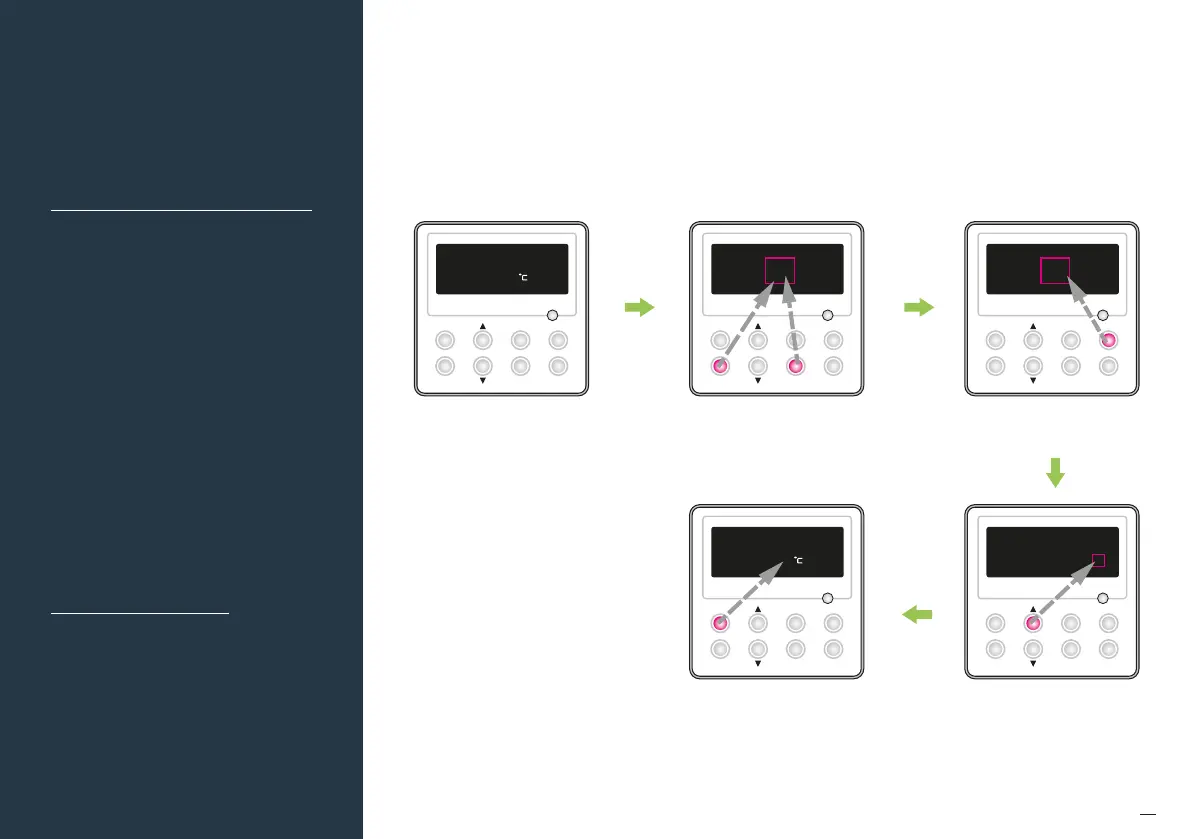
Entering Service Mode
To enter Service Mode, power must be connected to the unit
and wired controller, and the unit must be switched "OFF" at the
wall control. Follow he below steps and refer to the function and
parameter setting table:
Unit is in "OFF" or "STANDBY" mode. Press "Mode" button to change
the "Function" settings from
"00" to "12".
Simultaneously press "Function" and
"Timer" buttons for 5s, controller enters
the parameter setting interface.
Press "Up" or "Down" button to
adjust the parameter setting.
Press "Enter/Cancel" button to save the
settings and quit from the interface.
Failure to do this will result in changes
not being saved!


 To Next Page