Timing Dampers
Reverse Dampers
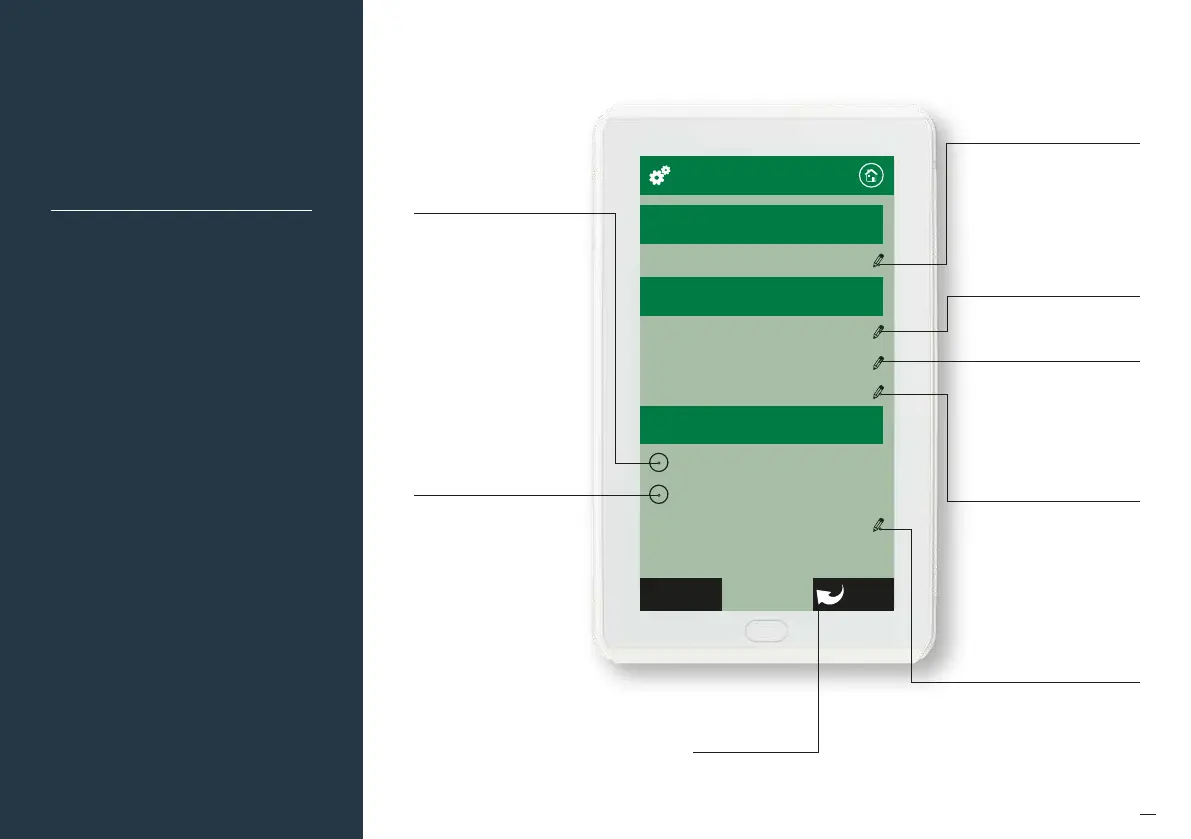
Temperature Adjustment
RF Channel Config 2
Airflow Adjustment
System Lock Out
Zone Port Skipping
System Options
RF Channel
Locks
Damper Control Type
BackNext
76
System Options
(Locks and Non
Standard Damper
Motors)
Note:
• Information on the configuration
screen may vary depending which
devices are connected to the system
and which model of Myzone
you have.
Select here for non standard
dampers such as Belimo.
You will need to type in the
drive time in seconds fro
fully closed to fully open.
Please note this will change
the timing for all motors in
the system so you cannot
have a mix of dierent
motors on the same system
when using this feature.
The damper fault detection
is ignored when this mode
is used.
Press here to change the systems
radio frequency channel. NOTE:
If the RF channel is changed, you
will need to re-pair all the RF
devices connected to the system
(Zone sensors, Wi-Fi Bridge etc.)
Press here to set limits for set
point adjustment and to lock
this setting
Touch here to lock airflow
adjustment. You can lock
minimum airflow only or both
minimum and maximum air flow
adjustments.
Default factory setting are:
Minimum Airflow = Locked
Maximum Airflow = Unlocked
Touch to lock the AC Unit. You
will need to enter a PIN number
and then the number of days you
want the system to operate for,
until it is locked o. Do not forget
your PIN. WARNING! If pin code is
forgotten, the CPU will need to be
re-programmed.
Select here to reverse the
operation of all dampers
Press here to skip a zone port on
the C225 Module in the event a
zone port is faulty
Touch here to go back to the previous
configuration page


 To Next Page