Myzone 3 12:00PM 01 Jan 2021
SYSTEM ZONES AC UNIT OPTIONS
Number of Zones
4
Number of Constants 1
Pair Wireless Device
iSave
WiFi Bridge Config
Change Password
*******
System Device List
80
Configuration
Main Menu
(Modern Display)
Note:
• Information on the configuration
screen may vary depending which
devices are connected to the system
and which model of Myzone
you have.
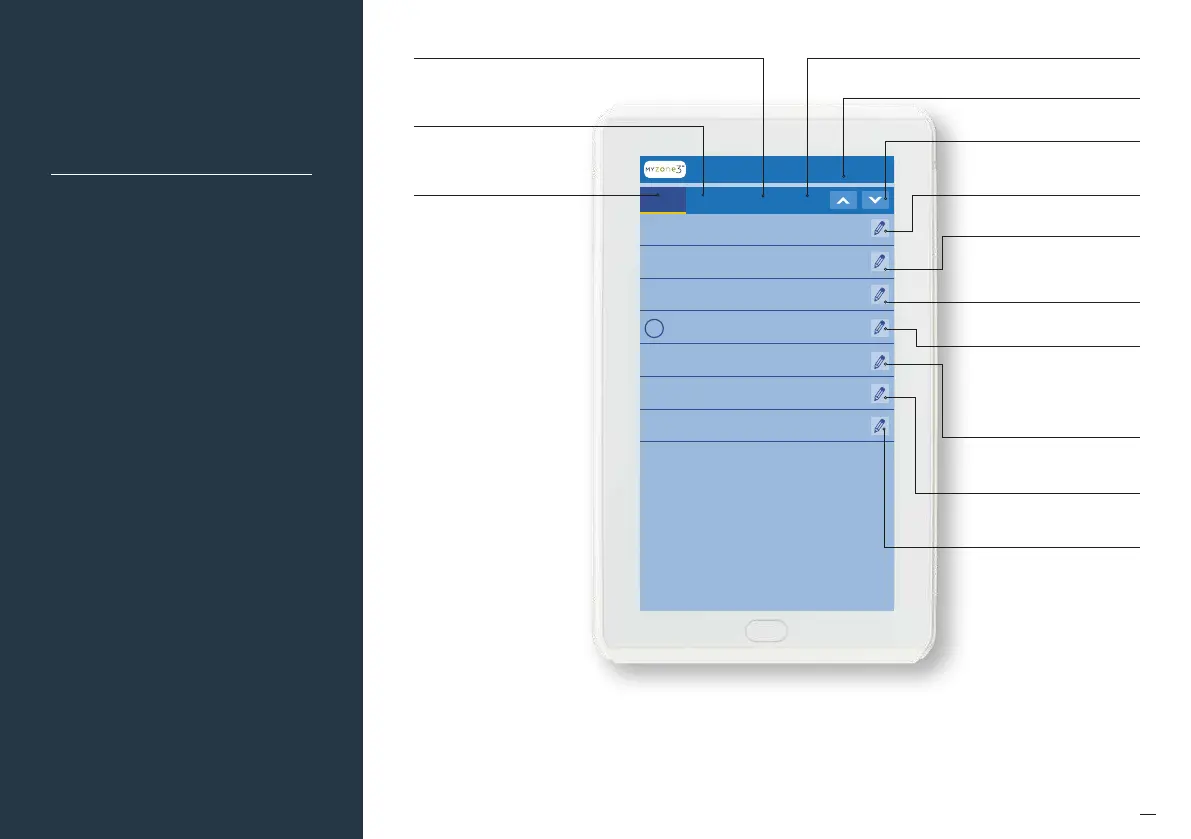
Touch here to view the A/C
Unit Settings
Touch here to view the
Options Settings
Touch here to view the
Zones Settings
Touch here to view the
System Settings
Touch here to scroll "UP"
through settings
Touch here to scroll "DOWN"
through settings
Touch here to edit the number of
zones installed (see page 76)
Touch here to pair wireless devices
Touch here to manually configure
the Wi-Fi Bridge
Touch here to list the devices and
sotware versions detected by
the system
Touch here to change the
system password
Touch here to enable iSave.
iSave components must be
installed and electronic hardware
set up accordingly
Touch here to edit the number of
variable electronic constant zones
required (see page 77)


 To Next Page