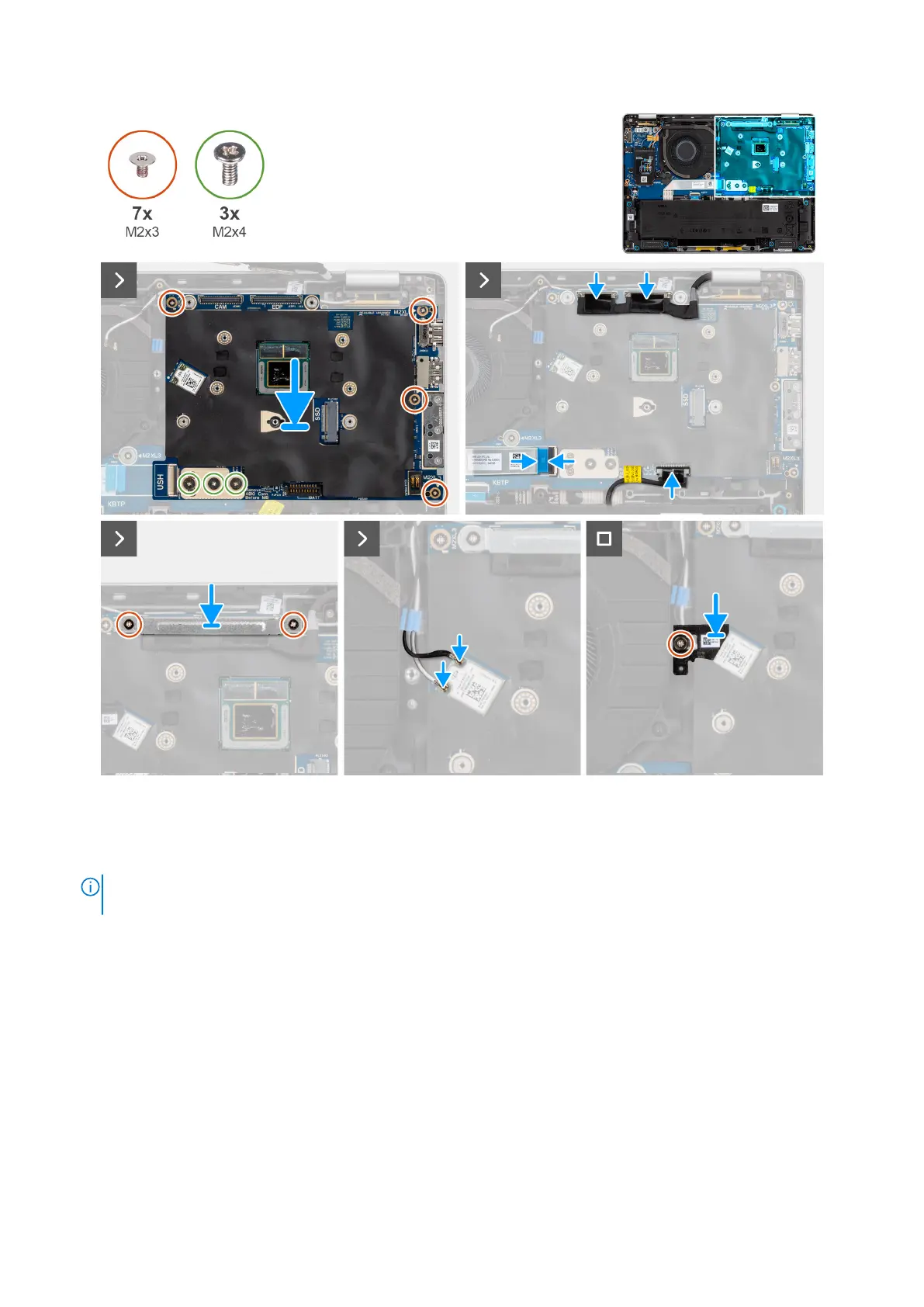
Figure 72. Installing the system board
Steps
1. Place the system board in place and align the screw holes on the system board with the screw holes on the chassis.
NOTE:
When installing the system board, follow the number markings on the board-to-board connector bracket to
install the two screws (M2x4) in the sequence of 1 > 2 > 3.
2. Replace the four screws (M2x3) and two screws (M2x4) to secure the system board in place.
3. Connect the display connector, camera connector, battery cable, and USH daughter board FFC (for models shipped with a
USH daughter board) to the system board.
4. Place the display bracket in place and replace the two screws (M2x3) to secure the display bracket in place.
5. Connect the WLAN antenna cables to the WLAN module on the system board.
6. Place the WLAN bracket over the WLAN antenna cable and replace the screw (M2x3) to secure it in place.
Next steps
1. Install the heat sink.
2. Install the WWAN card.
3. Install the M.2 2230 solid state drive or M.2 2280 solid state drive, as applicable.
4. Install the base cover.
5. Install the SIM card tray, if applicable.
Removing and installing Field Replaceable Units (FRUs)
103



 To Next Page