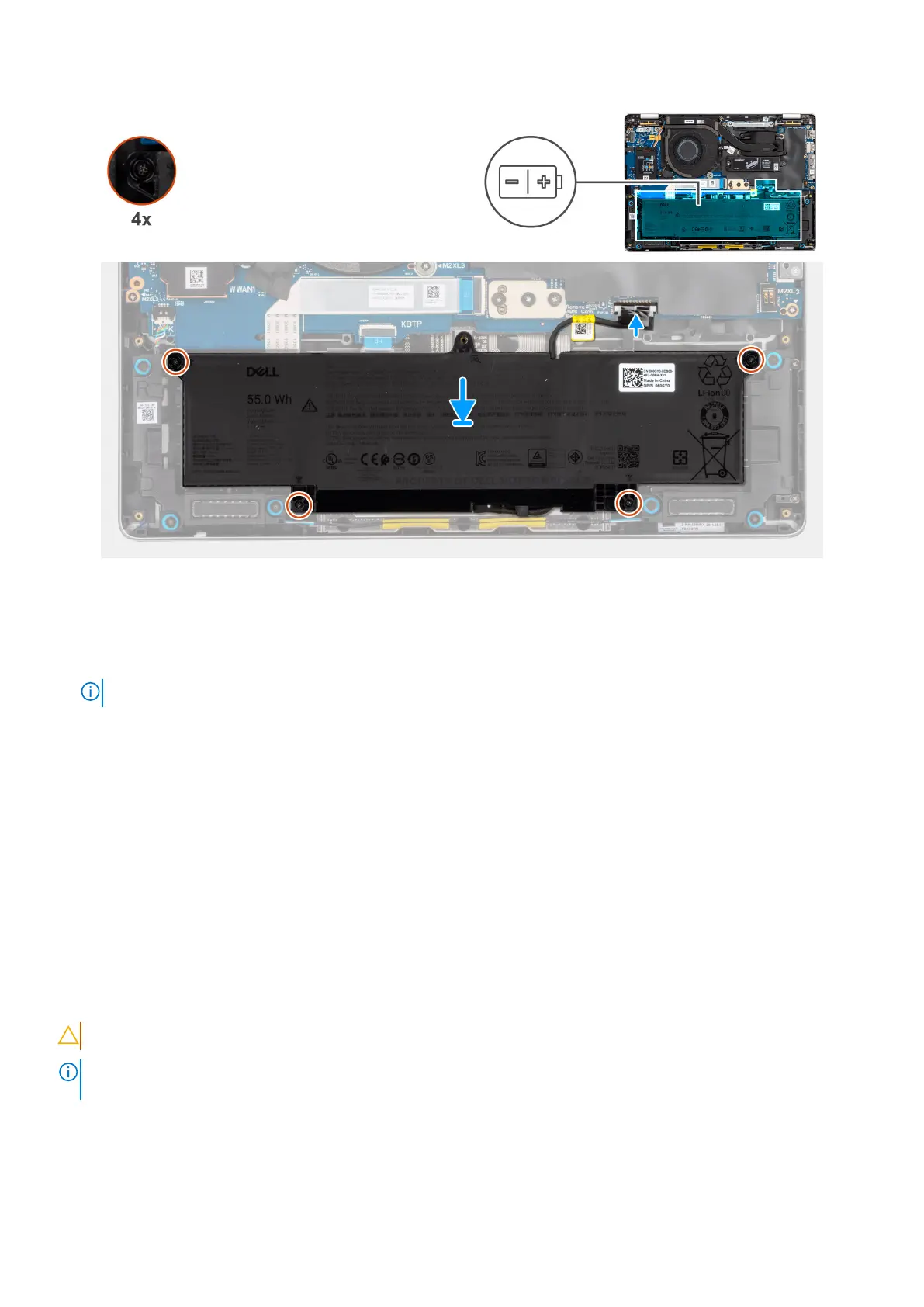
Figure 27. Installing the battery
Steps
1. Connect the battery cable to the connector on the battery.
2. Route the battery cable along the routing guides on the battery.
NOTE: When reinstalling the battery cable, ensure that the cable is properly routed under the securing tabs.
3. Using the alignment posts, place the battery on the palm-rest assembly.
4. Tighten the four captive screws that secure the battery in place.
5. Connect the battery cable to the connector on the system board.
Next steps
1. Install the base cover.
2. Install the SIM card tray, if applicable.
3. Follow the procedure in after working inside your computer.
Wireless Wide Area Network (WWAN) card
Removing the WWAN card
CAUTION: The information in this removal section is intended for authorized service technicians only.
NOTE: The 5G WWAN card is available only on certain configurations. It is connected to the computer with four antenna
cables.
Prerequisites
1. Follow the procedure in before working inside your computer.
2. Remove the sim-card tray, if applicable.
Removing and installing Customer Replaceable Units (CRUs)
51



 To Next Page