Installing the WWAN card
About this task
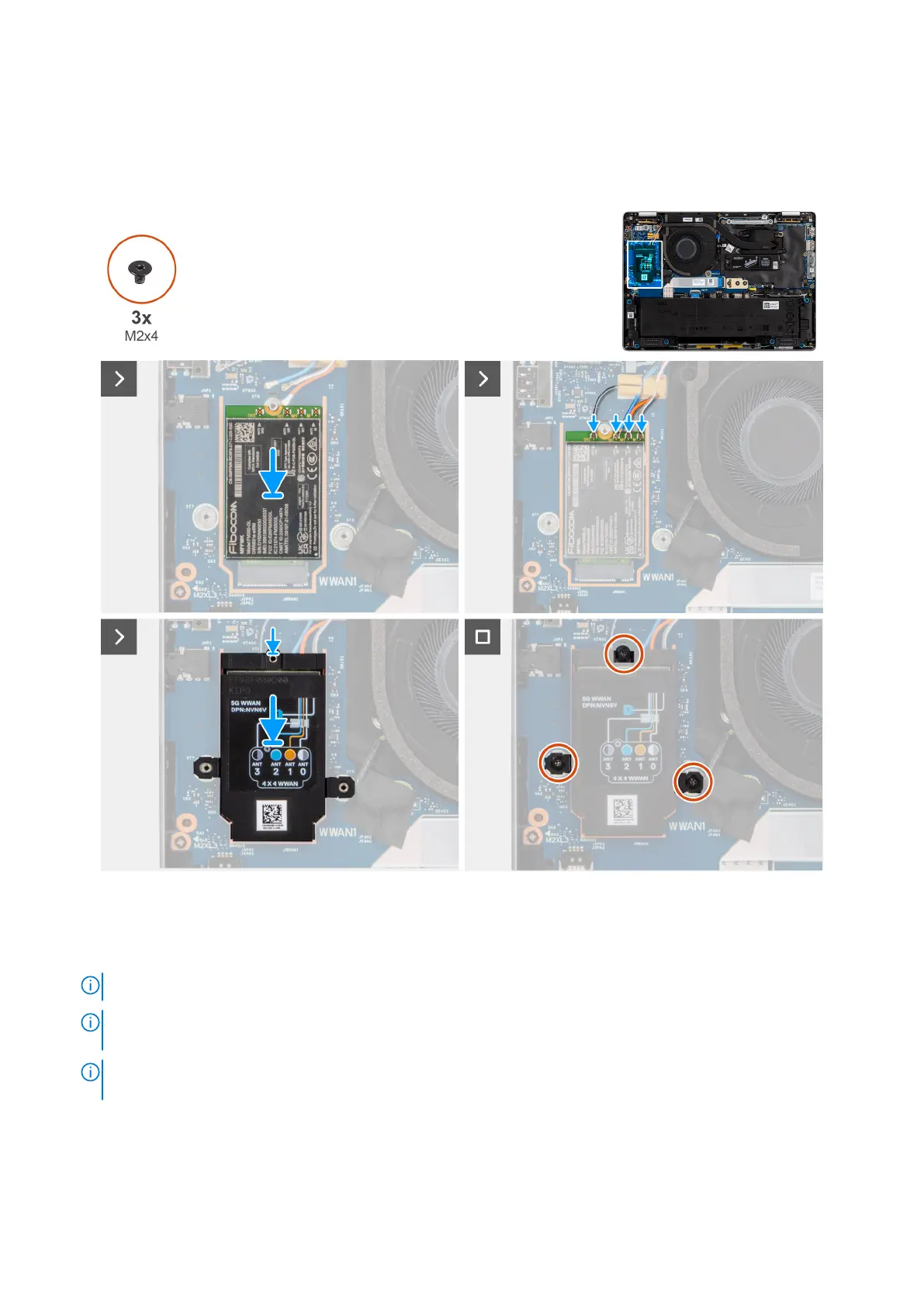
The following images indicate the location of the WWAN card and provide a visual representation of the installation procedure.
Figure 29. Installing the WWAN card
Steps
1. Insert the 5G WWAN card at an angle into the 5G WWAN-card slot on the I/O board.
NOTE: If you are replacing the 5G WWAN card, ensure that the thermal pad is in place.
NOTE: If you are replacing the system board, ensure to peel the thermal pad from the old system board to the new
system board.
NOTE: If the thermal pad is damaged, peel the thermal pad from the system board and replace it with a new thermal
pad. The thermal pad must be purchased separately.
2. Connect the antenna cables to the WWAN card.
The following table provides the antenna-cable color scheme for the 5G WWAN card that is supported on your computer.
Removing and installing Customer Replaceable Units (CRUs)
53



 To Next Page