USH daughter board
Removing the USH Daughter Board
CAUTION: The information in this removal section is intended for authorized service technicians only.
Prerequisites
1. Follow the procedure in before working inside your computer.
2. Remove the sim-card tray, if applicable.
3. Remove the base cover.
4. Remove the battery.
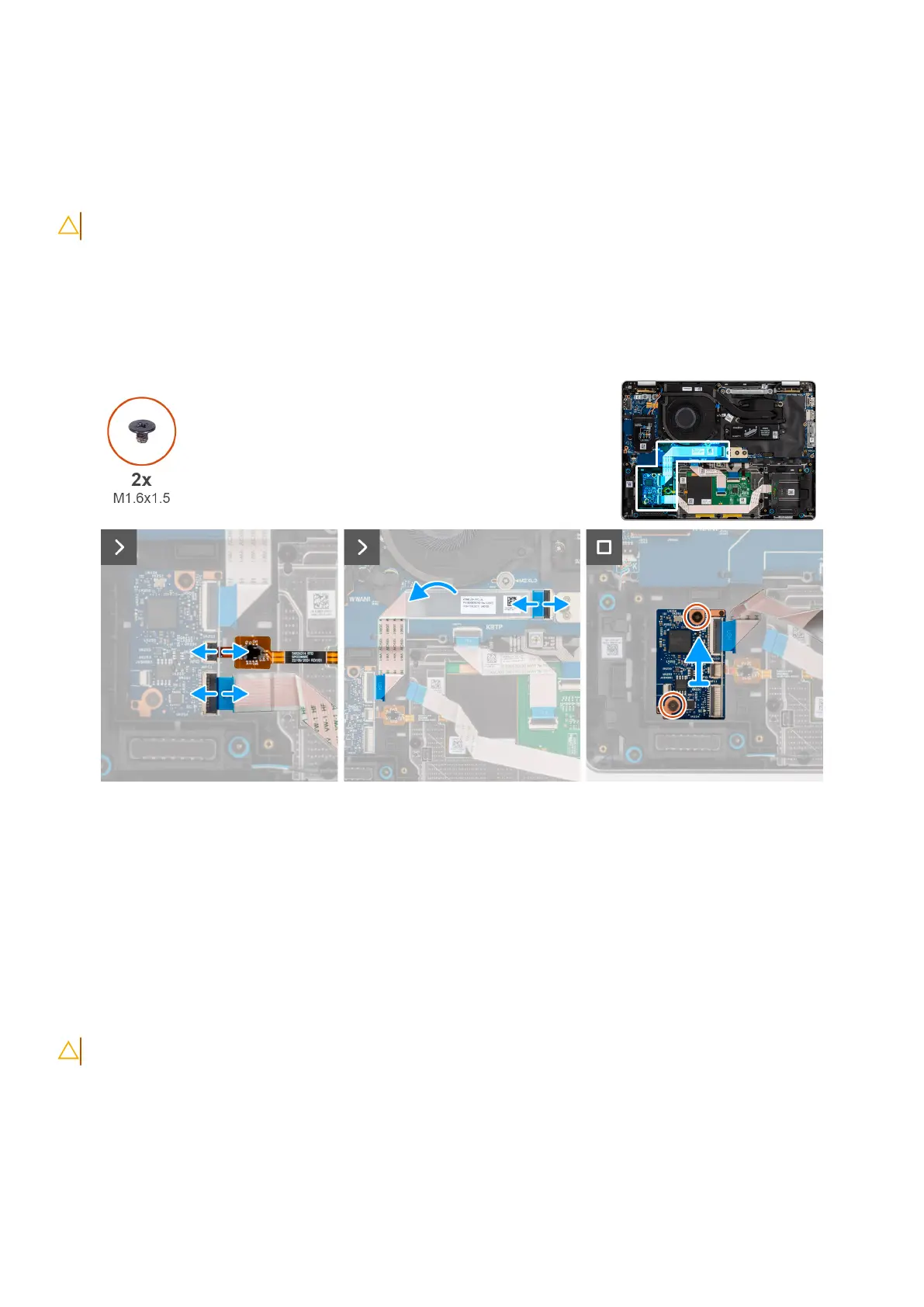
Figure 65. Removing the USH daughter board
Steps
1. Lift the latch and disconnect the smartcard reader flexible flat cable from the connector on the USH daughter board.
2. Lift the latch and disconnect USH daughter board flexible flat cable from the system board.
3. Pell back the USH daughter board flexible flat cable from the I/O daughter board.
4. Remove the two screws (M1.6x1.5) that secure the USH daughter board in place.
5. Lift the USH daughter board off the chassis.
Installing the USH Daughter Board
CAUTION: The information in this installation section is intended for authorized service technicians only.
96 Removing and installing Field Replaceable Units (FRUs)



 To Next Page