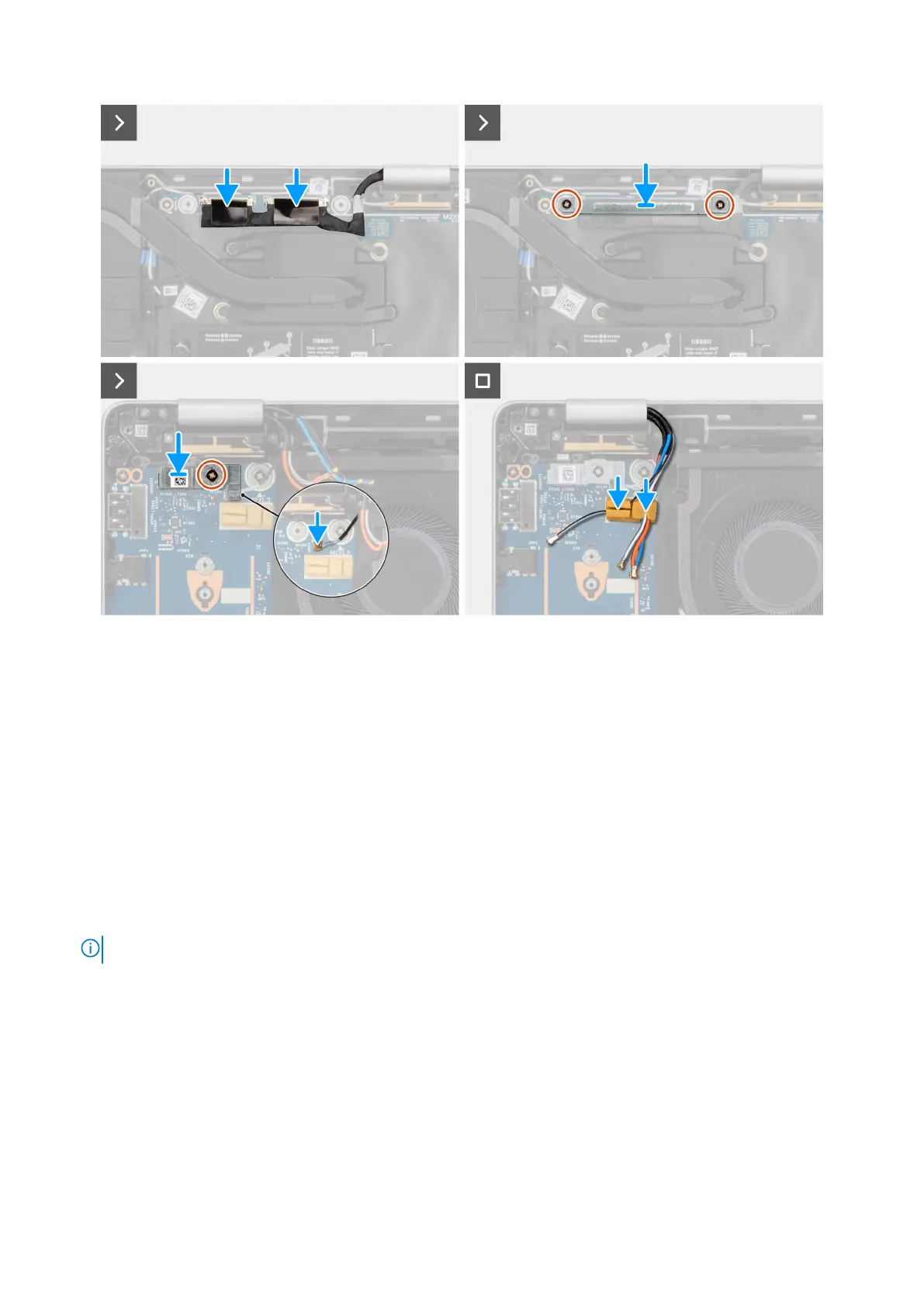
Figure 42. Aligning the display assembly with the palm-rest assembly (2-in-1)
Steps
1. Place the palm-rest assembly facing upwards on a flat table and place the display assembly at a 90-degree angle.
2. Align the holes on the hinges with the screw holes on the palm-rest assembly and replace the four screws (M2.5x4) that
secure it in place.
3. Connect the display cable and the camera cable to the connector on the system board.
4. Place the camera and display-cable bracket over the cables and replace the two screws (M2x3) to secure it in place.
5. Connect the power-button cable to the connector on the I/O daughter board.
6. Place the power-button bracket over the power button and replace the screw (M2x3) to secure it in place.
7. Route the power-button cable and WWAN antenna cables through the cable holder.
Next steps
1. Install the WWAN.
NOTE: This procedure applies only to computers shipped with a WWAN card installed.
2. Install the base cover.
3. Install the SIM card tray, if required.
4. Follow the procedure in after working inside your computer.
68
Removing and installing Field Replaceable Units (FRUs)



 To Next Page