HYBRID Coater Service Manual ver1.1 Chapter 8
65
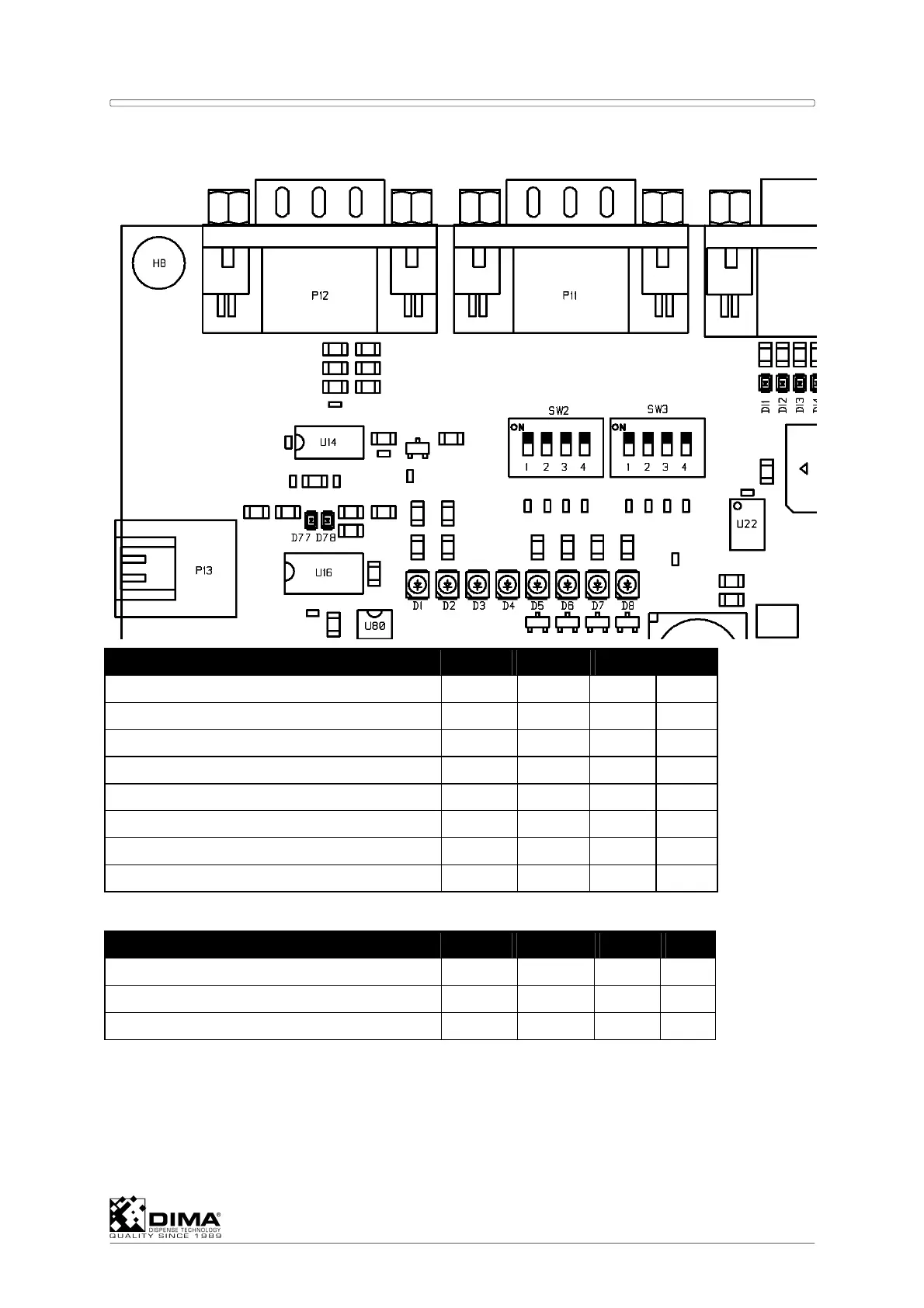
SW2 and SW3
DIP-switches on SW 2 #1 #2 #3 #4
HC-100 Off - - -
HC-200 On - - -
HC-1100 (static product holder) - Off Off -
HC-1150 (non-toothed belt) - On Off Off
HC-1150 (toothed belt) - On Off On
HC-1160 (chain) - Off On -
HC-1170 (non-toothed belt with clamping) - On On Off
HC-1170 (belt with clamping) - On On On
DIP-switches on SW 3 #1 #2 #3 #4
Default value Off Off - Off
Stored serial communication setting* - - Off -
Reset serial communication setting* - - On -
Explanation of above table:
On: DIP switch has to be ON (upper position)
Off: DIP switch has to be OFF (lower position)
- : the mentioned DIP switch is not relevant for this function
between PC and HYBRID, by USB or RS232 (baudrate 115.200 default).



 To Next Page