Chapter 9 HYBRID Coater Service Manual ver1.1
80
9.8 Exchanging the Flexible Cable Duct on the HC-200
The flexible cable duct runs from the interconnection on the fixed part of the coating head to
the rotating coating head. In this cable duct run three thin air lines for atomizing air, one thick
air line to the air distribution cross, three flat cables, one camera cable (through a similar
hose) and one flat grounding strip. The whole package has to be exchanged as one.
1. First switch of the HYBRID and disconnect the air and voltage.
2. Cut all tie wraps that keep the cable duct in place and loosen the plastic disc. Then undo
all connections on the fixed coating head in the following order.
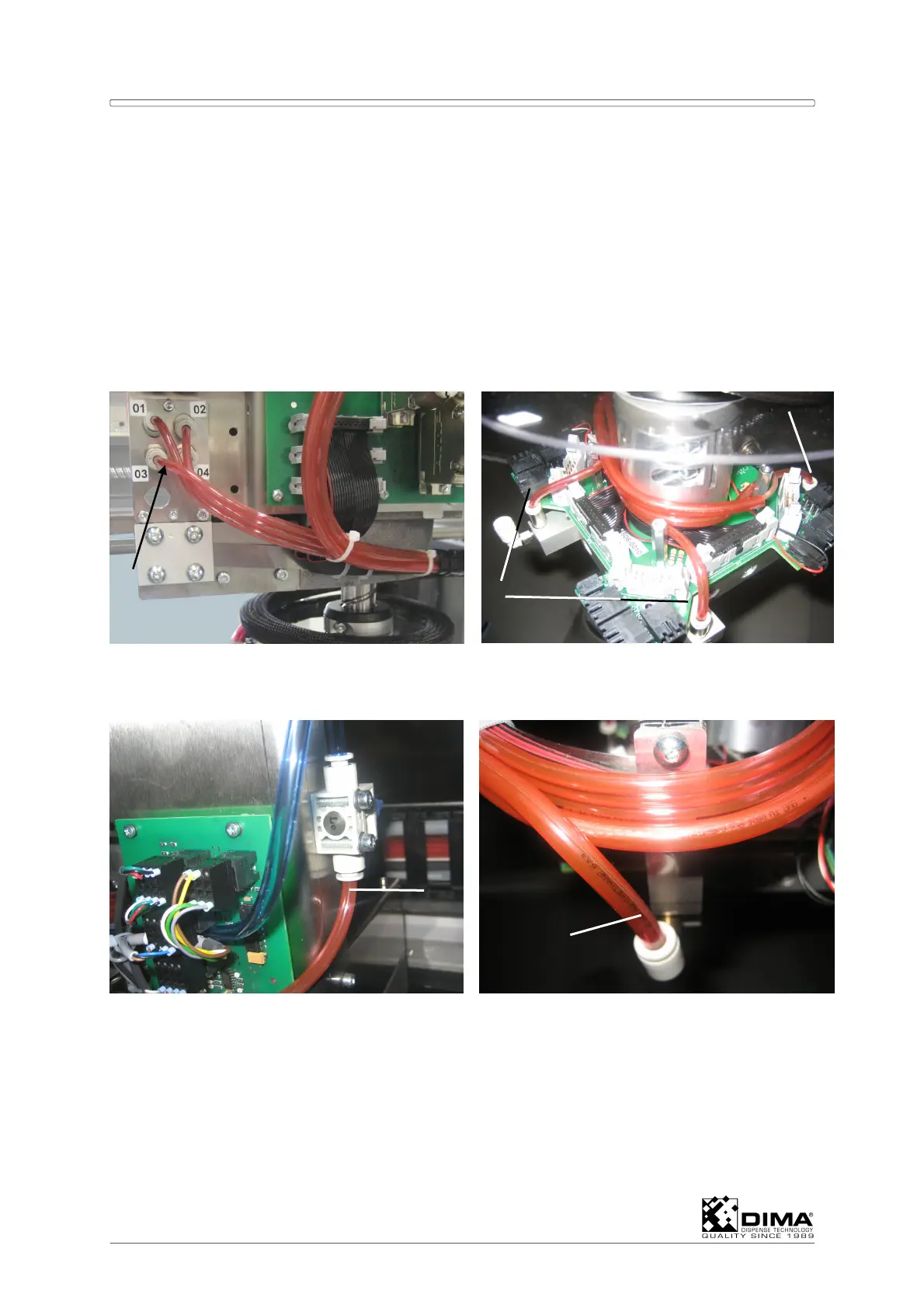
3. Loosen the three thin air lines from their interconnections 01 till 03 on the fixed coating
head.
4. Loosen these three thin air lines on the rotating head. Left of units 1,2, and 3.
5. Loosen the thick air line which comes from the air switch.
6. Loosen the thick air line near the grounding strip on the rotating head, this is left of unit 4.
7. Loosen the three flat cables on the fixed head. They are numbered P1, P2, and P3 on the
cable and on the PCB.
8. Loosen these three flat cables on the PCB on the rotating head. Here they are also
numbered on the outside of the PCB.
3
4
4
6
5



 To Next Page