HYBRID Coater Service Manual ver1.1 Chapter 9
79
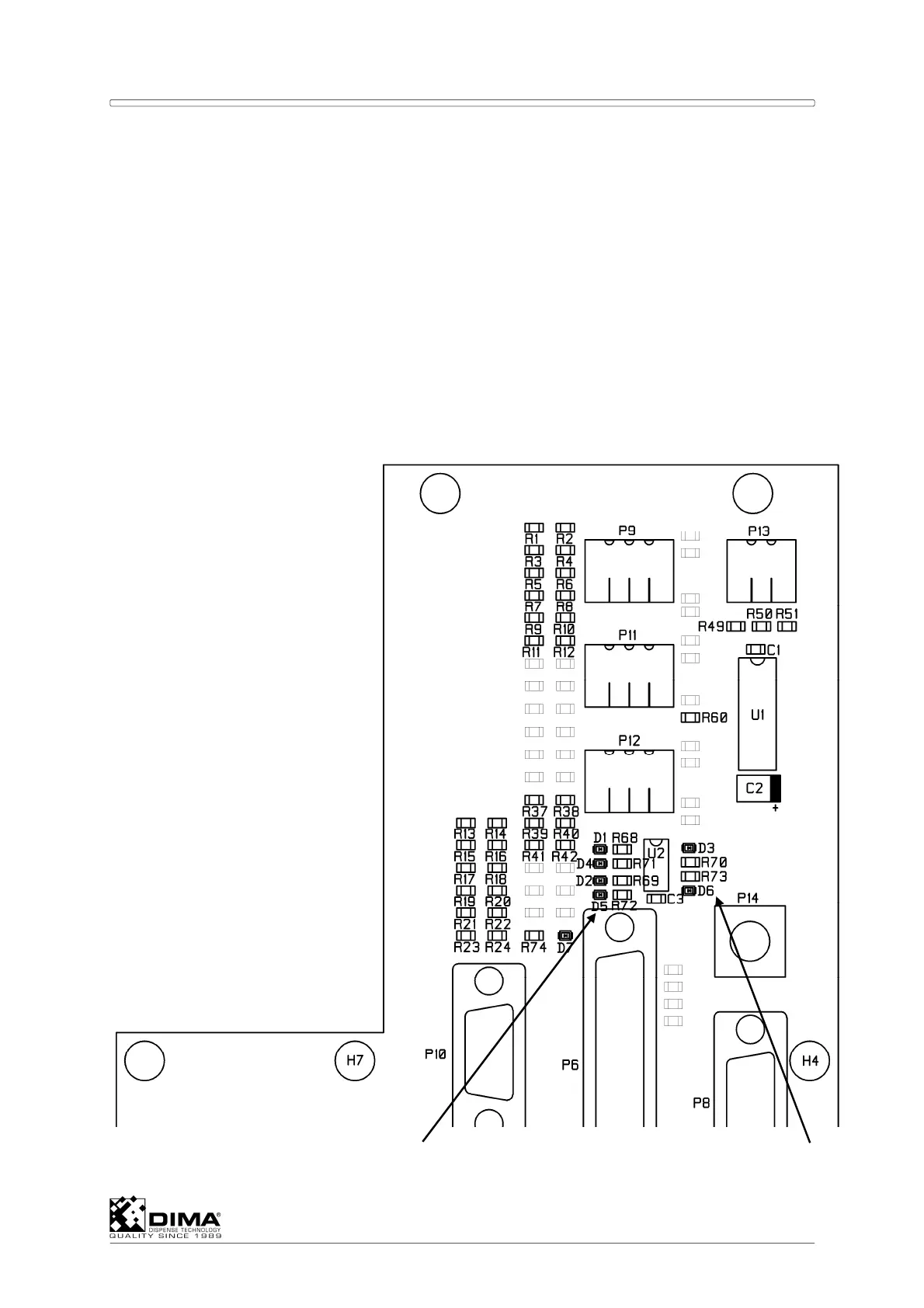
J Check that the Index Signal (through LED’s D3 and D6) is found when Tool 1 is pointed
towards the front.
K Turn the Coating Head on the Index Position and shut off the HYBRID and on again.
Push CTRL + Shift + Alt + F10 simultaneously and put the Controller in simulation, next
out of simulation and then start again without Full Initialization.
L Check that from the Index Position the Coating Head can rotate in both directions over
more than 185 degrees. This can be checked by entering the Terminal screen and enter
W3; in the Command box and then ask the positions of the Index and the outmost stops
either way, by entering !;. A difference in position of 185 degrees matches an Encoder
position 185/360 x 10000 = 5139. Or the differences must be greater than these value of
5139.
NOTE: When finished the cover has to be remounted. Watch out to place the electric wire
which runs to the sensor in the groove on the edge of the housing.
Next figure shows the exact position of the LED’s.
Encoder Signals A and B LED’s for Index



 To Next Page