Chapter 9 HYBRID Coater Service Manual ver1.1
78
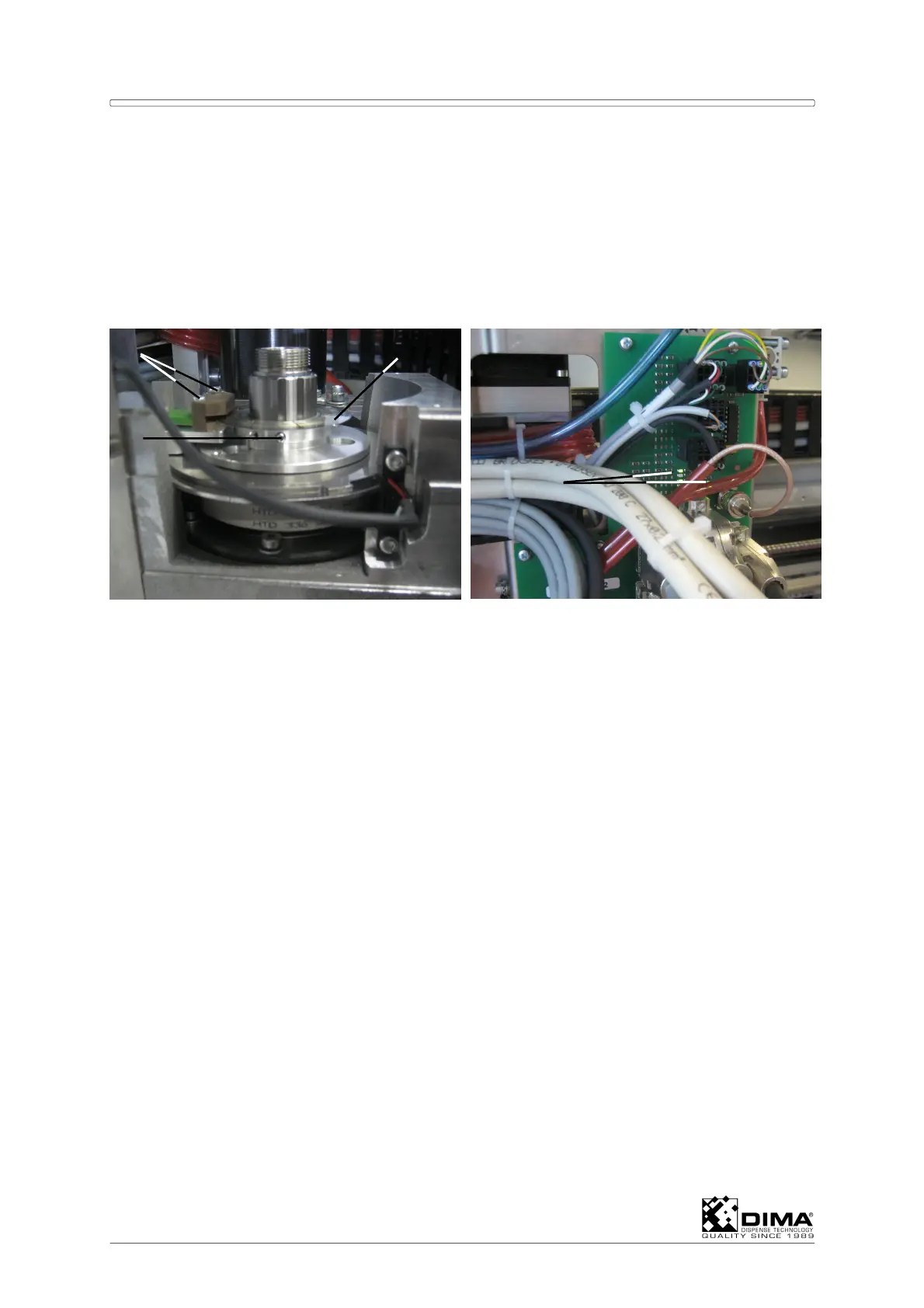
B Undo the four bolts (#3) on the corners (leave the other two untouched!) and remove the
cover (#4) on the side of the upper stepper motor.
ATTENTION: Don’t touch the encoder disc; this is a very delicate part! Put a long M3 bolt
(approx. 50mm) in the free hole of the metal ring and lift and turn the encoder
disc with this!
The other hole is used for the setting screw. Mark the Zero position of that
setting screw (#9) with a pencil on the metal disc underneath it.
C Undo the bolts (#8) which hold the encoder sensor (#5) and carefully place this sensor
aside.
D Loosen the setting screw (#9) underneath the encoder disc (#7) and remove it.
E Place the new encoder disc (#7) in place (don’t forget to use the long M3 bolt) and mount
the encoder sensor (#5) back in place.
F Turn the disc (#7) so that the line (#6) on the encoder disc is in the middle of the encoder
sensor (#5) when Tool 1 is in front. Tighten the setting screw (#9).
NOTE: After this the HYBRID has to be recalibrated. For this the HYBRID has to be started
OFF-LINE!! For this push Ctrl+Alt+Shift +F10 simultaneously. Put the Controller out
of Simulation. Check ‘Full initialization’ NO and close Machine State.
G Then go to Options/Test Machine Parts/Motion. Here the Ø indication must turn red when
the rotation reaches its stop (Height is not relevant during this check!).
H Check the LED’s (#10) on the EL-4875 Connection PCB (at the rear of the Coating
Head). Each channel of the Encoder is provided with two status LED’s (D1 and D4) for
the A-channel, D2 and D5 for the B-channel and D3 and D6 for the Index Signal. Per
channel one of the two LED’s must light up. During movement the LED’s will light
alternately. At high speeds this occurs so quickly that it seems as if both LED’s light
simultaneously. The luminosity however will be lower. During this check the height is not
relevant.
I Turn the Coating Head all the way counterclockwise against the stop. Shut off the
HYBRID by pushing the O button and on again, by pushing the I button. Push CTRL +
Shift + Alt + F10 simultaneously and put the Controller in simulation, next out of
simulation and then start again without Full Initialization. Go to the Options/Terminal
screen then Enter and type: W3; in the Command box. Now ask the position by typing: !;
in the Command box. The Encoder position will show about 0 (Zero) now. Turn the
Coating Head all the way clockwise against the stop. Ask the position by typing !; in the
Command box. The Encoder position now must show higher than 10278. Turn the
Coating Head all the way counterclockwise against its stop. Ask the position by typing !;
in the Command box. The Encoder position must show near 0 (Zero) again.
7
9
8
10



 To Next Page