FSoftware Omega 2
3 Managing media data
You create new media channels and edit or delete existing media channels
on the tab under Media.
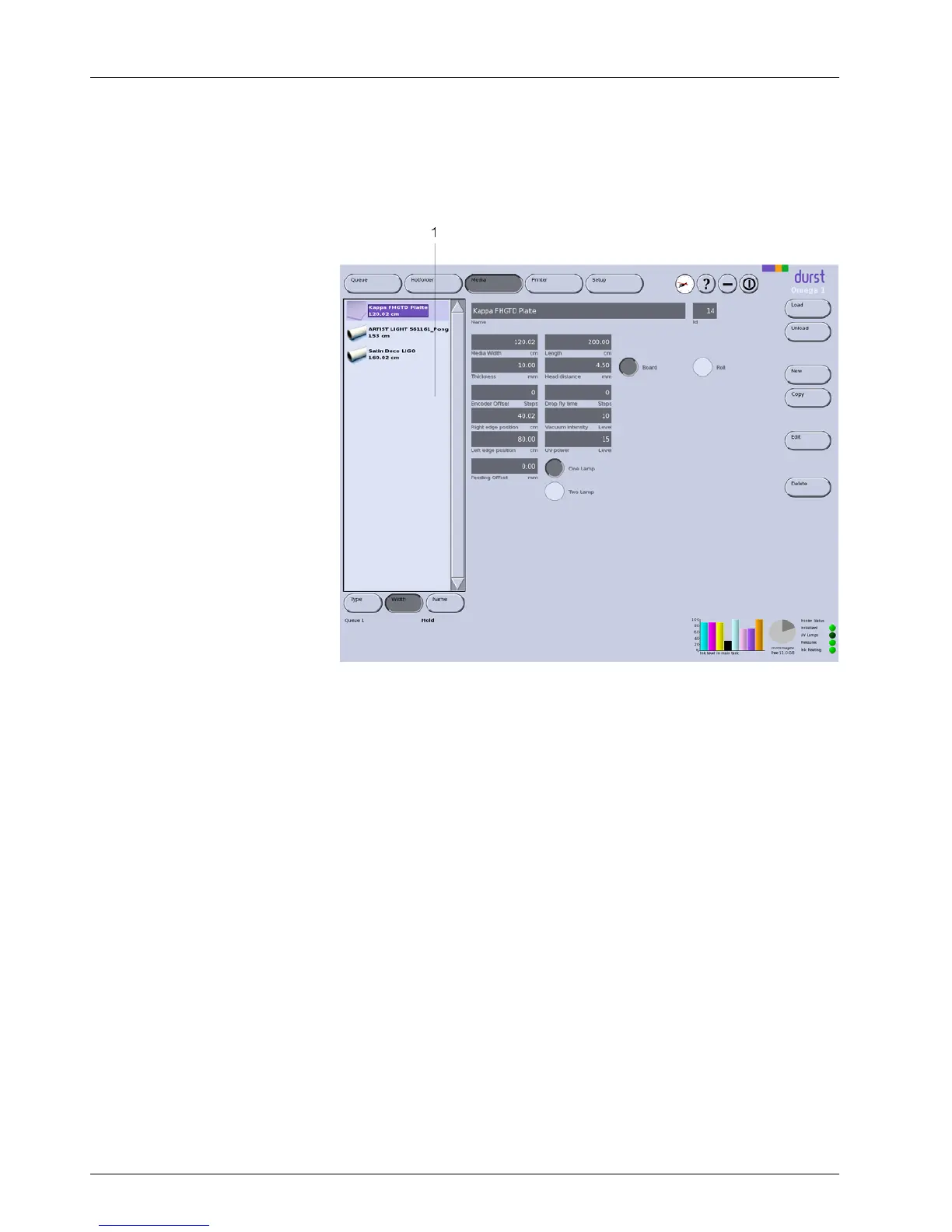
1 Navigation window
Fig. 37 Navigation window and tabs under Media
Navigation window
All created media channels are listed in the navigation window (1). You
specify the sorting order with the Type, Width and Name buttons.
Encoder Offset You m ust determine the value for the encoder offset for each media channel
using the Durst test image.
Feeding Offset Using the feeding offset value, you can correct the plate advance from the
loading flap up to the start of printing.
All other param eters
An overview of the recommended values for the different parameters is found
on the Durst Rho Community Website. The link is found on the D urst website
at www.rho-online.com.
3.1 Buttons on the right edge of the d ialog window
Load/Unl oa d The loading and unloading procedures for changing the media channel are
triggered with the Load and Unload buttons.
New A new media channel is created with the New button.
Copy
You copy the selected media channel and save it with a new name with the
the Copy button.
Edit
Parameters of the selected media channel are modified with the Edit button.
54 / 9 1 2004 – 2014 © Durst Ph ototechnik AG – www.d urst-online .com , Omega 2, Issued 0 7/20 14



 To Next Page